

Google Genie 2
Google DeepMind · Image
Google Genie 2 is a DeepMind foundation world model that turns one image into playable 3D environments. It's built for training and testing AI agents.
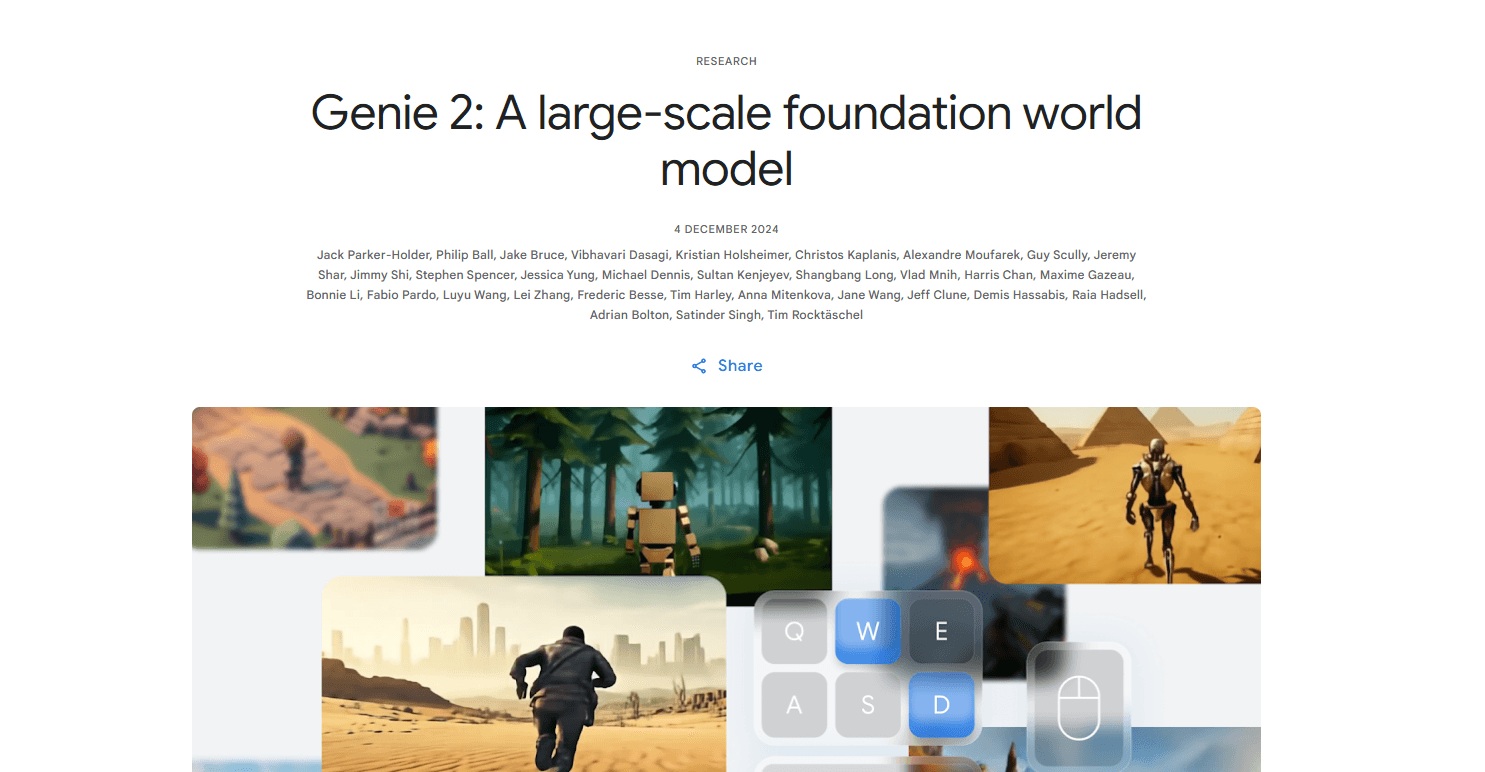
About Google Genie 2
What Is Google Genie 2
Google Genie 2 is a foundation world model from Google DeepMind, and it belongs to a newer class of AI world model that simulates environments rather than just describing them. You give it a single image, and it builds a small 3D world you can move around in with a keyboard and mouse. The model figures out what's the character, what's scenery, and how the world should react when you press a key. It's built for AI research, not for making games you'd sell.
The problem it solves is a supply problem. Training a general-purpose agent needs thousands of varied environments, and hand-building those worlds is slow and expensive. Genie 2 generates an endless stream of playable 3D environments instead, each one controllable and consistent enough to be useful. DeepMind also sees a second use: artists and designers can turn concept art into something interactive within minutes to prototype ideas. That's the whole pitch in one line. Worlds on demand, no studio required.
The main catch is availability. Genie 2 is a research preview, so there's no public product, no sign-up, and no pricing. Not yet, anyway. Worlds also stay coherent for roughly a minute at most, and the most impressive samples come from an undistilled model that can't play in real time, which is a genuine limitation if you were hoping to sit down and explore one yourself. If you're waiting for a tool to generate your next game level, this isn't it.
Getting Started
Because Genie 2 isn't a public product, there's no normal sign-up flow. Here's what the research workflow actually looks like.
- Generate a starting image, typically with a text-to-image model like DeepMind's Imagen 3.
- Feed that single image into Genie 2 as the world prompt.
- Play the generated world yourself with keyboard and mouse, or hand control to an AI agent like SIMA.
- Watch how the world reacts, then adjust the prompt image and repeat to get a different environment.
- Use the resulting worlds as training or evaluation tasks for an embodied agent.
Product Information
A quick look at Google Genie 2's pricing, supported platforms, and performance.
Best for
The users, tasks, and scenarios where this tool fits best.
Users
- AI researchers
- Game and level designers
- Reinforcement learning engineers
Tasks
- Generating training environments
- Evaluating generalist agents
- Rapid prototyping of interactive scenes
Scenarios
- Testing whether an agent can follow instructions in an unfamiliar setting
- Exploring a "what if" branch in training
- Pitching an environment idea early in a project
Key features
Image-to-World Generation
Google Genie 2 starts from a single image and builds a 3D environment around it. So how do you get one? The image can come from a text-to-image model or from a real-world photo. You describe a world in text, pick a rendering you like, and then step into it. That low input bar is the point, since building worlds by hand is the bottleneck that the model is trying to remove for anyone who needs a steady supply of fresh, varied environments rather than a handful of carefully crafted ones.
Action-Controllable Play
The model responds to keyboard and mouse input and works out which object the player is actually controlling. Press an arrow key in a forest scene, and the robot moves, not the trees or the clouds. That sounds trivial. It isn't, because the model was never told which pixels are the character, and it has to infer that from the image alone before any action means anything at all. That inference is what makes the worlds playable rather than just watchable.
Long-Horizon Memory
Genie 2 remembers parts of a world that have left the screen and redraws them correctly when you come back. Walk behind a house. Turn around. The house is still there, with the same details, and that's not something a plain video generator can promise. This consistency is what separates a world model from a video generator, and it's why generated worlds can hold up as agent testbeds rather than crumbling the moment your view changes.
Counterfactual Trajectories
From the same starting frame, you can take different actions and get different outcomes. That gives researchers counterfactual experiences to train against, which is hard to get from recorded video. Video only records the path that was actually taken. It has no idea what would have happened if you'd turned left instead, and that blind spot is exactly where counterfactuals help. If you want to know how an agent handles a branch it didn't take, this is one way to simulate it.
Emergent Physics and Effects
Genie 2 models water, smoke, gravity, lighting, reflections, and bloom without being explicitly taught each one. Balloons burst, doors open, barrels explode. The behaviors show up at scale rather than being hand-coded. They're not perfect, but they're enough to make the worlds feel like places with rules, and those rules shape how agents plan around obstacles they can see and predict, which is a surprising amount of structure to get from a model that was only ever trained to guess the next frame.
Simulated Other Agents
The model can simulate NPCs and interactions with them, plus character animation for a range of avatars. For agent research, that matters because many tasks involve dealing with something else that moves and reacts. Genie 2 gives those scenarios a home without a game studio.
Diverse Perspective Support
Worlds can render in first-person, isometric, or third-person driving views, and different avatars animate based on the prompt. A paper plane, a dragon, a hawk, and a parachute all get their own movement style. That range comes from the out-of-distribution generalization that lets a piece of concept art turn into a working, playable scene, and it's the difference between a model that copies its training data and one that can improvise when the prompt takes it somewhere new and unfamiliar.
Pros and cons
Pros
- Generates rich 3D worlds from a single image prompt, cutting the cost of building training environments.
- Handles action control intelligently, correctly identifying the character to move.
- Keeps worlds consistent for up to a minute, including objects that leave and re-enter view.
- Models physics and effects like water, gravity, and reflections on its own.
- Pairs with agents such as SIMA to create evaluation tasks on unseen worlds.
Cons
- No public release, sign-up, or pricing, so most people can't use it at all.
- World consistency caps out around a minute, which limits long training runs.
- The highest-quality samples in DeepMind's demos come from an undistilled base model chosen to show the ceiling of what's possible, and that version can't play in real time, so the crisp worlds you see in the blog post aren't the same ones you'd interact with even if you had access.
- No public API, so teams can't wire it into their own pipelines yet.
Frequently asked questions
It's used to generate controllable 3D environments for training and evaluating AI agents. Instead of hand-building worlds, researchers prompt the model with an image and get a playable environment back. Playable is the keyword there. It means an agent can actually act and see consequences, not just watch a rendered clip play out. That's why these worlds work as training or test tasks rather than as pretty demo videos.
Related content
Explore related tools, skills, and articles for Google Genie 2.
Google Genie 2 Alternatives

Google EmbeddingGemma 2
Google DeepMind · Writing · Image · CodingGoogle EmbeddingGemma 2 is a 740M-parameter open model that turns text, code, images, audio, and video frames into vectors in one 768-dimension space, running on phones and laptops.

Tractionwave
TractionWave · Image · MarketingTractionWave is an AI attention heatmap tool for static ads. Upload a PNG or JPG and it returns predicted attention, ranked hotspots, and fixes before you spend budget.

Imejis.io
Imejis.io · Image · MarketingImejis.io is an AI design studio for agents and marketing teams. Describe an image in plain words, and it writes the copy, builds the layout, reflows it to every size, then exports a finished file.