

Granite
Granite · Productivity
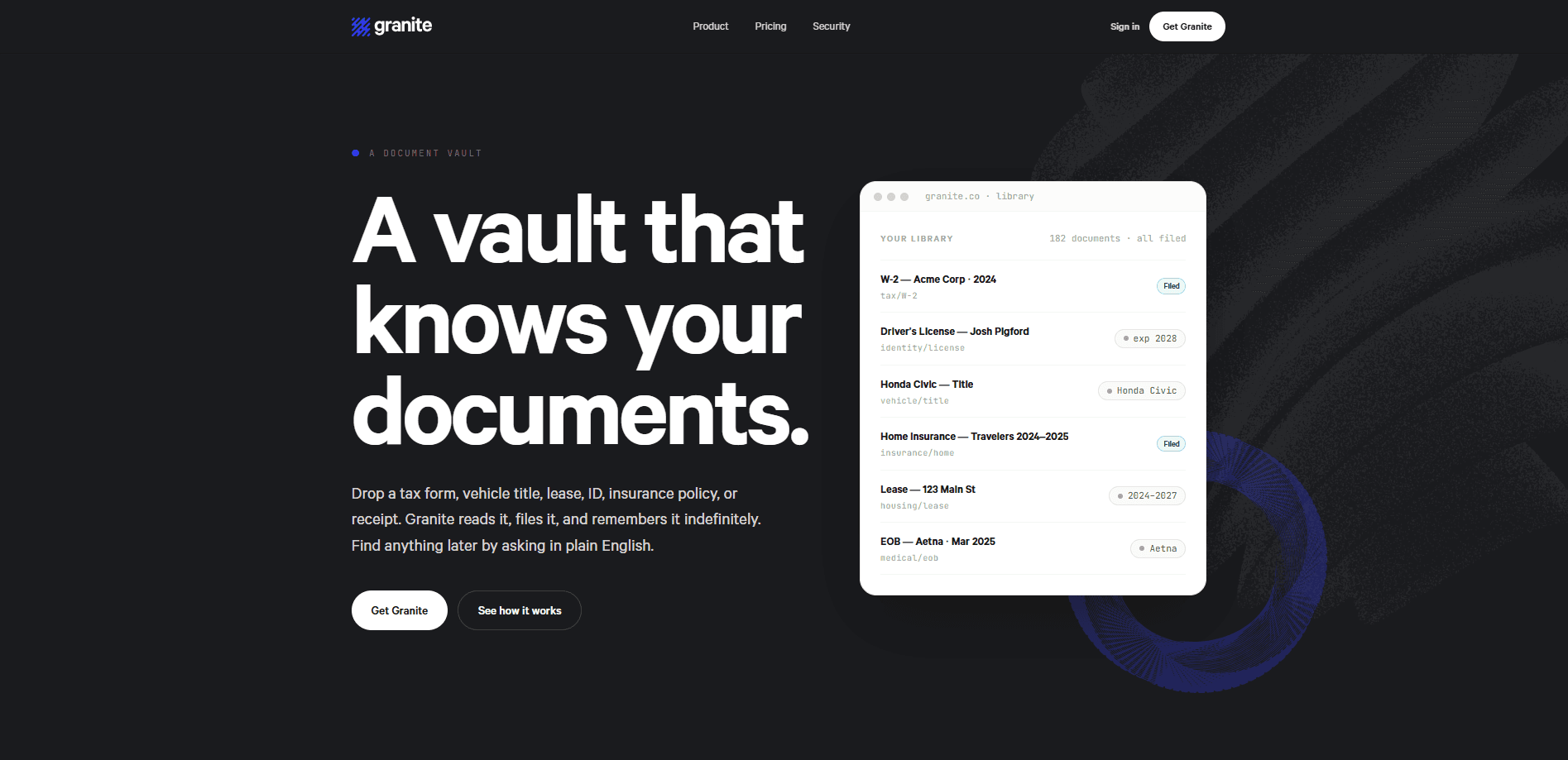
Granite is an encrypted document vault that reads, files, and remembers the paperwork you'd rather not lose. Drop in a tax form, a vehicle title, a lease, an insurance policy, or a receipt, and it works out what the document is, pulls out the fields that matter, and links it to the people and accounts it concerns. Later you find it by asking a plain-English question and getting an answer with a citation, so you can check the source yourself. It runs in your browser and as an iPhone app, and it stores everything as ciphertext.
About Granite
What Is Granite
Granite is a document management tool built around a simple frustration: important papers vanish into folders, email threads, and scans you never label. Instead of asking you to name, tag, and file every upload, Granite acts as an AI document organizer that does that work itself. It recognizes more than 110 document types, including W-2s, 1099-NECs, driver's licenses, vehicle titles, home insurance policies, and leases, and it sorts them into collections that form on their own around tax years, vehicles, and vendors.
The part that separates Granite from a plain cloud drive is retrieval. Search works in plain English, so you can ask "when does my passport expire" or "what's the deductible on my home insurance" and get an answer drawn from the actual document, with a citation pointing to the source page. A semantic index and a keyword index both run scoped to your own vault, which is what makes natural-language questions return a specific policy rather than a pile of matches.
So why bother? Because most document apps make you do the sorting. Granite skips that step.
Encryption is the foundation rather than an add-on. Each upload gets its own AES-256 key before it reaches storage, and titles, summaries, and extracted fields are encrypted again inside the database. The catch is flexibility: because Granite reads your documents to organize them, some derived data such as vector embeddings and a digit index stays queryable on the server. That's a deliberate trade of strict zero-knowledge design for a vault that can actually answer questions. Granite also has no monthly plan, so you commit for a year or stay on the free tier. No middle ground.
Getting Started
- Create an account at granite.co and open your first vault, or poke around the live demo first if you'd rather look before you sign up.
- Upload documents by dragging in files, forwarding an email, or shooting a photo on your phone. PDFs, JPGs, PNGs, WebP, HEIC, and plain text all work, and folder upload covers bulk imports.
- Let Granite read each file. It identifies the document type, extracts the key fields, and files it into an auto-collection without any naming or tagging from you.
- Ask a question or search for a document in plain English, then open the citation to confirm the answer against the original page.
- Move to Granite Paid when you pass 25 documents, or connect an Evernote or Dropbox archive under Settings to bring an existing library across.
Product Information
A quick look at Granite's pricing, supported platforms, and performance.
Best for
The users, tasks, and scenarios where this tool fits best.
Users
- Individuals with a growing pile of life-admin paperwork
- Small-business owners tracking contracts, LLC formation papers, and receipts
- Families coordinating shared documents
- Anyone who inherits an Evernote or Dropbox archive
Tasks
- Finding a specific document fast
- Answering questions buried in fine print
- Spotting upcoming deadlines
- Archiving permanently
- Preparing for an address change
Scenarios
- Tax season
- Buying or selling a vehicle
- Filing an insurance claim
- Handling an estate or a move
Key features
Automatic reading and filing
Granite identifies what each upload is and pulls out the fields that matter, so you skip the naming and tagging step entirely. No folders to build. It links documents to the people, vendors, and accounts they concern, and covers more than 110 document types, a list that grows weekly. Folder upload and email forwarding mean bulk imports don't need a manual pass.
Plain-English search with citations
Search accepts normal questions, not just filenames or keywords. Type it like you'd say it out loud. A semantic index and a full-text index both run scoped to your documents, so asking about a policy limit returns the actual policy. Every answer comes with a citation to the source page, which means you can verify the result instead of trusting it.
Two-layer AES-256 encryption
Each upload is wrapped with its own AES-256-GCM key before it reaches storage, and user-visible fields like titles, summaries, and extracted text are encrypted again in the database. Granite staff don't browse vaults. The one exception is a document you send for schema review, and that lands in your audit log. Exports stay sealed with their own key as well.
Multiple vaults
The paid plan lets you keep a personal vault, a business vault, and a property vault separate rather than mixing everything into one archive. Keep them apart. Each vault keeps its own collections and access settings, and you sign in once to reach all of them.
Sharing and emergency access
You can share a vault you own with view-only or full edit access, and the other person reaches it from their own Granite account. Emergency access for a person you name is opt-in and audited, so a trusted contact can get in if something happens to you, and you can revoke a role at any time.
Portable encrypted exports
Export the whole vault as a zip whenever you want, with the extracted fields alongside the original documents. Your data isn't a hostage. Granite builds an envelope-encrypted archive and emails a one-time authenticated download link, so your data isn't locked inside the service.
iPhone app and camera capture
Granite runs on iPhone as well as in the browser, and the plan covers every device you sign into. You can photograph a paper document, including a HEIC photo straight from the camera, and have it read and filed like any other upload.
Move Mode
Paid users get a checklist built from the documents already in the vault, which is handy when you change address and need to update everyone who has your details on file.
Pros and cons
Pros
- Files documents itself, so you don't have to invent a folder structure or tag anything.
- Answers questions with a citation to the source page, which makes the results checkable.
- Encrypts uploads with per-file AES-256 keys and keeps exports sealed.
- Imports Evernote and Dropbox archives, so an existing library isn't stranded.
- Free tier holds 25 documents, enough to judge whether the auto-filing works for you.
Cons
- No monthly plan at all, so testing the paid tier means committing to a year at $99.
- The free tier's 25-document limit counts documents ever added, not a monthly allowance, so it fills up quickly.
- iPhone only on mobile, so Android users are stuck with the browser.
- Some derived data, including embeddings and a digit index, stays queryable unencrypted, so it isn't a strict zero-knowledge vault.
Frequently asked questions
Granite is an encrypted document vault that reads each file you upload and works out what it's looking at. It then files the document automatically. You find things later by asking questions in plain English, with a citation back to the source. It handles tax forms, IDs, insurance policies, leases, receipts, and more than 110 other document types.
Related content
Explore related tools, skills, and articles for Granite.
Granite Alternatives

Base Code
Base44 (Wix) · Coding · ProductivityBase Code is a shared cloud development environment from Base44. Teammates describe changes to an existing GitHub codebase in chat, preview them live and send them back as pull requests.

Knocket
Knocket (Tencent RTC team) · Productivity · Business · ChatbotKnocket is a free live chat and contact page tool that lets visitors message you from your website, app, or a shareable link, with every reply handled from Telegram or one inbox.

FloorGen
Vinit Kumar (FloorGen) · Productivity · China AIFloorGen is a browser-based floor plan maker that turns a sentence or a sketch into an editable 2D plan and a 3D walkthrough. Export to PDF, DXF or video, and draw without an account.