

HappyPagesAI
HappyPagesAI · Image
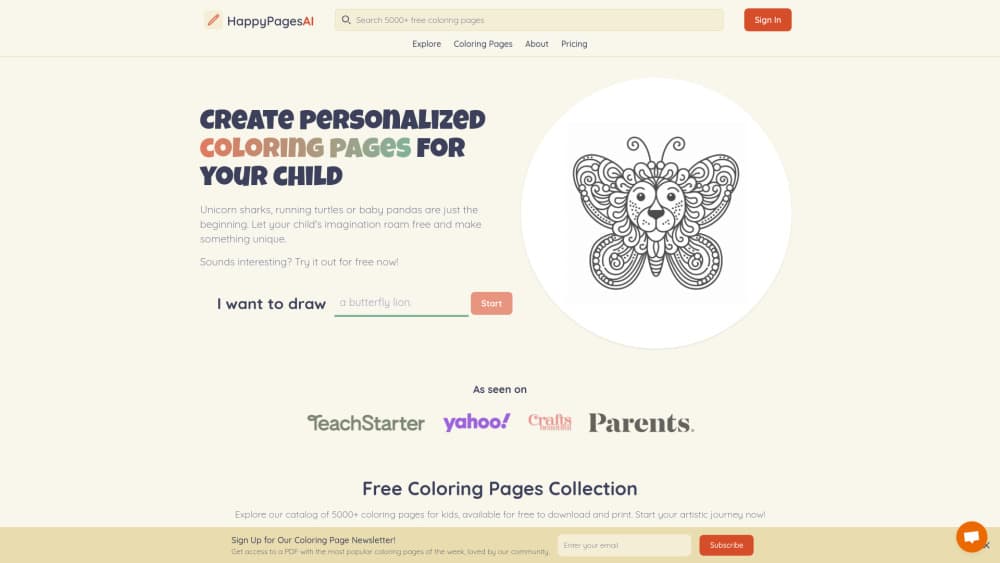
HappyPagesAI is an AI coloring page generator that turns a written idea into a printable page. You pick an age level and style, then print or download the result.
About HappyPagesAI
What Is HappyPagesAI
HappyPagesAI builds custom coloring pages from a text prompt. Type what you want to color, choose how complex the drawing should be, and the site returns a black-and-white line drawing: printable coloring pages you can run off at home. No drawing skill is involved, and there's no template library to dig through. The library exists, but the point of the product is making a page that doesn't exist yet.
The company now runs the same service under the name ColorPenguin. The old happypagesai.com address forwards to colorpenguin.com, so both names lead to one product with one account system. That matters if you found the tool through an older review or a directory listing. Nothing is lost in the move.
Two things shape who this suits. The free plan is generous enough to test but constrained: five pages a week, square format only, a watermark, and every page you make stays public. And a custom coloring page is still an AI drawing. Small hands, tiny patterns, or lettering can come out messy, so plan on a few attempts before you get one worth printing.
Getting Started
- Go to colorpenguin.com, which is where the happypagesai.com address now lands, and create a free account. No credit card is needed for the free tier.
- Describe the page you want in the prompt box. A single sentence works. Add details like an animal, an action, and a setting if you want a specific scene.
- Pick the age level. Preschoolers gets large simple shapes, Older Children sits in the middle, and Teens & Adults returns dense patterns.
- Hit create and wait for the generator to finish. Premium accounts can queue up to four pages at once.
- Download or print. The output comes out as a PDF or image file you can send straight to a printer or open later.
Product Information
A quick look at HappyPagesAI's pricing, supported platforms, and performance.
Best for
The users, tasks, and scenarios where this tool fits best.
Users
- Parents
- Teachers and educators
- Adult colorists
- Coloring book creators
Tasks
- Filling a rainy afternoon
- Building a classroom worksheet set
- Making party favors
- Testing a book idea
Scenarios
- You need a specific subject that no free printable site covers, like a school bus shaped like a whale.
- You're printing for a group and want consistent quality instead of five different art styles from five sites.
- You sell activity books and want pages that don't look like the same stock art your competitors use.
Key features
Prompt to Page Generation
You describe the drawing in plain language and the generator produces a black-and-white line drawing. Scenes work better than single objects, so "a hedgehog baking bread in a tiny kitchen" beats "hedgehog." There's no prompt library to copy, which means your page looks unlike anything already on the site.
Age-Based Complexity
Three presets control how dense the drawing gets. Preschoolers returns big shapes and thick lines that suit fat crayons. Teens & Adults returns fine patterns and lots of small regions. Skipping this step is the most common reason a page comes back unusable for the person who asked for it.
Over 100 Page Styles
Beyond the default illustration there are named styles, including mandala coloring pages, zentangle, bold & easy, and text-based designs. Bold & easy is reserved for paid plans, which is the one aimed at younger kids and beginners. Text-based pages let you build lettering into the artwork.
Sizes and Print Output
Free accounts get square pages at standard print quality. Premium unlocks tall and wide formats plus high-resolution output with no watermark, so a page can scale up to A4 or Letter without turning fuzzy. Everything exports as a PDF or an image file.
Photos Into Coloring Pages
Premium accounts can turn a photo into a line drawing. That covers family pictures, a pet, or a classroom photo you want to hand out as an activity. It's the feature that separates this from prompt-only generators, and it's the one people ask about most.
Private Pages and Bulk Output
Paid plans can mark pages private, and Business adds bulk download and delete so a growing folder doesn't become unmanageable. Up to 1,000 pages a month are included at that level. CSV batch generation is listed as coming soon, which tells you multi-page automation isn't finished yet.
Pros and cons
Pros
- The free tier is a real trial, not a locked demo: five pages a week is enough to judge output quality.
- Everything runs in a browser, so a Chromebook, an iPad, or a school laptop all work without installing anything.
- The age selector does more for print quality than most prompt tricks, and it takes one click.
- Commercial rights come with the Business plan, which matters if you publish activity books.
- The refund policy covers up to 20 generations, so testing Premium costs you a message rather than a month's fee.
Cons
- Free pages are public, watermarked, and square only. For a classroom handout that's usually fine, but you won't want to sell them.
- Business pricing isn't listed on the site, so you have to ask before you can budget for it.
- There's no documented API, and CSV batch generation is still marked coming soon. Anyone hoping to plug this into a print pipeline should wait.
- Fixing one bad detail means rewriting the prompt and generating again. The site doesn't advertise manual editing tools.
Frequently asked questions
Yes. The free plan gives you five pages a week with no credit card, plus access to the site's free coloring page library. Those five pages are square, watermarked, and public.
Related content
Explore related tools, skills, and articles for HappyPagesAI.
HappyPagesAI Alternatives

Google EmbeddingGemma 2
Google DeepMind · Writing · Image · CodingGoogle EmbeddingGemma 2 is a 740M-parameter open model that turns text, code, images, audio, and video frames into vectors in one 768-dimension space, running on phones and laptops.

Tractionwave
TractionWave · Image · MarketingTractionWave is an AI attention heatmap tool for static ads. Upload a PNG or JPG and it returns predicted attention, ranked hotspots, and fixes before you spend budget.

Imejis.io
Imejis.io · Image · MarketingImejis.io is an AI design studio for agents and marketing teams. Describe an image in plain words, and it writes the copy, builds the layout, reflows it to every size, then exports a finished file.