

Headshotgrapher
Nithur · Image
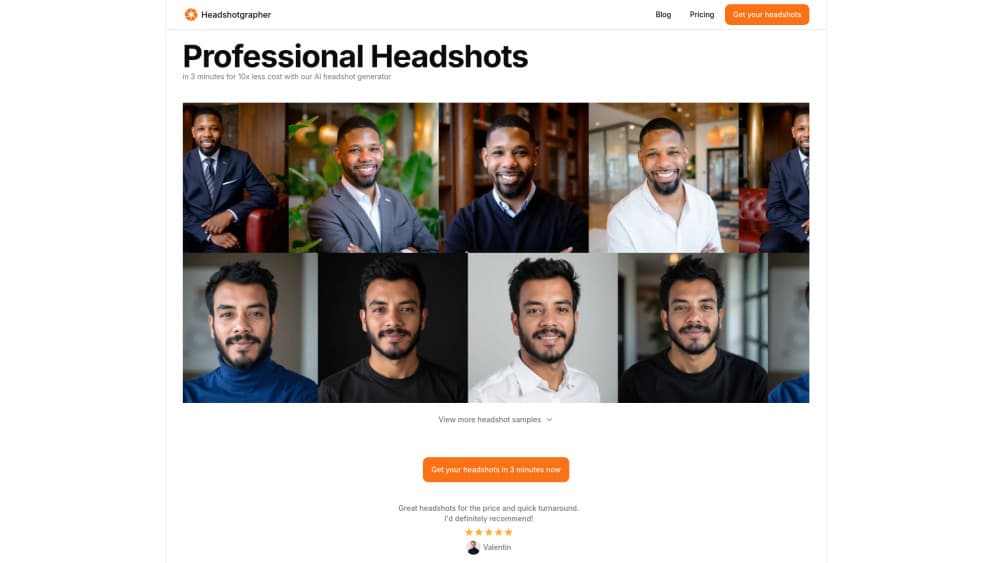
Headshotgrapher was an AI headshot generator that turned selfies into professional headshots in about 3 minutes. The service has shut down and no longer accepts new users.
About Headshotgrapher
What Is Headshotgrapher
Headshotgrapher was a web-based AI headshot generator. You uploaded a set of selfies, and the service produced professional-looking headshots without a studio booking, promoting a turnaround of roughly 3 minutes and a price well below traditional photography. As an AI headshot tool, it targeted the same job as a photographer session: a clean portrait for LinkedIn, a company page, or a resume.
The product was built and run by an independent developer, Nithur, as a small project rather than a large company platform. That shape explains both its appeal and its limits. On the upside, it was a focused tool with one clear task. On the downside, a one-person operation carries less capacity to keep serving users over time.
That limit has now played out. The official site carries a notice that Headshotgrapher has closed its doors, stating that the developer decided to wind the project down. Anyone who used it for a professional image is directed to previous results, and new orders are no longer possible. The Headshotgrapher shut down notice also thanks users who trusted the tool with their professional image. If you need a headshot today, you have to look at services that are still running.
Getting Started
- Sign in on the Headshotgrapher site and choose a headshot package.
- Upload a set of selfies that show your face clearly from a few angles.
- Pick your preferred style and background for the output.
- Wait while the service renders your batch, which was quoted at around 3 minutes.
- Download the finished headshots. Note that the service is now closed, so these steps no longer work for new orders.
Product Information
A quick look at Headshotgrapher's pricing, supported platforms, and performance.
Best for
The users, tasks, and scenarios where this tool fits best.
Users
- Job seekers
- LinkedIn headshots
- Freelancers and consultants
- Remote workers
Tasks
- Refreshing a LinkedIn photo
- Preparing a resume or bio
- Testing looks quickly
- Filling a small team page
Scenarios
- A job application due soon
- A new role or promotion
- Looking for alternatives now
Key features
Selfie to headshot conversion
The core job was turning ordinary selfies into professional headshots, that is, AI headshots from selfies rather than a studio session. You supplied a handful of photos, and the service rendered portraits that kept your features and produced studio-style lighting and backgrounds. The advertised turnaround was about 3 minutes, which was the selling point over a scheduled shoot. Output quality tracked the photos you uploaded, so recent, well-lit images mattered most.
Professional styles and backgrounds
Headshotgrapher focused on corporate and professional looks rather than novelty filters. Styles were pitched at the contexts a headshot is actually used in: a clean LinkedIn photo, a company page, or a conference bio. Each run produced several variations, so you could pick the one that fit your field. That focus is what separated it from general-purpose avatar tools.
Fast, low-cost headshots
The value proposition was speed and price. It promised professional-quality headshots in minutes at a fraction of what a photographer charges. For people who only needed one or two usable images, that removed the cost and scheduling of a studio session. It was a one-shot tool aimed at a specific need rather than an ongoing service.
Browser-based workflow
The whole flow ran in a web browser with no mobile app to install. You signed in, uploaded photos, chose a style, and downloaded results from the same screen. That made it simple to start. The trade-off was needing a desktop or laptop for the smoothest experience. There were no plugins or integrations to configure.
Independent, single-purpose build
Headshotgrapher was a focused product from an individual developer, not a broad platform. It did one thing and avoided the extra features that dilute similar tools. The same focus meant the project depended on one person, and a wind-down leaves no successor product to move to. That is the trade-off that came with using a small independent service.
Now closed to new orders
The service has shut down. The official site states that Headshotgrapher has closed its doors and that the developer wound the project down after a good run. Existing notice thanks users who trusted the tool with their professional image. New sign-ups and orders are no longer available, so the feature set above is now historical rather than something you can use.
Pros and cons
Pros
- The quoted 3-minute turnaround was far quicker than booking a studio.
- Pricing was framed as a fraction of traditional photography costs.
- Styles were aimed at professional contexts rather than novelty looks.
- A browser-based flow kept setup simple, with no app to install.
- It was a focused tool built for one clear task.
Cons
- The service has shut down, so you cannot place new orders.
- Output quality depended on the selfies you uploaded.
- It was a one-person project, with less long-term capacity than a company platform.
- Pricing and plan details are no longer published, so cost cannot be compared.
- There is no successor product, so users must switch to a different service.
Frequently asked questions
Headshotgrapher was an AI headshot generator that turned selfies into professional headshots. You uploaded photos, chose a style, and it rendered a batch in about 3 minutes. It was built for profile images on LinkedIn, company pages, and similar professional contexts.
Related content
Explore related tools, skills, and articles for Headshotgrapher.
Headshotgrapher Alternatives

Google EmbeddingGemma 2
Google DeepMind · Writing · Image · CodingGoogle EmbeddingGemma 2 is a 740M-parameter open model that turns text, code, images, audio, and video frames into vectors in one 768-dimension space, running on phones and laptops.

Tractionwave
TractionWave · Image · MarketingTractionWave is an AI attention heatmap tool for static ads. Upload a PNG or JPG and it returns predicted attention, ranked hotspots, and fixes before you spend budget.

Imejis.io
Imejis.io · Image · MarketingImejis.io is an AI design studio for agents and marketing teams. Describe an image in plain words, and it writes the copy, builds the layout, reflows it to every size, then exports a finished file.