
Heidi
Heidi Health · AI Assistant
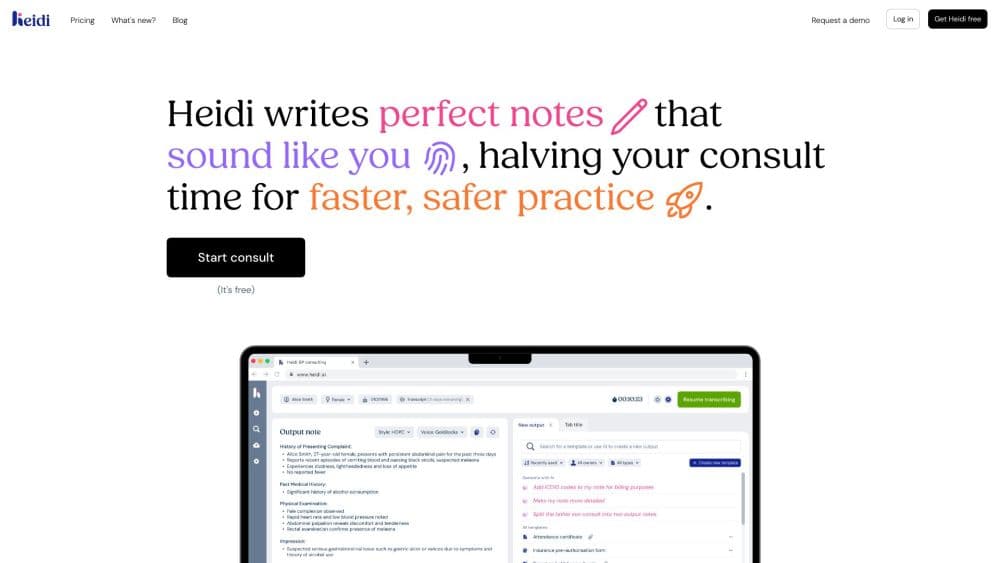
Heidi is an AI medical scribe that listens during patient visits, turns the conversation into finished clinical notes, and handles follow-up admin like referrals and coding.
About Heidi
What Is Heidi
Heidi is an ambient AI scribe and medical transcription software built by Heidi Health, a Melbourne company that launched the product in early 2024. It runs quietly in the background during a consultation, transcribes what's said, and drafts the note for the clinician to review. The pitch is simple: fewer hours on paperwork, more attention on the patient in the room.
The tool covers more ground than note-taking alone. This clinical note generator produces referral letters and handover documents, suggests billing codes, and offers an Evidence feature that answers clinical questions with cited sources. Heidi Health says the platform supports over 2.7 million patient interactions each week across 110 languages, and clinicians in 190 countries use it.
The main limits are the ones any AI scribe runs into. Accuracy depends on clean audio, so noisy wards or heavy accents can push edits higher, and every note still needs a clinician's review before it enters the record. Some advanced features, like team-level controls and single sign-on, sit behind the higher tiers.
Getting Started
- Create a Heidi account with your email and pick a plan, starting on the free tier if you want to test it first.
- Install the desktop app for macOS or Windows, or add the browser extension, so Heidi can capture audio during visits.
- Ask the patient for consent at the start of the consult, then let Heidi transcribe while you talk.
- Review the drafted note, edit anything that needs fixing, and pick a template that matches your specialty.
- Generate the follow-up documents you need, such as referral letters or codes, before the patient leaves.
Product Information
A quick look at Heidi's pricing, supported platforms, and performance.
Best for
The users, tasks, and scenarios where this tool fits best.
Users
- General practitioners and family doctors
- Specialists with heavy documentation
- Allied health and mental health clinicians
- Clinic managers weighing rollout
Tasks
- Writing progress notes during a consultation
- Producing referral letters and handover documents
- Answering clinical questions with sources
- Handling billing and coding suggestions
- Creating patient communications and follow-up letters
Scenarios
- A busy back-to-back clinic day where notes pile up
- Remote or telehealth appointments
- Working across languages with multilingual patients
- Reducing after-hours admin, the time clinicians often call "pajama time"
Key features
Real-Time Ambient Transcription
Heidi listens to the consultation and transcribes it as it happens, distinguishing between speakers and working through background noise. It handles over 110 languages, so a clinician can document a patient's visit in the language they're most comfortable with. The recording isn't stored, which keeps the workflow in line with typical patient privacy rules.
Note Generation From a Single Recording
From one visit recording, Heidi produces progress notes, referral letters, handover documents, and discharge summaries. You pick a template and the output matches that format instead of a generic block of text. This matters most for clinicians who currently write each document by hand after the visit.
Template Library
Heidi ships with a large set of templates covering hundreds of specialties and subspecialties. Clinicians can build and save their own templates, and on team plans those templates can be shared across the practice so everyone documents consistently. Custom templates are a paid feature; the free tier sticks to the standard set.
Evidence With Cited Answers
The Evidence feature answers clinical questions and backs each answer with transparent citations to medical literature. Paid plans add full-text journal access, CPD and CME tracking, and patient-context-aware answers inside the visit. It turns Heidi from a pure scribe into a reference tool you can query mid-consultation.
EHR and Workflow Integration
Heidi connects to major EHR systems, including Epic, Best Practice, and Athena, so notes move into the record without copy-paste. On higher tiers, teams get flexible data retention settings and centralized billing. EHR integration is sold as an add-on, which is worth factoring into the total cost.
Billing, Coding, and Admin Tasks
Beyond notes, Heidi suggests billing codes, drafts patient communications, and supports repetitive admin through agents and routines. These agent-based features draw on a usage allowance rather than the scribing itself, so heavy automation is worth tracking if your team leans on it daily.
Heidi Health Pricing at a Glance
Heidi Health pricing starts free and climbs through three paid tiers. The Clinician plan costs $150/mo, or $110/mo billed yearly, and adds advanced templates and patient-context evidence. The Practice plan runs $180/mo with team controls and free assistant seats, while Enterprise pricing is quoted per deal.
Pros and cons
Pros
- Free tier offers unlimited scribing with standard templates, so you can test the core workflow before paying.
- Supports 110 languages, which helps with multilingual patients and clinicians working outside English-speaking markets.
- Covers multiple documents from one recording, cutting the separate writing passes for notes, letters, and summaries.
- Evidence feature gives cited clinical answers, useful for quick point-of-care lookups without leaving the appointment.
- Works across web, desktop, browser extension, and mobile, so the same account follows you between rooms and devices.
Cons
- Accuracy depends on audio quality, so noisy environments or unclear speech mean more manual editing before a note is final.
- Implementation requires human input despite the promises. Clinician review is still required, and consent workflows add a step to every visit.
- Advanced team features like single sign-on and centralized controls sit behind the Practice and Enterprise tiers, so small practices pay more for them.
- EHR integration is an add-on, not part of the base plan, which raises the real monthly cost for practices that need it.
- Agent and automation features run on a separate usage allowance, and once it's used up those features pause until the next reset.
Frequently asked questions
Heidi is an AI medical scribe for clinicians. It transcribes patient visits and drafts clinical notes, referral letters, and other documentation so doctors spend less time typing and more time with patients.
Related content
Explore related tools, skills, and articles for Heidi.
Heidi Alternatives
Agibot
Agibot · Productivity · AI Assistant · ChatbotAgibot is a personal AI agent for Mac that keeps running after you close the window, runs routines on a schedule, and works from Telegram or Slack with your own API keys.

Foley
Hanamori Labs, LLC · Voice & Language · Productivity · AI AssistantFoley is a voice to-do list that turns a spoken sentence into a filed task, complete with project, date and time, then helps you plan the day around what is already there.

Ghost Core
Ghost · Productivity · AI AssistantGhost Core is a $3,499 screenless personal AI computer that runs local AI models on its own hardware, builds context from your apps and devices, and acts without waiting for a prompt.