

Help AI: Your Homework With AI
IAStudio · Leaning
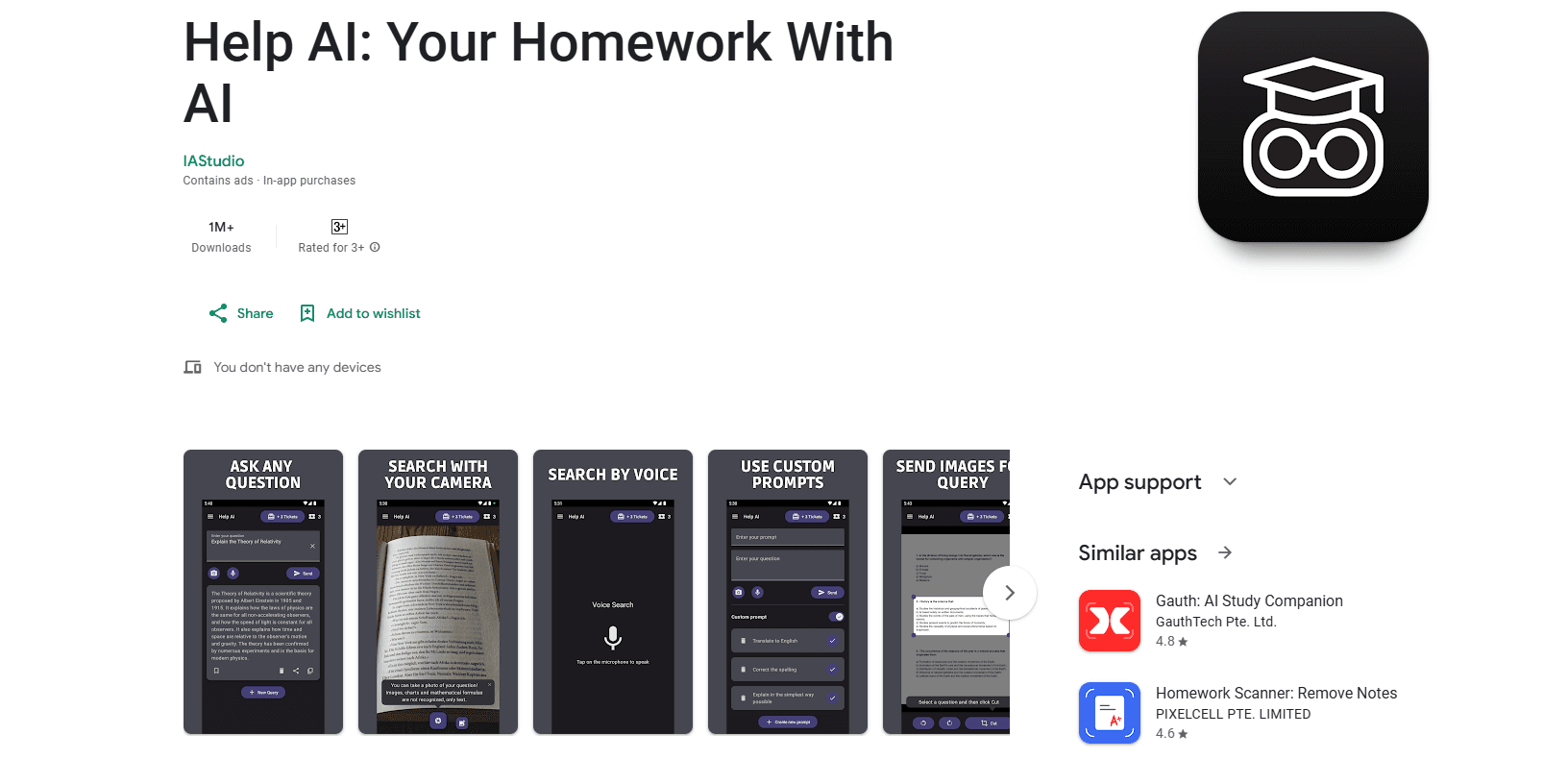
Help AI: Your Homework With AI is an AI homework helper for Android. It answers questions by text, camera scan, or voice search, built for students who want fast answers.
About Help AI: Your Homework With AI
What Is Help AI: Your Homework With AI
Help AI: Your Homework With AI is a mobile AI assistant built around one job: getting an answer to a question fast. Instead of hunting through search results, you type, speak, or photograph the problem and the app returns a response in seconds. The developer, IAStudio, describes it as a virtual assistant for homework and general doubts, and the framing fits. It's a homework solver app for quick questions, not a full learning platform.
The appeal is the input flexibility. Typing a long algebra problem on a phone is slow and error-prone. Camera scanning skips that step. Voice search works when you're walking or just don't want to type. Around that core loop, the app adds small conveniences: custom prompts, saved queries, and the ability to share text or images into it from other apps.
The limits are worth knowing up front. It's Android-only. It runs ads and in-app purchases. And it leans on a third-party AI model rather than one you can inspect or tune. It's a helper for quick answers, not a replacement for actually learning the material, and any student who leans on it without checking the underlying steps is likely to get caught out on an exam that asks them to show their work. That's the fine line any AI study assistant walks.
Getting Started
- Install Help AI: Your Homework With AI from Google Play and open the app.
- Choose how you want to ask: type the question, tap the camera to scan it, or use voice search.
- Add a custom prompt first if you want a specific style of answer, like step-by-step work or a shorter summary.
- Review the response, then save, copy, or share it to another app.
- Revisit past questions from your saved list when you need the same answer again.
Product Information
A quick look at Help AI: Your Homework With AI's pricing, supported platforms, and performance.
Best for
The users, tasks, and scenarios where this tool fits best.
Users
- Students who need quick answers
- Parents helping with homework
- Self-learners and test takers who want to move fast
Tasks
- Solving homework questions
- Translating and proofreading
- Brainstorming
Scenarios
- Last-minute homework before class, when typing it all out would take too long.
- Studying on the move, using voice search instead of a keyboard.
- Sharing an image from a chat app straight into Help AI to ask about it.
Key features
Three ways to ask a question
You can type your question, scan it with the camera, or ask by voice. Why does that matter? The camera option matters most for math and diagrams, where typing is painful on a phone. Voice search covers the moments when you can't use your hands.
Camera scanning for printed problems
Point the camera at a textbook page or a worksheet and the app reads the question for you. This removes the slowest part of getting help on a phone: retyping symbols and equations by hand. So when you scan homework with camera mode, a dense equation turns into a readable question in one shot, which is the single feature most likely to decide whether you keep the app installed. Results are best with clear print in decent light, since blurry photos and handwriting are hit or miss.
Custom prompts
You can write and save your own instructions for how the AI should answer, so a prompt like "explain step by step" doesn't have to be retyped each time. The app ships with some preset prompts and lets you build your own on top. If you ask the same kind of question often, this saves real time, and it's the difference between getting a bare answer and getting one shaped the way you actually study.
Saved and shareable queries
Every query can be saved so you can find it again later. You can copy it to your clipboard or share it to another app. That turns the app into a light history of your study questions rather than a throwaway search box. Handy. Not a dealbreaker, but handy.
Share-in from other apps
You can send text or an image from another app directly into Help AI and run a query on it. That's handy when a question shows up in a chat or a document and you don't want to switch contexts to retype it.
Answers across many subjects
IAStudio markets the app for questions "from any discipline," and the everyday use cases it lists run wide: translation, spell checking, sentence and text generation, name ideas, recommendations, and study-plan building. It's a general assistant, not a subject specialist. That breadth is the point, but it also means depth varies by topic.
Pros and cons
Pros
- Camera scan and voice search cut out slow typing on a phone.
- Free to use, with 5M+ downloads and a 4.5-star rating on Google Play.
- Custom prompts let you lock in the answer style you prefer.
- Saved queries and share-in support fit it into a normal study routine.
Cons
- Android only, so iPhone users are out of luck.
- Answers come from a model you can't inspect, which means you'll want to double-check the work on anything that matters, and the app won't show you its reasoning sources the way a citation-based tool would.
- Ads and in-app purchases are part of the free experience.
Frequently asked questions
It answers questions typed, spoken, or scanned through your camera, and returns an AI-generated response. It's built for homework help and general questions across subjects.
Related content
Explore related tools, skills, and articles for Help AI: Your Homework With AI.
Help AI: Your Homework With AI Alternatives

HireKey
HireKey · Voice & Language · Productivity · LeaningHireKey is an AI job search copilot built by a former tech recruiter. It checks role fit, tailors resumes, runs interview practice and tracks every application.

Lune
Retrograde Labs · Productivity · LeaningLune is a research search engine for scientific AI agents. It runs as an MCP server that lets Claude, ChatGPT and Cursor search peer-reviewed computer science papers and cite them.
Coddy
Coddy · Coding · LeaningCoddy is a gamified platform to learn to code through short interactive lessons in 20+ languages, with a browser editor, an AI tutor and free certificates.