

HeyPhoto AI Photo Editor Online
HeyPhoto · Image
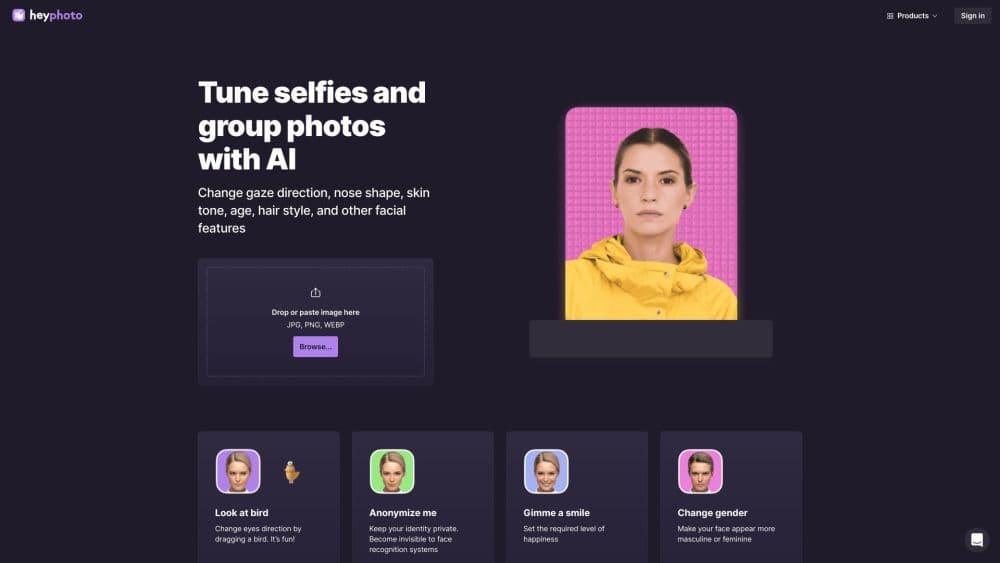
HeyPhoto is a free online AI photo editor that reshapes faces in a browser. It changes gaze, age, gender, and expression, swaps faces, and builds headshots without any install or editing skill.
About HeyPhoto AI Photo Editor Online
What Is HeyPhoto
HeyPhoto is a browser-based AI photo editor built around one job: editing faces. Instead of layers and brush tools, you pick a tool, drop a photo, and the site's AI detects the face and applies the change. Most edits finish in seconds and return an image at the same size and quality as the source.
The product targets people who want a quick portrait tweak and have no interest in learning Photoshop. Tinder users anonymize their front-facing shots to dodge face recognition. Casual users age themselves up, flip their expression, or nudge their gaze. Creators run face swaps at what the team calls the largest resolution on the market, and a separate Face Generator spins up photorealistic headshots from a few parameters.
The main limits are worth knowing up front. Uploads cap at 5 MB, and faces work best at up to 1024 x 1024 px with the subject facing the camera. Every free export carries a watermark, and several advertised tools (nose shape, skin tone, makeup, hair) still sit behind a "Soon" label. HeyPhoto does not publish an API, so it stays a hands-on web tool rather than something you wire into a pipeline.
Getting Started
- Open hey-photo.com in any browser. There is no app to download and no account to create.
- Drag a photo onto the page or paste it from your clipboard. JPG, PNG, and WEBP all work.
- Pick a tool, such as Anonymize Me, Change My Age, or Change Gender, and adjust the slider or direction if the tool offers one.
- Download the result. Free exports include a watermark, and the file keeps the resolution of your original.
Product Information
A quick look at HeyPhoto AI Photo Editor Online's pricing, supported platforms, and performance.
Best for
The users, tasks, and scenarios where this tool fits best.
Users
- Casual selfie editors
- Privacy-minded dating app users
- Social media creators
Tasks
- Refreshing a profile photo
- Building a portable headshot
- Quick face retouching on the go
Scenarios
- A last-minute dating profile update
- Brainstorming a character's look
- Casual social posts
Key features
AI Face Detection With One-Tap Tools
HeyPhoto scans an uploaded photo, finds the face, and applies whichever effect you pick. There's no masking or manual selection. Tools like Anonymize Me, Gimme a Smile, and Change My Age each target a specific facial trait, so the workflow stays a single click rather than a multi-step edit.
Gaze and Expression Control
The eyes direction tool lets you drag a marker to move where a subject looks, which the site frames as a playful way to redirect attention. A separate emotion tool rewrites the whole expression to match a mood. Both changes happen on the face itself, so lighting and skin texture stay intact.
Age, Gender, and Identity Editing
Change My Age shifts a face forward or back to show a younger or older version, while Change Gender leans the features more masculine or feminine. Anonymize Me is the privacy angle: it alters identifying details so face recognition has less to grip on, which the site markets toward dating app users.
High-Resolution Face Swap
HeyPhoto's AI face swap tool promises production-quality swaps at what the team calls the largest resolution available. You can drop your face onto another person's photo and keep a level of detail that usually survives up close, not just at thumbnail size. This is the feature most likely to pull in creators who want believable composite shots.
Face Generator for Headshots
The Face Generator works as an AI headshot generator: it builds a new, photorealistic person from parameters you set, which suits headshots and avatar work. You adjust the traits, generate, and get a portrait that reads as a real photo rather than an obvious render. It's the closest HeyPhoto gets to a from-scratch portrait workflow.
Fully Browser-Based With No Install
Everything runs in the browser, so phones, tablets, and desktops all work without a download. Uploads cap at 5 MB and faces should sit at roughly 1024 x 1024 px or below, with the subject facing the camera for the cleanest result. Output matches the source file's size and quality.
Pros and cons
Pros
- Free to use with no account, no install, and no subscription to start editing.
- Face-focused tools like gaze, age, and anonymize each solve one clear task in a single click.
- Face swap keeps high resolution, so composites hold up beyond thumbnail size.
- Browser-based design means the same tools work on a phone as on a laptop.
- Applications aside, it also works as a fast portrait editor that doubles as an AI photo editor for quick fixes.
Cons
- Every free export carries a watermark, so clean results mean leaving the free tier.
- Several promised tools (nose shape, skin tone, makeup, hair) are still marked "Soon" and can't be used yet.
- The 5 MB upload ceiling and 1024 x 1024 px face limit rule out larger, higher-resolution source photos.
- No public API means you can't automate edits or fold HeyPhoto into a larger workflow.
Frequently asked questions
Yes. HeyPhoto is free to use, but every result comes back with a watermark. You trade a clean export for the free service, which the site openly frames as a promotion swap.
Related content
Explore related tools, skills, and articles for HeyPhoto AI Photo Editor Online.
HeyPhoto AI Photo Editor Online Alternatives

Google EmbeddingGemma 2
Google DeepMind · Writing · Image · CodingGoogle EmbeddingGemma 2 is a 740M-parameter open model that turns text, code, images, audio, and video frames into vectors in one 768-dimension space, running on phones and laptops.

Tractionwave
TractionWave · Image · MarketingTractionWave is an AI attention heatmap tool for static ads. Upload a PNG or JPG and it returns predicted attention, ranked hotspots, and fixes before you spend budget.

Imejis.io
Imejis.io · Image · MarketingImejis.io is an AI design studio for agents and marketing teams. Describe an image in plain words, and it writes the copy, builds the layout, reflows it to every size, then exports a finished file.