
Hippist AI
hippist AI · Image
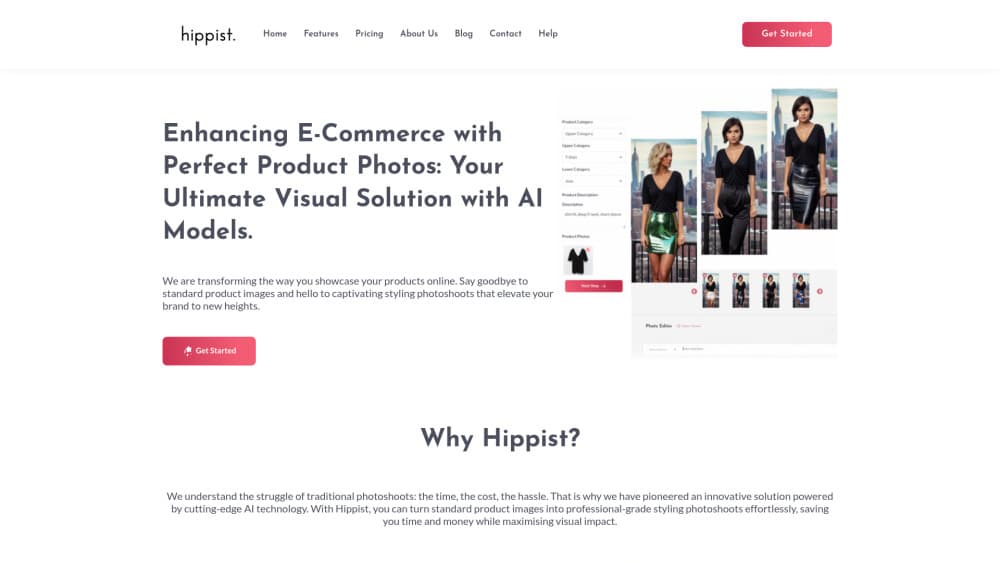
hippist AI turns plain product photos into studio-grade e-commerce visuals. It generates AI models, swaps backgrounds and styling, and expands tight shots into full scenes.
About Hippist AI
What Is hippist AI
hippist AI is a web tool for online stores that need AI product photography without booking a studio. You upload a shot of your product, then let the software put it on an AI-generated model, in a new scene, with new clothes and accessories.
The problem it targets is money and repetition. A real shoot costs a photographer, a model and a location, and you pay again every time a season changes. With hippist AI, one photo becomes many variations, so a jewelry brand can show the same ring on five different hands in five different settings. In practice it works as a product photo generator for catalogs that already exist.
The limits matter too. Everything you see is generated, so fine details like stone facets, fabric weave or a small logo can drift from the real item. Treat the output as a draft that a human approves, not as a replacement for a legal product image.
Getting Started
- Create an account and start the 7-day trial that ships with every plan.
- Upload a product photo, either a clean studio shot or a picture of a mannequin wearing the item.
- Generate a model and choose age, gender, expression and outfit, or let Mannequin2Model convert the mannequin into a person.
- Pick a background or describe the scene you want, then apply styling changes and Magic Expand if the original crop is tight.
- Clean up the result with the after-edit tools, remove the background if needed, and download the image.
Product Information
A quick look at Hippist AI's pricing, supported platforms, and performance.
Best for
The users, tasks, and scenarios where this tool fits best.
Users
- Small store owners
- Jewelry and fashion brands
- Freelance marketers and agencies
Tasks
- Building seasonal campaign visuals
- Replacing mannequin photos
- Creating lifestyle images for marketplaces
- Testing styling ideas before a real shoot
Scenarios
- A new shop with one product photo and no shoot budget
- A brand selling into several regions
- A team sitting on old studio files
Key features
AI-Generated Models
You describe the person you want, and hippist AI builds a model with a chosen age, gender, background and expression. The model can wear any outfit you specify or one from the built-in selections. This is the core of the product: a product photo becomes a photo of someone using the product.
Magic Expand
Close-up shots often cut off hands, necks or faces, which makes them useless for a full scene. Magic Expand fills in the missing body parts and extends the frame into a complete studio composition. It keeps the sharpness of the original item while inventing the surrounding area.
StyleSwap
Upload a reference image, say a lookbook photo or an outfit combination, and the tool applies a similar styling to your own product shot. The company describes the result as matching the vibe rather than copying the reference. It's useful when a client sends a mood board and expects something in that direction.
Mannequin2Model
Many small brands photograph clothing on a mannequin because a live model is expensive. This feature converts that mannequin shot into a lifelike person wearing the same garment. Existing catalog images can be refreshed without reshooting anything.
Background and Scene Customization
You can place a product in a forest, a restaurant, a historic site or a holiday set. The tool offers pre-designed templates, free-text prompts and manual adjustments for the backdrop. Seasonal and regional scenes are the practical use, since the same item can be shown in settings that match a market.
Advanced Editing After Generation
AI output rarely lands perfect on the first try. The after-edit tools add precise brushing, color correction and detailed retouching on top of a generated image, and the editor also includes background removal, an eraser and a history panel. The point is to fix small errors without starting over.
Pros and cons
Pros
- Output looks like a real photoshoot, which lifts a plain product page fast.
- One base photo produces many variations, so seasonal refreshes stop requiring new shoots.
- The 7-day trial runs on every plan and includes all features with no watermark.
- StyleSwap and Magic Expand cover two common blockers: tight crops and missing styling direction.
- The interface is simple enough that a store owner can work without a designer.
Cons
- No permanent free plan, so testing beyond 7 days means paying $11.99 at minimum.
- Plans are capped by projects rather than images, and each project holds one uploaded photo, which limits high-volume catalogs.
- Generated details can drift from the real product, so every image needs a human check before it goes live.
- No public API is documented, so automated pipelines have to use the web app.
Frequently asked questions
It creates product photography for online stores. You upload a photo of a product and the tool puts it on a generated model, in a new scene, with new styling, so you get e-commerce visuals without a studio shoot.
Related content
Explore related tools, skills, and articles for Hippist AI.
Hippist AI Alternatives

Google EmbeddingGemma 2
Google DeepMind · Writing · Image · CodingGoogle EmbeddingGemma 2 is a 740M-parameter open model that turns text, code, images, audio, and video frames into vectors in one 768-dimension space, running on phones and laptops.

Tractionwave
TractionWave · Image · MarketingTractionWave is an AI attention heatmap tool for static ads. Upload a PNG or JPG and it returns predicted attention, ranked hotspots, and fixes before you spend budget.

Imejis.io
Imejis.io · Image · MarketingImejis.io is an AI design studio for agents and marketing teams. Describe an image in plain words, and it writes the copy, builds the layout, reflows it to every size, then exports a finished file.