

Hotpot.ai
Panabee, LLC · Image
Hotpot.ai is an AI image and video generator that turns text and photos into artwork, headshots, logos, and edited pictures. It runs in a browser, and most tools are free to try.
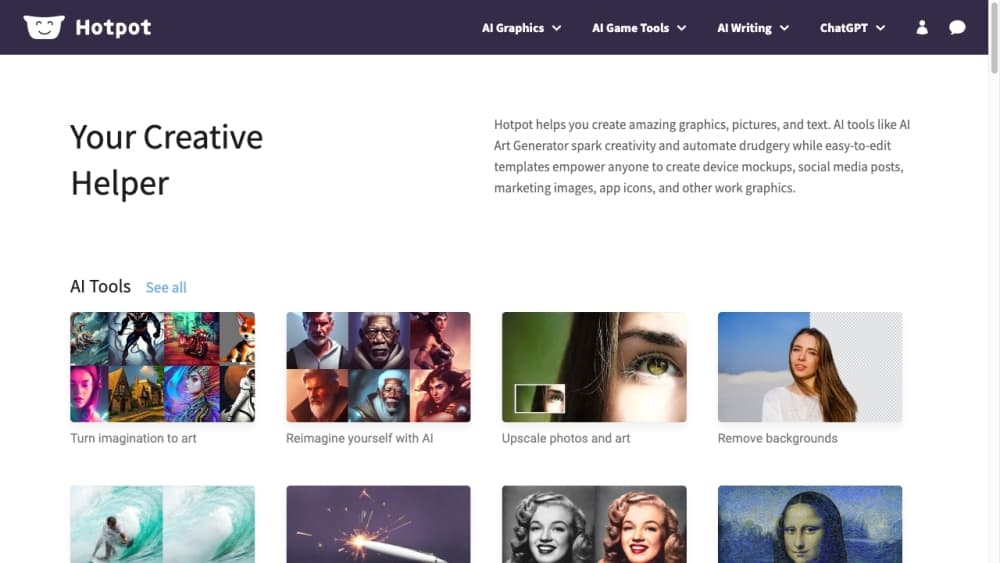
About Hotpot.ai
What Is Hotpot.ai
Hotpot.ai is a creative platform from Panabee, LLC that turns written prompts and photos into finished visuals. You describe an idea and the AI image generator returns artwork; you upload a picture and the editing tools upscale, colorize, restore, or strip the background from it. The same platform covers AI headshots from a single selfie, AI logos for a brand, and an AI video generator that sets a photo or prompt in motion.
It suits people who want a quick visual without design training. The workflow leans on prompts and presets, so a first image takes a few words and one tap. Small businesses reach for it to mock up a logo, solo creators use it for profile pictures and social graphics, and gamers generate characters, backgrounds, and title art.
The catch is the credit system. Most tools are free to explore, but commercial use and advanced settings pull from credits you buy in packs or on a subscription. Output quality moves with the prompt and the settings you choose, and control stays lighter than a model you fine-tune yourself.
Getting Started
- Open hotpot.ai in a browser. You can try the AI image generator without an account for quick tests.
- Type a few words describing what you want, or upload a photo if you're editing or building a headshot.
- Pick a tool such as the image generator, photo upscaler, background remover, or headshot packs.
- Adjust settings where offered, then generate. Credit-based options like commercial use and advanced controls draw on your balance.
- Download the result, or buy a credit pack for higher volume and commercial rights.
Product Information
A quick look at Hotpot.ai's pricing, supported platforms, and performance.
Best for
The users, tasks, and scenarios where this tool fits best.
Users
- Small business owners
- Casual creators
- Gamers and worldbuilders
Tasks
- Turning text into images
- Making AI headshots
- Cleaning up photos
Scenarios
- Building a social profile
- Restoring a family photo
- Drafting a logo for a side project
Key features
AI Image Generator
The core tool turns a short text prompt into a finished image. You describe a subject and pick a style, and the generator returns artwork in seconds. It suits anyone with an idea but no drawing skill, and the style presets keep results consistent.
AI Headshots
Upload a single photo and the headshot packs return polished portraits in several looks, spanning corporate, casual, glamour, and real estate styles. It replaces booking a photographer for a profile picture, and you choose the setting before generating.
Photo Editing Suite
A set of editing tools handles the cleanup work. The photo upscaler enlarges an image, the colorizer adds color to black-and-white shots, the restorer repairs old or damaged pictures, and the background remover isolates a subject. Together they cover the fixes people reach for most.
AI Video Generator
The video tool sets a photo or an idea in motion by describing what happens next. You start with an image or a few words, and the generator animates a character, scene, or portrait. It extends the same prompt-first workflow from stills to short clips.
AI Logos and Game Tools
AI logos generate brand marks from a description, and the game tools produce characters, backgrounds, logos, and copy for projects. Both borrow the same generator engine, so a small team can outfit a project without a dedicated art pipeline.
Web-Based Access
Hotpot.ai runs in a browser with no install, and the image generator works without an account for quick tests. Credits, once bought, follow your account email across sessions, so you can pick up work on any machine.
Pros and cons
Pros
- Turns a short prompt or one photo into finished art, headshots, logos, or edits
- Broad tool set covers images, video, photo repair, and writing in one place
- Most tools are free to explore, and the image generator needs no account for tests
- Credit packs start low, with pay-once or subscription options at several sizes
- Official API is available for teams that want to build on the platform
Cons
- Commercial use and advanced settings require paid credits, which adds up for volume
- Control over exact composition is lighter than a model you tune yourself
- Output quality shifts with the prompt and settings, so results aren't guaranteed
- API access needs payment and a direct request, not self-serve signup
Frequently asked questions
Hotpot.ai turns text and photos into visuals. You can generate images, create AI headshots from one selfie, design logos, animate a photo into a short video, or edit pictures with upscaling, colorizing, restoring, and background removal. People use it for brand graphics, profile pictures, and game art.
Related content
Explore related tools, skills, and articles for Hotpot.ai.
Hotpot.ai Alternatives

Google EmbeddingGemma 2
Google DeepMind · Writing · Image · CodingGoogle EmbeddingGemma 2 is a 740M-parameter open model that turns text, code, images, audio, and video frames into vectors in one 768-dimension space, running on phones and laptops.

Tractionwave
TractionWave · Image · MarketingTractionWave is an AI attention heatmap tool for static ads. Upload a PNG or JPG and it returns predicted attention, ranked hotspots, and fixes before you spend budget.

Imejis.io
Imejis.io · Image · MarketingImejis.io is an AI design studio for agents and marketing teams. Describe an image in plain words, and it writes the copy, builds the layout, reflows it to every size, then exports a finished file.