

Hubflo
Hubflo · Productivity · Marketing
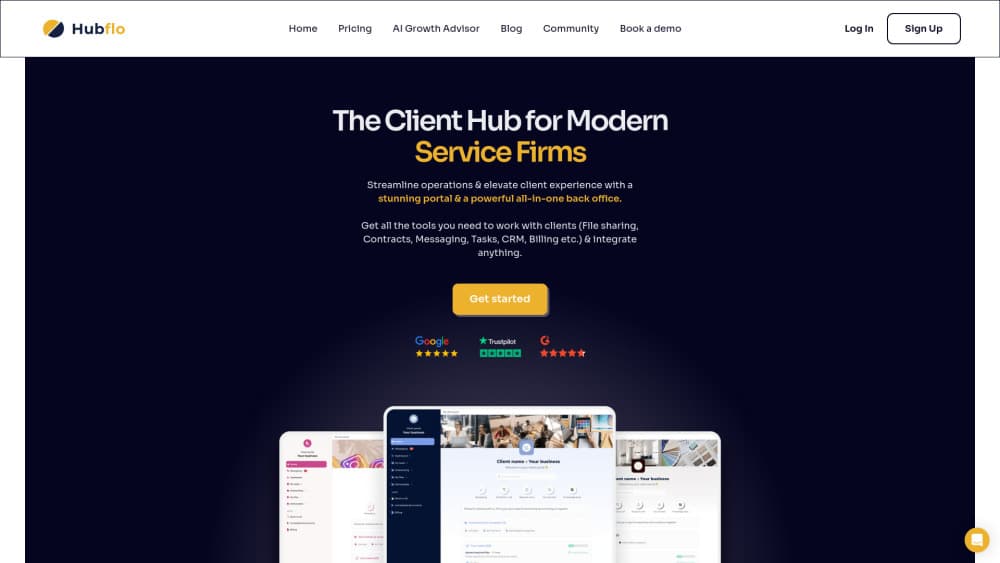
Hubflo is a client portal and workflow platform for service firms. It turns onboarding, document collection, e-signature, and approvals into automated flows clients follow in a branded portal.
About Hubflo
What Is Hubflo
Hubflo is client portal software for service businesses: accounting and tax firms, agencies, law practices, consultancies, insurance brokers, and real estate teams. You map a process once, then every client walks the same steps inside a portal that carries your logo, colors, and domain. Files, forms, signatures, approvals, and messages live in that one space instead of a long email thread.
The problem it solves is scattered delivery. Most small firms run onboarding through email, a shared drive, a spreadsheet, and a separate e-sign tool, and the client sees none of the logic behind it. Hubflo puts the client-facing steps into a single flow, with tasks and automations running on your side at the same time. Think of it as workflow automation aimed at client work rather than at internal tickets. Clients get a clear next action. Your team stops chasing the same document for the third time.
There are limits worth knowing before you commit. Each plan caps clients, active forms, Smartdoc completions, and storage, so a busy firm can hit the Starter ceiling fast. The client mobile app is a paid add-on, extra seats cost extra, and there's no free tier. Hubflo is built around service delivery, not around product or engineering project management.
Getting Started
- Book a demo, choose a plan, and create your workspace. Pricing isn't self-serve checkout, so the call comes first.
- Pick a flow template from the industry gallery, such as new client onboarding or monthly bookkeeping close, or build one from an empty canvas.
- Add your branding: logo, colors, and on the Unlimited plan a custom domain for the client portal.
- Build the steps clients will see: document requests, forms, e-signature, approvals, and messages. Then set reminders and let the AI checks read incoming files.
- Invite the client, connect your CRM or Zapier, and follow progress from the dashboard while tasks land in your team's queue.
Product Information
A quick look at Hubflo's pricing, supported platforms, and performance.
Best for
The users, tasks, and scenarios where this tool fits best.
Users
- Accounting and CPA firms
- Agencies and consultancies
- Law firms
- Small service businesses without an operations hire
Tasks
- New client onboarding
- Document collection
- E-signature and approvals
- Recurring service delivery
Scenarios
- Tax season document chase
- Loan or policy application intake
- Multi-step project delivery
- A firm that wants a branded portal without building one
Key features
Branded Client Portal
The portal carries your logo, colors, and, on the Unlimited plan, your own domain, so clients never land on a generic Hubflo page. Access runs over 256-bit encryption, and internal user roles keep junior staff out of sensitive sections. For a firm selling premium work, the portal is often the first thing a client sees after signing.
Automated Client Flows
Client workflows in Hubflo follow a step-by-step path: upload a file, sign, approve, fill a form, send a message. Your team's tasks, automations, and integrations run alongside it in the same record. Templates cover accounting, legal, insurance, construction, and agency work, which saves the blank-page stage. Flows can start from a signed agreement, a form submission, or a manual trigger.
Smart Document Requests with AI Checks
You ask for a specific file, Hubflo reads what comes back. It pulls data such as employer, wages, and tax withheld out of a W-2 and saves it to the client record, and it flags problems like a bank statement covering only two months or an unsigned lease page. Catching those before review saves a full round of messages. Each plan caps Smartdoc completions per year, so heavy document volumes need Business or Unlimited.
Forms and E-Signature
Forms collect structured intake data, and conditional logic on the Unlimited plan shows or hides sections based on earlier answers. E-signature sits in the same flow, so an engagement letter gets signed without a second tool and a second login. Business plans allow 8 active forms at once, while Starter allows 1.
Reminders, Messaging, and SMS Notifications
Reminders send themselves when a client goes quiet, by email on every plan and by SMS from Business up. Built-in messaging keeps the conversation attached to the client record rather than a personal inbox. Mass messaging lets you reach a whole client list at once, which helps at deadline season.
Integrations, API, and Zapier
Hubflo connects to 18+ native integrations for CRM, accounting, calendars, and file storage, and Business plans add API and Zapier access. Files land in the right folder without a manual upload, and a won deal in the CRM can create the client and start the flow. Firms with an in-house stack can push events through the API instead.
Pros and cons
Pros
- Setup is fast because industry templates already encode the steps most firms repeat, and the interface needs little training.
- Client-facing steps and internal tasks share one record, so nobody has to reconcile a portal with a separate task board.
- AI document checks catch missing pages and unreadable statements before a person reviews the file.
- Business and Unlimited tiers add the pieces firms ask for later: client permissions, recurring tasks, SMS, and a white-label portal.
- Reviews on G2, Google, and Trustpilot consistently praise support responsiveness and time to launch.
Cons
- Starter stops at 50 clients, 1 active form, and 100 Smartdoc completions a year, which is tight for a firm in growth mode.
- The client mobile app starts at $79/mo as an add-on, and implementation packages start at $599, so the entry price isn't the whole bill.
- Extra team members cost $49/mo on Business and $56/mo on Unlimited, which adds up for a five-person team.
- There's no free plan or self-serve trial, and a demo call stands between you and a first look at the product.
Frequently asked questions
Hubflo runs client-facing service processes in one portal. Firms use it for onboarding, document collection, forms, e-signature, approvals, and status updates, with internal tasks and automations attached to the same client record.
Related content
Explore related tools, skills, and articles for Hubflo.
Hubflo Alternatives

Base Code
Base44 (Wix) · Coding · ProductivityBase Code is a shared cloud development environment from Base44. Teammates describe changes to an existing GitHub codebase in chat, preview them live and send them back as pull requests.

Knocket
Knocket (Tencent RTC team) · Productivity · Business · ChatbotKnocket is a free live chat and contact page tool that lets visitors message you from your website, app, or a shareable link, with every reply handled from Telegram or one inbox.

FloorGen
Vinit Kumar (FloorGen) · Productivity · China AIFloorGen is a browser-based floor plan maker that turns a sentence or a sketch into an editable 2D plan and a 3D walkthrough. Export to PDF, DXF or video, and draw without an account.