
HueWheel - AI Color Palette Generator
HueWheel · Image
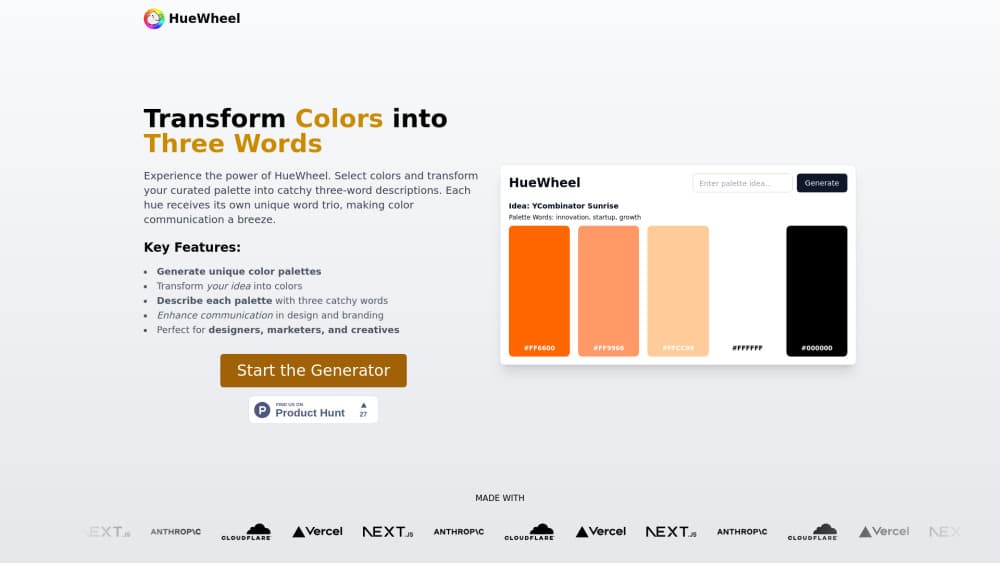
HueWheel is an AI color palette generator that turns a text vibe or an image upload into a usable color scheme, then lets you refine it in a color picker studio and preview it on mockups.
About HueWheel - AI Color Palette Generator
What Is HueWheel
HueWheel is a browser tool that builds color palettes from plain-language descriptions. You type something like "sunset beach" or drop in a photo, and the AI returns a set of colors that matches the mood you described. No color theory background needed.
It bundles four jobs people usually stitch together from separate apps. Generation happens in one box. Editing happens in a picker studio with color harmony tools. Preview happens in a mockup generator. Discovery happens in a gallery of trending palettes other people made. That matters when a palette has to survive contact with a real interface.
Two limits are worth knowing up front. Everything runs in the browser on huewheel.com, so there's no mobile app or desktop install. The site also mentions paid premium features billed through Stripe, yet no public price list shows what they cost.
Getting Started
- Open huewheel.com in any modern browser. Nothing to install.
- In the generator box, type a few descriptive words or upload an image as your starting point.
- Press generate and let the AI process the input into a full color palette.
- Open the result in Color Picker Studio to adjust shades, check color harmony, and copy HEX codes.
- Send the palette to the mockup generator to see it on a real layout, then save or share it with your team.
Product Information
A quick look at HueWheel - AI Color Palette Generator's pricing, supported platforms, and performance.
Best for
The users, tasks, and scenarios where this tool fits best.
Users
- UI and product designers
- Brand and marketing teams
- Students and hobbyist makers
Tasks
- Building a first color system for a new app or site, where you need five colors that look deliberate rather than random.
- Matching a photograph's mood to a design, using an image upload instead of guessing at the exact tones.
- Checking how a palette reads on a real mockup before a client sees it, since swatches alone hide contrast problems.
- Restyling an existing palette with lighter and darker shades, so hover states and borders stop looking improvised.
Scenarios
- Early concept work where the direction is still open and you want three or four options to react to.
- Handing a palette to a developer who needs HEX codes pasted into a stylesheet.
- A client presentation where a mocked-up screen lands better than a row of colored squares.
Key features
Vibe to Palette Generation
You describe a mood in a few words and the AI builds a matching color palette. Short prompts work better than long briefs, since the model reads tone rather than technical color values. It's the fastest part of the workflow and the reason most people open the site.
Image to Palette Extraction
Drop in a photo and HueWheel pulls a palette from its colors. Useful when you're working from a reference shot, a product photo, or a moodboard you already like. This is the image upload path, and it skips the guessing that comes with naming a color in words.
Color Picker Studio
The studio is where a generated palette becomes usable. It includes an eyedropper for grabbing any color on screen, color harmony suggestions, lighter and darker shades, a history of recent colors, and one-click copy for HEX codes. Search works by name, HEX value, or vibe.
Mockup Generator
Mockup previews place your palette on a real interface layout instead of a flat strip of swatches. That's how you catch a failing contrast pair before a build starts. The site currently offers at least an Apple-style device frame.
Trending Palettes and Explore Creations
A gallery of trending palettes and community creations gives you reference points when your own prompt comes back flat. Treat it as a source of directions rather than finished answers, because someone else's palette carries their context, not yours.
HueChat
HueChat is an AI assistant for color questions, with an added social layer for talking to other creators. It's useful for the vague stage, such as asking why two colors clash or which direction to take a brand refresh. Keep in mind that advice from any assistant still needs a contrast check against your final screen.
Pros and cons
Pros
- Text prompts and image upload both feed the same generator, so you aren't locked into one way of describing a color direction.
- The picker studio covers the boring follow-up work: shades, tints, harmony, history, and one-click HEX copying.
- Mockup previews catch contrast mistakes that flat swatches hide.
- Trending palettes and community creations give you a starting reference when a prompt returns something off.
- No install and no credit card needed to try the generator in a browser.
Cons
- Web only. There's no mobile app, so palette checks on a phone mean opening a browser tab.
- Premium pricing isn't published on the site, which makes budgeting awkward until you reach checkout.
- No documented API, so teams that want to generate palettes inside their own tools can't integrate it yet.
- AI output is a starting point, not a finished system. You'll still need the studio and a contrast check before shipping.
Frequently asked questions
The palette generator works without payment, and the site lists a free plan. A paid tier exists for premium features, billed through Stripe according to the Terms and Conditions, but the price isn't shown publicly.
Related content
Explore related tools, skills, and articles for HueWheel - AI Color Palette Generator.
HueWheel - AI Color Palette Generator Alternatives

Google EmbeddingGemma 2
Google DeepMind · Writing · Image · CodingGoogle EmbeddingGemma 2 is a 740M-parameter open model that turns text, code, images, audio, and video frames into vectors in one 768-dimension space, running on phones and laptops.

Tractionwave
TractionWave · Image · MarketingTractionWave is an AI attention heatmap tool for static ads. Upload a PNG or JPG and it returns predicted attention, ranked hotspots, and fixes before you spend budget.

Imejis.io
Imejis.io · Image · MarketingImejis.io is an AI design studio for agents and marketing teams. Describe an image in plain words, and it writes the copy, builds the layout, reflows it to every size, then exports a finished file.