

Hylark
Ezekia · Productivity · Marketing
Hylark is an AI-powered workspace and community platform that helps you organize projects, share pages, and run a community in one place.
About Hylark
What Is Hylark
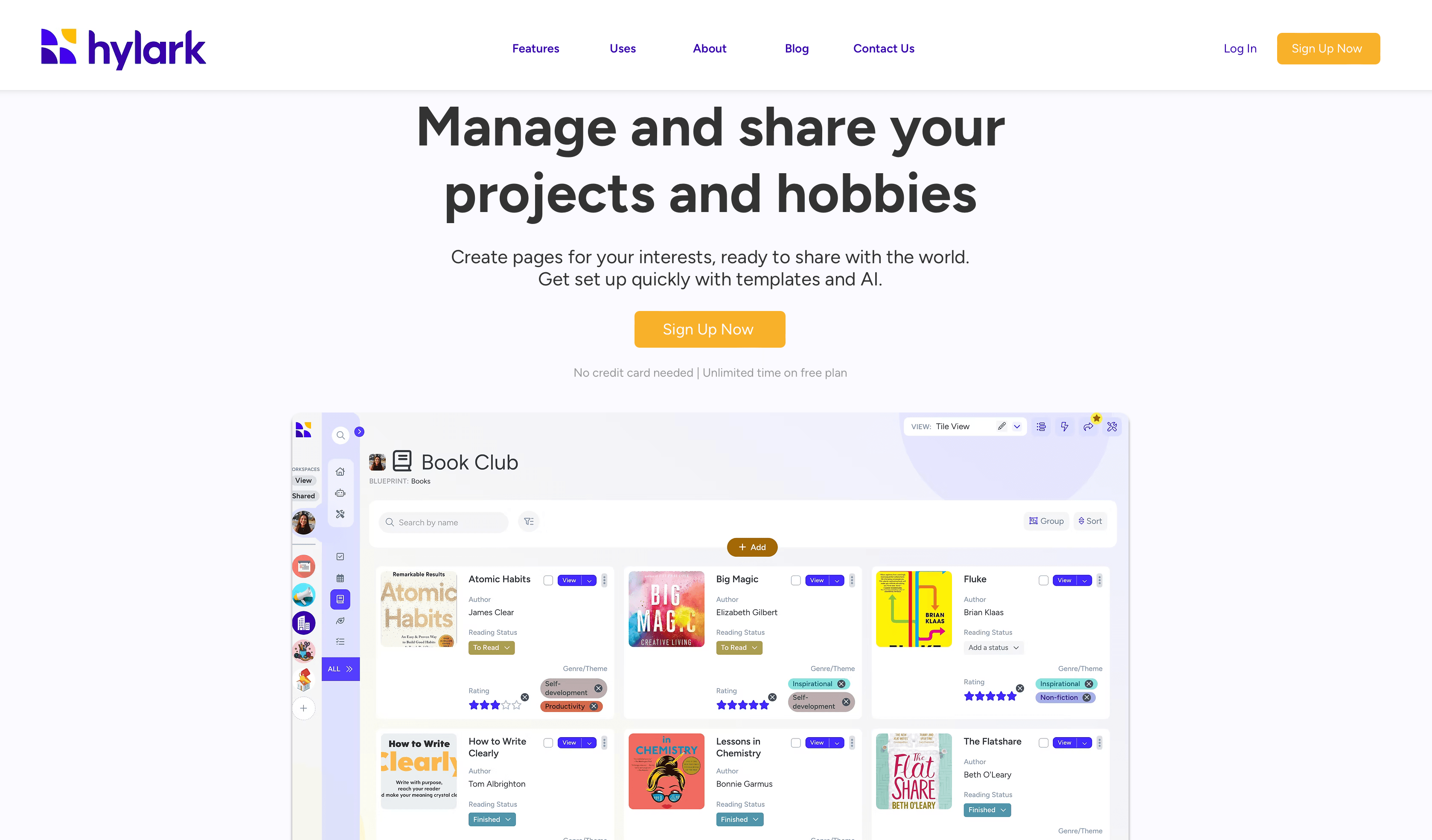
Hylark is a web-based workspace where you build pages for the things you care about, then invite other people in. It comes from Ezekia, the company behind a CRM platform used by 750+ organizations, so the product leans toward structured data rather than simple note-taking. You can keep a personal space for planning and hobbies, or flip it into a community hub with channels, events, and member profiles.
The selling point is flexibility. Instead of forcing you into one fixed layout, Hylark lets you assemble a workspace from templates, custom pages, and shared records that fit how you already work. A chat assistant called HylarkAI builds and edits those workspaces for you, so you don't have to configure everything by hand. Think of it as a project tracking tool and a community platform sharing one login. It works. We mean that.
The catch is pricing and scope. Hylark is a paid product with one plan at $49.99 per month (or $41.67 per month billed yearly), and there's no free tier to test it out first. One plan. No free option. It's also a newer name, so it lacks the deep third-party integrations and mobile apps that bigger workspace tools carry. No free tier, and no public API story either. Best to treat it as a focused community management software pick and a structured life planner, not an all-purpose replacement for your project management stack.
Getting Started
- Go to app.hylark.com/signup and create your account, then enable two-factor authentication for security.
- Start from a template or open a chat with HylarkAI and describe what you want to track or share.
- Build out pages, add custom tags, and pick a custom URL for your community space.
- Invite members by link or email, then set up channels, announcements, and events.
- Post updates, share records, and adjust the workspace as your needs change.
Product Information
A quick look at Hylark's pricing, supported platforms, and performance.
Best for
The users, tasks, and scenarios where this tool fits best.
Users
- Community organizers
- Consultants and coaches
- People managing personal projects and hobbies
Tasks
- Planning and tracking projects
- Running a community
- Sharing records with others
Scenarios
- Launching a niche community around your expertise
- Keeping personal and professional life in one workspace
- Drafting an event planner or travel itinerary from a blank start
Key features
HylarkAI Workspace Builder
HylarkAI is a chat assistant that creates and reshapes your workspace. You describe what you need, like an event planner or a travel itinerary, and it builds the pages for you. If you're not sure where to start, you can just ask it for guidance. The same assistant edits your workspace later when your needs shift.
Templates and Custom Pages
Templates give you ready-made page structures so you're not designing every layout from scratch. Custom pages let you decide what fields, tags, and views each record uses. That combination means a travel itinerary and a client tracker can live in the same workspace without looking alike. Big difference.
Communities and Channels
Each workspace can host a personal space or a full community, and channels keep conversations organized by topic. A community hub pulls posts, announcements, events, and member activity into one view. Admins get a dedicated zone for personalization, custom posts, custom tags, and a custom URL.
Sharing by Link or Email
You don't have to open up your whole workspace to collaborate. Any record can be shared with a link or sent to an email address, so people see just the sliver you hand them. It's a practical middle ground between keeping everything private and inviting everyone in. Sharing is the feature we'd lean on most. Simple as that.
Community Engagement Tools
Hylark handles the usual community posts: announcements, articles, polls, images and videos, links, and documents. Members can comment and react with emojis, and a members directory with profiles helps people find each other. Unlimited members are included on the paid plan. Nobody gets locked out as the group grows. No per-seat math.
Security and Human Support
Accounts get two-factor authentication and the company states that data is kept safe and secure. Support is human, not a chatbot. Why does that matter? Because a real person answers when you're mid-rollout and something breaks. That beats a canned reply.
Pros and cons
Pros
- Combines a custom workspace with real community features like channels, events, and a member directory, so you don't stitch together two tools.
- HylarkAI handles setup and edits, cutting the configuration work that usually slows down workspace tools.
- Unlimited members and unlimited communities are included on the single paid plan, with no per-seat surprises.
- Human support and two-factor authentication come standard.
- Templates speed up the first build for common uses like event planning and itineraries.
Cons
- No free plan, so you commit to $41.67 - $49.99 per month without a hands-on trial first.
- Web-only with no native mobile apps, which is awkward if you want to post or check in from a phone.
- Newer product with limited third-party integrations, so it won't slot neatly into an existing toolchain.
- API availability isn't clearly documented, so developers should confirm access before planning an integration.
Frequently asked questions
Hylark is a web workspace for organizing projects and for running communities around your expertise. You build custom pages for what you want to track, then invite members into channels, events, and shared records.
Related content
Explore related tools, skills, and articles for Hylark.
Hylark Alternatives

Base Code
Base44 (Wix) · Coding · ProductivityBase Code is a shared cloud development environment from Base44. Teammates describe changes to an existing GitHub codebase in chat, preview them live and send them back as pull requests.

Knocket
Knocket (Tencent RTC team) · Productivity · Business · ChatbotKnocket is a free live chat and contact page tool that lets visitors message you from your website, app, or a shareable link, with every reply handled from Telegram or one inbox.

FloorGen
Vinit Kumar (FloorGen) · Productivity · China AIFloorGen is a browser-based floor plan maker that turns a sentence or a sketch into an editable 2D plan and a 3D walkthrough. Export to PDF, DXF or video, and draw without an account.