

Hylse
Hylse · Image
Hylse is an AI front-end design tool that turns a written prompt into React and Tailwind CSS components you can preview and export. Access is still limited and pricing isn't public yet.
About Hylse
What Is Hylse
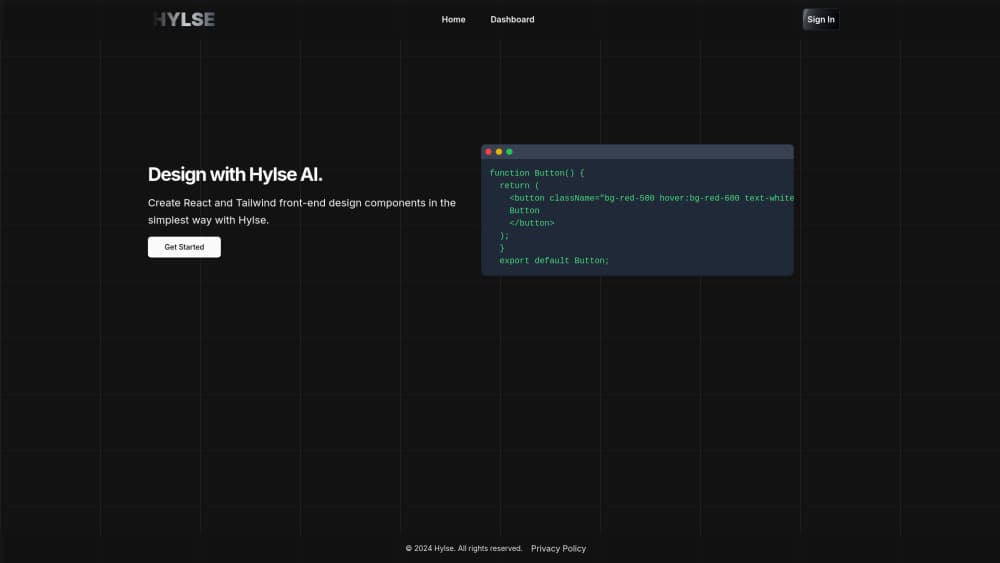
Hylse is a browser-based AI UI generator built around one task. You describe a piece of interface in plain words, and it hands back working React code styled with Tailwind CSS. No canvas to drag boxes across, no component gallery to scroll through. You type, it builds, you adjust.
The tool aims at the slowest part of front-end work. Laying out a pricing card or a navigation bar in Tailwind takes longer than it should, because spacing, breakpoints and hover states all need typing out by hand. Hylse tries to replace a blank file with a usable first draft. Most directory listings describe it the same way: a way to prototype responsive web components without heavy manual coding.
Availability is the catch. As of late 2026, the hylse.com homepage sits behind a password wall with an "Opening soon" notice and an email signup, so new users join a waitlist instead of opening an editor. The team publishes no changelog, no public price list and no documentation we could verify. Treat the details below as what the product is built to do, not as results from a hands-on test.
Getting Started
- Sign up for the newsletter on the hylse.com waiting page so you get access when the doors open.
- Open the workspace after your invite arrives and name the component you need, such as a signup form or a hero section.
- Describe the layout, the states and the styling in everyday language, then submit the prompt.
- Read the generated React and Tailwind markup, request changes in a follow-up prompt, and copy the code into your project.
Product Information
A quick look at Hylse's pricing, supported platforms, and performance.
Best for
The users, tasks, and scenarios where this tool fits best.
Users
- Front-end developers
- Designers who hand work to engineers
- Solo founders and indie builders
- People learning React
Tasks
- Drafting a landing page section
- Turning a sketch into code
- Standardizing small components
Scenarios
- Early prototyping before a design review
- Freelance work with a tight deadline
- Side projects on nights and weekends
Key features
Text to React Component Generation
The core of the product is a text to React component workflow. You type a description of the interface you want, including the pieces it should contain and how they should sit on the page, and the tool returns component code rather than an image. The output is meant to run in a real project, so the value shows up when the draft saves you a first pass.
Tailwind CSS Styling Baked In
Every generated component arrives styled with Tailwind utility classes instead of a separate stylesheet. That suits teams already using Tailwind, since the markup matches the conventions in the rest of the codebase. The AI React component generator approach also means you can ask for a different spacing scale or color set in the next prompt instead of editing class names one by one.
Prompt-Based Iteration
Rarely does the first attempt land exactly. Hylse is built for rounds of follow-up prompts, so you refine a section by describing what feels off rather than rewriting the code yourself. This is where a Tailwind CSS component generator earns its keep on small teams, because the revision loop stays in plain language.
Responsive Layout Handling
Breakpoints are the tedious part of hand-written Tailwind. The tool is designed to produce layouts that hold up on phone, tablet and desktop widths without you adding responsive prefixes to every class. Check the generated markup before shipping, then adjust the edges where your design differs.
Copy-Ready Code Export
Components come out as code you can paste into an existing React app, which keeps the handoff simple. There's no lock-in to a proprietary runtime, and nothing forces you to host the page on Hylse. As a React Tailwind code generator, its practical limit is whatever your own build setup can accept.
Low Barrier for Non-Coders
Because the input is ordinary language, someone with basic React knowledge can produce a first draft of a UI without deep Tailwind fluency. That widens who can contribute to a prototype. A developer should still review the code before it goes live.
Pros and cons
Pros
- Removes the blank-file problem by returning a working component instead of a mockup.
- Output stays inside the React and Tailwind stack most modern teams already run.
- Revisions happen through conversation, which suits people who think in layouts rather than class names.
- Responsive behavior comes with the draft, cutting the fiddly part of hand-written breakpoints.
Cons
- The product isn't generally available. As of late 2026 the site shows an "Opening soon" page and a newsletter form, so you can't evaluate it today.
- No published pricing means you can't budget for it or compare plans before signing up.
- Generated code still needs a developer's review for accessibility, edge cases and design consistency.
- With no public docs, no changelog and no API details, judging long-term fit is guesswork.
Frequently asked questions
It generates front-end components as code. You describe an interface in words and it returns React components styled with Tailwind CSS, ready to be reviewed and pasted into a project.
Related content
Explore related tools, skills, and articles for Hylse.
Hylse Alternatives

Google EmbeddingGemma 2
Google DeepMind · Writing · Image · CodingGoogle EmbeddingGemma 2 is a 740M-parameter open model that turns text, code, images, audio, and video frames into vectors in one 768-dimension space, running on phones and laptops.

Tractionwave
TractionWave · Image · MarketingTractionWave is an AI attention heatmap tool for static ads. Upload a PNG or JPG and it returns predicted attention, ranked hotspots, and fixes before you spend budget.

Imejis.io
Imejis.io · Image · MarketingImejis.io is an AI design studio for agents and marketing teams. Describe an image in plain words, and it writes the copy, builds the layout, reflows it to every size, then exports a finished file.