

Hyper
Hyper Online, Inc. · Image
Hyper Online is a mobile avatar studio for VTubers. Build or import a 3D avatar, let your phone camera drive its face, then record or live stream to Twitch, YouTube, or TikTok.
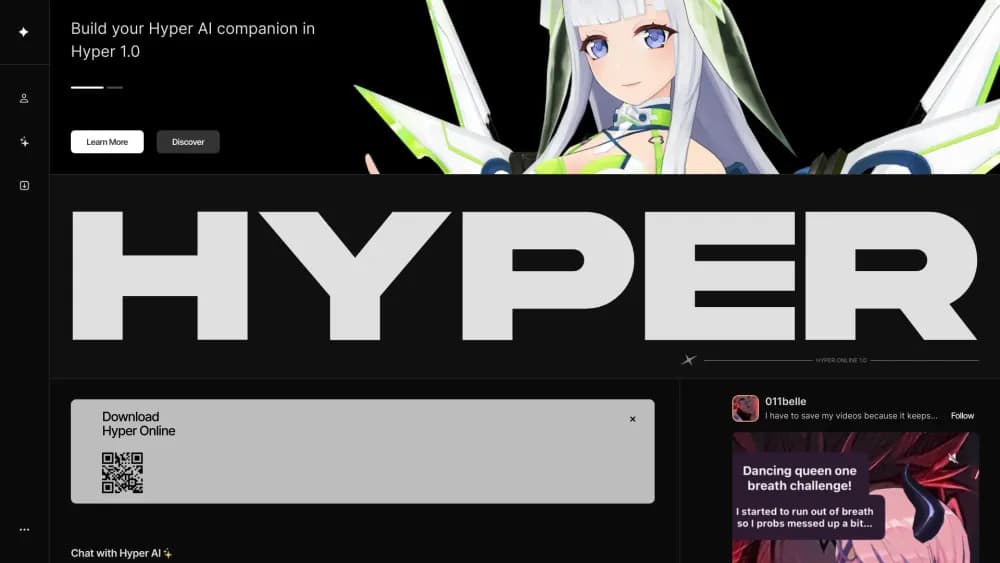
About Hyper
What Is Hyper
Hyper Online is an avatar app for people who want to appear as a virtual character instead of a face on camera. The company describes itself as an avatar company, and the app is the main product: a recording and live streaming studio built around a 3D avatar you design inside the app or import from files you already own. VTubers are the core audience, yet the same tools work for anyone who wants a character on screen during a call, a stream, or a short video.
The appeal of this mobile VTuber app is that the whole studio runs on a phone. You don't need a gaming PC, a capture card, or a separate motion capture rig to start, which cuts the entry cost for someone testing whether VTubing suits them. The front camera reads your face and maps those movements onto the avatar in real time.
A few limits matter before you commit. Face tracking quality depends on the device, and Hyper's own guides point to newer iPhones with a TrueDepth camera for the best results. The professional setup lives in a separate desktop app and an OBS plugin, so a multi-camera production still needs extra software. Android support trails iOS, and the official download page still marks the Android build as coming soon.
Getting Started
- Install Hyper from the App Store, or grab the desktop avatar studio through Steam, then create an account.
- Open the avatar maker and either customize a preset character or load a VRM file exported from VRoid Studio.
- Watch the camera preview and adjust your distance, roughly one to two feet from the phone, until face tracking follows you smoothly.
- Choose a mode: record a clip, start an in-app live stream with a Twitch or YouTube stream key, or switch to OBS mode for Discord and Zoom.
- Keep your characters and outfits in the asset manager so you can swap avatars between sessions.
Product Information
A quick look at Hyper's pricing, supported platforms, and performance.
Best for
The users, tasks, and scenarios where this tool fits best.
Users
- New VTubers without a gaming PC
- Existing VTubers with VRM models
- Creators who would rather not show their face
Tasks
- Recording short avatar clips for TikTok, Shorts, and X
- Going live to Twitch or YouTube from a phone
- Joining Discord or Zoom as your avatar
- Testing a character design before commissioning a full Live2D rig
Scenarios
- A first stream with no dedicated gear
- Streaming while traveling
- Collab streams with other creators
Key features
Avatar Builder
The built-in avatar maker covers wardrobe, facial features, and backgrounds, so a usable character comes together in minutes rather than days. New clothing and props arrive monthly, which keeps a long-running persona from looking stale. You can also save several outfits and switch between them mid-week.
VRM Import and Asset Manager
If you already own a 3D model, import the VRM file and skip the builder entirely. A web asset manager holds multiple characters, outfits, and props in one place, which helps creators who run more than one persona. The app supports VRoid exports directly, and the desktop studio handles the same files.
Face Tracking With Your Phone Camera
The front camera drives the avatar's expressions, including blinks and mouth shapes, without extra hardware. Hyper recommends holding the phone one to two feet away for stable tracking. Results are strongest on iPhones with a TrueDepth camera, and older devices show more jitter during fast movement.
In-App Live Streaming
The app streams straight to Twitch, YouTube, TikTok, and other platforms once you add a stream key. A staging area lets you place photos, props, text, and drawings before going live, and the canvas rotates for vertical or horizontal output. Everything happens on the phone, with no capture card in the chain.
OBS Mode and Chroma Key
OBS mode hides the interface and paints the background green or blue, turning the phone into a clean avatar source for OBS, Discord, Zoom, or any streaming tool. A plugin for Windows streamlines the connection, and shaking the phone resets the view. This is the bridge between the casual mobile workflow and a desktop production.
Social Feed and Collab Streams
Hyper doubles as a small social network, with avatar posts, lives, and Discord webhooks that announce new content to a community server. Collab streams let two creators share a live session, which is useful for interviews and crossover events. The feed keeps discovery inside the app instead of scattering it across platforms.
Pros and cons
Pros
- Starts on a phone, so the barrier to a first VTuber stream is an app install rather than a PC build
- VRM import preserves an existing model and its rigging work
- Direct streaming with a stream key removes the usual OBS step for simple broadcasts
- OBS mode with chroma key makes the avatar usable in Discord calls, Zoom meetings, and desktop productions
- Monthly avatar items and multiple outfit slots keep a persona fresh without new art commissions
Cons
- Face tracking is best on newer iPhones, so older phones and most Android devices get a rougher result
- Android availability still lags, and the official download page lists it as coming soon
- Advanced setups still need a desktop app plus the OBS plugin, which splits the workflow across devices
- The desktop studio sits in early access and has drawn mixed user reviews on Steam, so stability varies by machine
Frequently asked questions
Yes. The app is free to download, and the avatar maker, recording, and streaming tools work without a subscription. Optional in-app purchases cover extra avatar items and cosmetic content.
Related content
Explore related tools, skills, and articles for Hyper.
Hyper Alternatives

Google EmbeddingGemma 2
Google DeepMind · Writing · Image · CodingGoogle EmbeddingGemma 2 is a 740M-parameter open model that turns text, code, images, audio, and video frames into vectors in one 768-dimension space, running on phones and laptops.

Tractionwave
TractionWave · Image · MarketingTractionWave is an AI attention heatmap tool for static ads. Upload a PNG or JPG and it returns predicted attention, ranked hotspots, and fixes before you spend budget.

Imejis.io
Imejis.io · Image · MarketingImejis.io is an AI design studio for agents and marketing teams. Describe an image in plain words, and it writes the copy, builds the layout, reflows it to every size, then exports a finished file.