

Hyprnote
fastrepl · Productivity
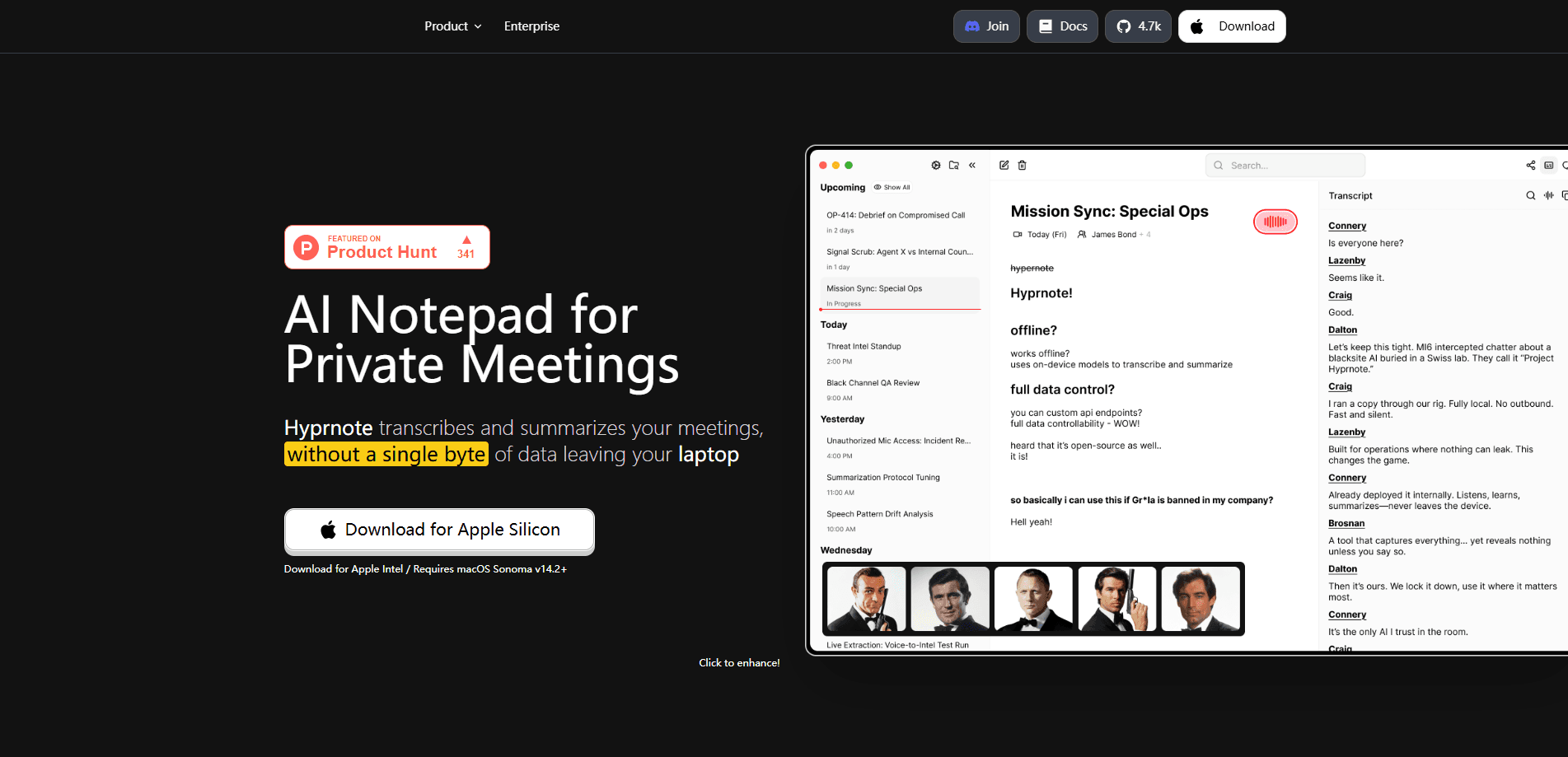
Hyprnote is a local-first AI notepad for meetings that listens to your device audio, writes notes you can edit, and turns them into a summary, all without sending a bot into the call.
About Hyprnote
What Is Hyprnote
Hyprnote is an AI notepad for meetings, built by the team at fastrepl, that runs on your own computer and keeps your meeting data there. It records what happens on your device, transcribes the conversation, and lets you type quick notes while people are still talking. When the call ends, it reads your notes and the full transcript together and writes a clean summary you can share.
The point is control. Nothing joins your call, so no stranger appears in the participant list and no outside service sits in the room. Your meetings, transcripts and recordings live in a local database and plain files on your disk, and you can export any note as Markdown. You decide which AI does the summarizing, whether that's a model running on your laptop or an API key you already pay for.
Two things are worth knowing before you install it. The app leans on local models for the private path, so a machine with some headroom will give you a smoother experience than a thin laptop. And the different desktop builds haven't shipped at the same time, with macOS reaching maturity first while Windows and Linux followed later in beta.
Getting Started
- Download Hyprnote for your desktop from the official site and open it
- Grant microphone and system audio permissions so it can capture both sides of a call
- Join a meeting and let Hyprnote listen, typing your own notes in the editor as it goes
- Open settings and connect an AI provider, either a local server like Ollama or your own API key
- Generate the summary once the call ends, edit it like a document, and export it as Markdown
Product Information
A quick look at Hyprnote's pricing, supported platforms, and performance.
Best for
The users, tasks, and scenarios where this tool fits best.
Users
- Frequent meeting goers
- Privacy-minded teams
- Consultants and account managers
- Open source fans
Tasks
- Capturing a call as it happens
- Turning rough notes into a summary
- Searching past meetings
- Exporting a record
- Keeping AI on your terms
Scenarios
- You have four calls stacked back to back
- A client asks what you promised last month
- Your team blocks cloud note tools
- An interview runs long
- You work offline on a plane
Key features
Local-First Meeting Storage
Hyprnote keeps sessions, notes and transcripts in a local database on your own machine, and recordings and attachments as plain files beside them. There is no hosted account standing between you and your own meetings, and nothing has to sync anywhere to work. When you want a portable copy, you export any note as Markdown and it opens in whatever editor you already use.
System Audio Capture Without a Bot
Instead of inviting a recorder into the call, Hyprnote captures your device audio directly, pulling in both the microphone and the sound coming out of your speakers. No bot shows up in the participant list, and there are no calendar permissions to hand over. That matters for external calls where a surprise guest in the roster would raise questions.
On-Device Transcription
On supported hardware, the built-in transcription models run on your own computer rather than on a server. You get live text during the meeting without shipping audio to someone else's cloud. The app also keeps transcription separate from the model you use for summaries, so you can change either one without touching the other.
Bring Your Own LLM
Summaries and chat run on whichever provider you point the app at, so you can bring your own LLM rather than accept a fixed vendor. That can be a local server such as Ollama or LM Studio, or a hosted API key you already hold. The active model is visible in settings, so you always know what is doing the writing. Because the choice is yours, the private setup and the powerful setup are both on the table.
From Quick Notes to a Full Summary
You type short memos during the call, and Hyprnote reads them together with the complete transcript to produce a structured summary afterwards. You can steer how freely the AI works, keeping it close to your own notes or letting it draw on the whole conversation. The result is a draft you edit like any document instead of a wall of raw transcript.
Chat With a Meeting
Once a session is saved, you can ask questions about it directly in the app, such as what the action items were or what a decision means in plain language. The chat reads the meeting in front of it, so follow-up questions stay grounded in what was actually said. It saves scrolling back through an hour of transcript to find one line.
Pros and cons
Pros
- Captures system audio and microphone on your device, so no bot joins the call and no one appears in the participant list
- Keeps meetings, transcripts and recordings in local storage, with Markdown export when you want a portable copy
- Works with the AI you choose, from a local Ollama or LM Studio server to your own hosted API key
- Runs transcription on-device on supported hardware, so audio can stay off a cloud service
- Separates transcription from the summary model, so you can swap one without disturbing the other
- Open source, so a security team can read the code before it runs in a sensitive room
Cons
- Local transcription and local models need a reasonably capable machine, and a low-spec laptop will feel slow
- The desktop builds haven't shipped together, with macOS the most mature while Windows and Linux arrived later in beta
- There is no phone app, so you can't record or review meetings from a mobile device
- Because you supply the AI provider, first-run setup adds a step that a fully hosted tool would handle for you
Frequently asked questions
Hyprnote is a local-first AI notepad for meetings. It records your device audio, transcribes the conversation, and turns your quick notes plus the transcript into a summary, with all the data living on your own machine instead of a hosted service.
Related content
Explore related tools, skills, and articles for Hyprnote.
Hyprnote Alternatives

Base Code
Base44 (Wix) · Coding · ProductivityBase Code is a shared cloud development environment from Base44. Teammates describe changes to an existing GitHub codebase in chat, preview them live and send them back as pull requests.

Knocket
Knocket (Tencent RTC team) · Productivity · Business · ChatbotKnocket is a free live chat and contact page tool that lets visitors message you from your website, app, or a shareable link, with every reply handled from Telegram or one inbox.

FloorGen
Vinit Kumar (FloorGen) · Productivity · China AIFloorGen is a browser-based floor plan maker that turns a sentence or a sketch into an editable 2D plan and a 3D walkthrough. Export to PDF, DXF or video, and draw without an account.