

ICLight Studio
ICLight Studio · Image · Other
ICLight Studio is a free browser app that relights a photo from a written prompt, so a flat snapshot can pick up window light, sunset glow, or studio falloff without a lighting kit.
About ICLight Studio
What Is ICLight Studio
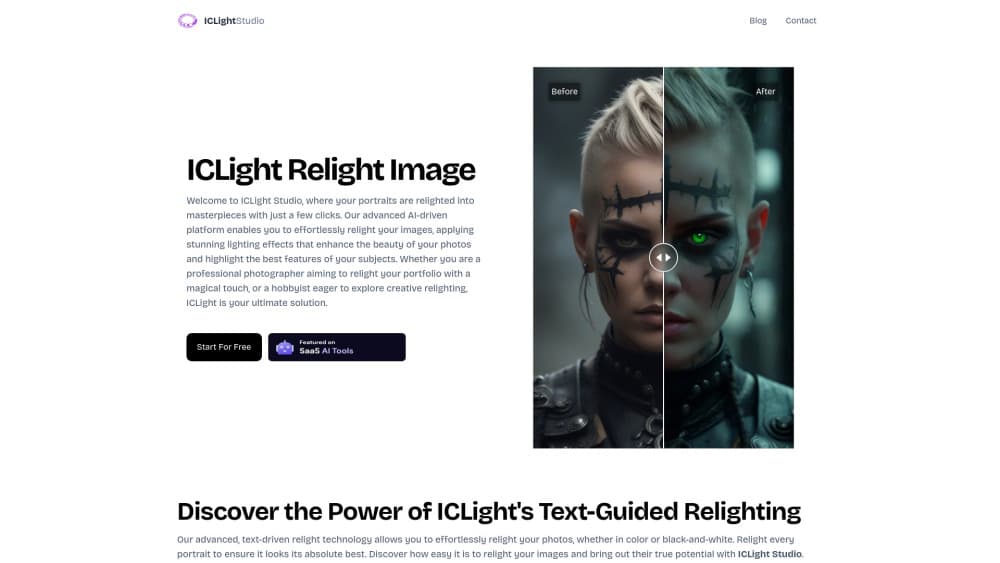
ICLight Studio is a web app for AI photo relighting. You upload an image, describe the light you want in plain words, and the model rebuilds the illumination on the subject while keeping the person, pose, and background in place. The site has run since July 2024 and the whole tool is free, with no paid tier and no credit counter. If you want to relight photo online without installing anything, the AI lighting editor loads in a browser tab.
The job it handles is the one that eats an evening in Photoshop. A portrait shot at noon under office tubes looks flat, and fixing that by hand means masks, curves, and a lot of guessing about where shadows should land. Here the guesswork moves to the model, and a sentence like "soft window light from the left, late afternoon" gets you a usable result in a couple of minutes.
There are limits worth knowing before you upload. The app works one image at a time, so a 40 shot catalog becomes 40 separate runs. You need to sign in before the editor loads, and there is no published API for automating that queue. Prompt quality drives the output, and vague wording such as "make it better" returns vague light.
Getting Started
- Open iclight.online and follow the sign-in prompt on the relight page. The editor won't load until authentication finishes.
- Upload the photo you want to work on. Portraits, product shots, and interior scenes all work, and a clean, well-exposed source gives the model more to work with.
- Describe the light in the prompt box, for example "warm sunset from the right, long shadows" or "cool studio softbox, front left". Presets and the four light direction buttons cover the common cases.
- Open the advanced panel if you want finer control. Steps, CFG, high-res scale, and denoising each change how far the model pushes the relight.
- Run the job, compare the preview against the original, then export as webp, png, or jpg at the dimensions you need.
Product Information
A quick look at ICLight Studio's pricing, supported platforms, and performance.
Best for
The users, tasks, and scenarios where this tool fits best.
Users
- Portrait photographers
- Content creators
- Small online sellers
- Hobbyists learning about light
Tasks
- Rescuing flat indoor portraits
- Matching a subject to a new background
- Restyling product photos
Scenarios
- A profile photo needed tonight
- Planning a shoot
- Seasonal campaign variants
Key features
Text-Guided Relighting
The prompt box takes ordinary language and turns it into a lighting setup. Write "golden hour from behind, soft rim on the shoulders" and the model moves the light source, adjusts color temperature, and draws new shadow edges. No layer masks, no exposure bracketing, no reference photo required.
Light Direction Controls
Four buttons set the key light to the left, right, top, or bottom of the frame. This is the fastest way to fix a portrait where the light came from the wrong side, and it pairs well with a short prompt that sets the mood. Direction changes are strong enough to alter the shape of a face, so compare against the original before exporting.
Portrait-Aware Processing
Portrait relighting is where the app spends most of its tuning, and the model reads facial structure, keeping features, skin tone, and expression intact while it rebuilds the illumination. That matters for client work, where a relit face that no longer looks like the subject is worse than a flat photo. Fine detail such as hair edges and glasses still needs a check at full size.
Preset Lighting Looks
A set of ready-made looks covers natural daylight, studio setups, and warmer interior moods. Presets suit people who don't want to write prompts, and they work as a starting point that you can refine with a sentence or two. Each preset shifts color and contrast along with direction, so skin tones can warm up quickly.
Advanced Parameter Panel
Steps run from 1 to 50 and control how much detail the model rebuilds. CFG runs from 1 to 32 and sets how literally the prompt is followed, with 2.0 as the default. High-res scale goes up to 4x and denoising has its own slider, which is where you balance a natural result against an obvious effect.
Flexible Export Options
Results save as webp, png, or jpg, and you can set the output dimensions instead of accepting a fixed size. Webp keeps file size down for web use, while png is the safer pick when the image goes back into an editor. The preview updates before export, so a bad run costs nothing but time.
Pros and cons
Pros
- Free with no credit system, watermark, or paid tier, which is rare for a hosted relighting tool.
- Prompt-based control means you don't need to understand masks, curves, or 3D lighting software to get a directional result.
- The advanced panel exposes steps, CFG, high-res scale, and denoising, so results can go from subtle fill light to a full restyle.
- Mobile layout works in a phone browser, which covers quick edits when the desktop is out of reach.
Cons
- One image per run. A catalog or a wedding gallery has to be processed shot by shot, and there is no batch queue.
- No API and no documented integration, so the free AI photo editor can't be wired into an automated pipeline.
- The output is a generated relight, not a raw adjustment. Skin texture and fine hair can drift on aggressive settings, and you won't get the original lighting data back.
Frequently asked questions
Yes. The site states the tool is free to use, and there is no subscription, credit pack, or export fee listed anywhere on it. You can run as many images as you have patience for.
Related content
Explore related tools, skills, and articles for ICLight Studio.
ICLight Studio Alternatives

Google EmbeddingGemma 2
Google DeepMind · Writing · Image · CodingGoogle EmbeddingGemma 2 is a 740M-parameter open model that turns text, code, images, audio, and video frames into vectors in one 768-dimension space, running on phones and laptops.

Tractionwave
TractionWave · Image · MarketingTractionWave is an AI attention heatmap tool for static ads. Upload a PNG or JPG and it returns predicted attention, ranked hotspots, and fixes before you spend budget.

Imejis.io
Imejis.io · Image · MarketingImejis.io is an AI design studio for agents and marketing teams. Describe an image in plain words, and it writes the copy, builds the layout, reflows it to every size, then exports a finished file.