

Image To Drawio
Image To Drawio · Image · Productivity
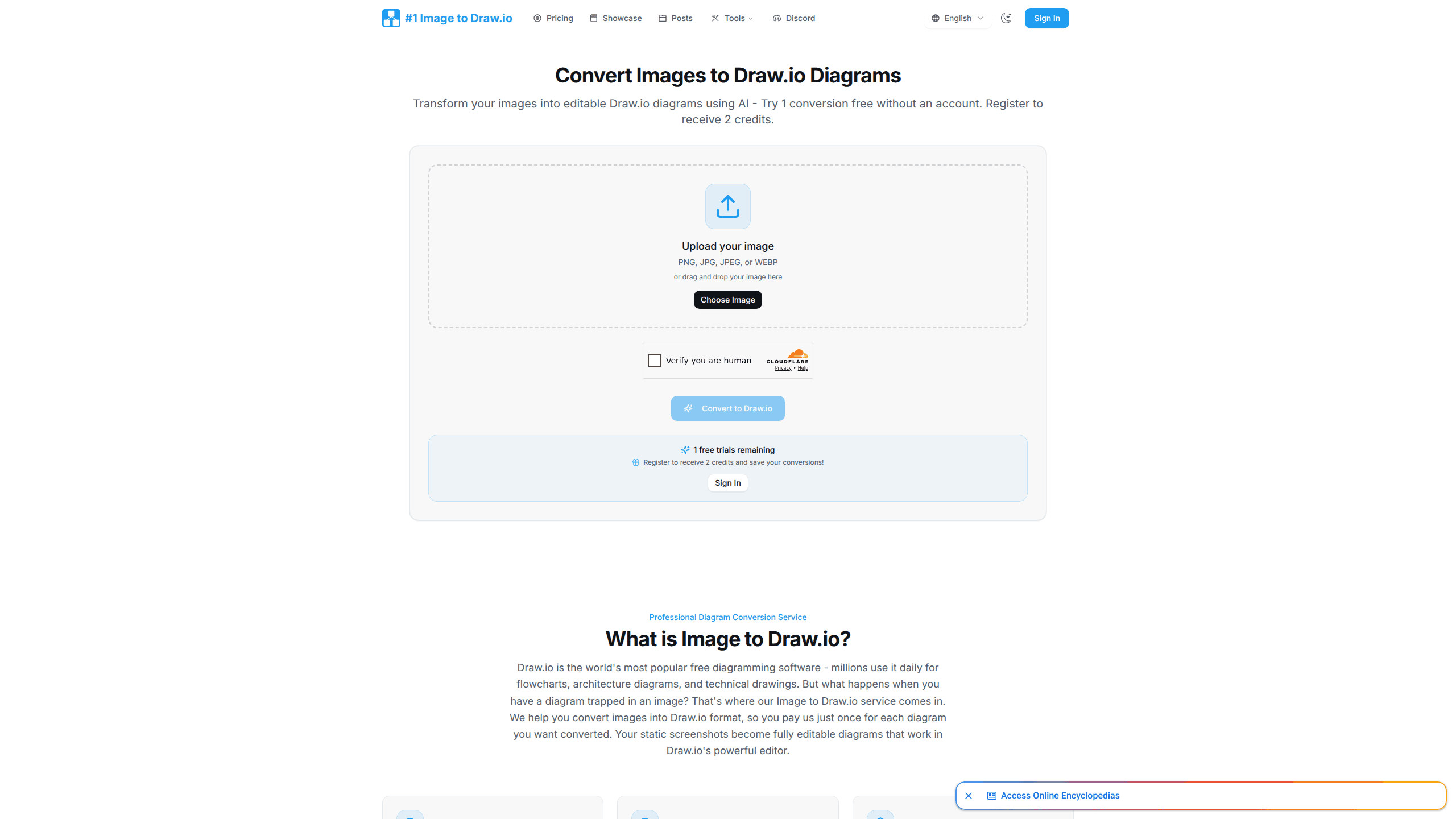
Image To Drawio is an online converter that turns a flat image into an editable Draw.io diagram. You upload a PNG, JPG, JPEG, or WEBP file, the AI recognizes shapes, text, arrows, and colors, and you get back a file that opens in the free Draw.io editor. If you've ever needed to convert image to Draw.io but had no source file to open, this does that in about a minute. It's built for the moment when the only copy of a diagram you still have is a picture, and you need to change something today.
About Image To Drawio
What Is Image To Drawio
Image To Drawio is a web service that converts images of diagrams into editable Draw.io files. Draw.io is the free diagramming tool millions of people use for flowcharts, cloud architecture, and network maps. The problem it solves is simple and annoying: you have the exported picture, not the original file, so every small edit means rebuilding the whole thing by hand.
Upload the image, let the AI trace the shapes and connections, then download a file you can keep editing in Draw.io. The service runs on a pay-per-conversion credit system, which means you pay once for each diagram instead of renting the tool month after month. The resulting file is yours forever, with no subscription required to keep using it.
The limits are worth knowing upfront. There's no public API, so you can't plug it into a pipeline. Accuracy depends on image quality, and a clean screenshot converts far better than a blurry photo of a whiteboard because the AI has to separate shapes from lines, read the text, and follow the arrows without guessing. Hand-drawn sketches need to be reasonably legible for the shapes to come through.
Getting Started
- Go to imagetodrawio.com and upload your image (PNG, JPG, JPEG, or WEBP).
- Try one conversion without an account to see how the AI handles your diagram.
- Register to claim 2 free credits and keep your converted files.
- Review the editable diagram in the built-in editor, then tweak shapes, text, or arrows.
- Export your file in the format you need and keep editing in Draw.io anytime.
Product Information
A quick look at Image To Drawio's pricing, supported platforms, and performance.
Best for
The users, tasks, and scenarios where this tool fits best.
Users
- Developers and architects
- Project managers
- Students and teachers
Tasks
- Converting screenshots
- Rebuilding whiteboard photos
- Reusing old diagrams
Scenarios
- The lost source file
- Quick documentation fixes
- Presentation prep
Key features
Image to Editable Diagram Conversion
The core job is turning a static picture into a file you can actually edit. Image To Drawio detects shapes, keeps text readable, follows the connecting arrows, and matches colors so the result looks like the original once it reopens in Draw.io. It handles flowcharts, architecture diagrams, and network topologies, not just simple boxes. Want to know if it clears the low bar of an editable file? That's exactly what the free try is for. Try the worst image you've got.
AI Diagram Recognition
The converter uses AI to read what's in the image instead of guessing at pixels. It separates a shape from the line running into it, which is what makes the output editable rather than a traced outline that you'd still have to rebuild piece by piece. Clean screenshots come through best. Blurry photos and messy handwriting give it more trouble, so start with the sharpest version you have.
Works Across Draw.io Everywhere
Converted files open in any Draw.io editor. That includes the web app, the desktop version, and the Draw.io integration inside VS Code. Convert once, edit anywhere. Your workflow doesn't lock you into a single tool or platform.
Instant Online Editing
After the conversion finishes, the diagram opens right in an embedded Draw.io editor on the site. No download, no install, no setup. That's it. You can fix a label or move a box right away, then export in the format you need.
Pay-Per-Conversion, No Subscription
You buy credits and spend one per diagram. Ten credits cost a one-time $4.99, and those credits never expire. That model suits people who convert a handful of diagrams a year and don't want another monthly bill quietly sitting on their card for the rest of the year.
Privacy-First Processing
Uploaded images are processed and then deleted after conversion. The service states it doesn't train AI on your diagrams or share your data. For anyone converting internal architecture or client work, that's a detail worth confirming before you upload anything sensitive.
No-Watermark Downloads
Free conversions come with a watermark, but paid credits remove it. If the diagram is going into a report, a slide, or client-facing documentation, the paid tier is what you want, since a visible watermark defeats the purpose of cleaning it up.
Pros and cons
Pros
- Saves hours of redrawing when you only have an exported image and no source file.
- Output opens in any Draw.io editor, so it fits the tool you already use.
- One-time credit pack ($4.99 for 10 conversions) with no expiring credits suits occasional users.
- Built-in editor lets you fix small issues right after conversion without extra software.
Cons
- No public API means you can't automate conversions inside your own app or pipeline.
- Accuracy leans heavily on image quality, so blurry photos and rough sketches often need manual cleanup.
- Free conversions carry a watermark, and editing goes through the browser, so offline use isn't an option.
Frequently asked questions
It converts an image of a diagram into an editable Draw.io file. You upload a screenshot, whiteboard photo, or exported diagram, and the AI rebuilds it as shapes, text, and connections you can change in Draw.io.
Related content
Explore related tools, skills, and articles for Image To Drawio.
Image To Drawio Alternatives

X Ray Interpreter
X-ray Interpreter · ImageX Ray Interpreter is a web-based AI radiology tool that turns X-rays, CT scans, MRI, ultrasound, and PET images into plain-language reports. You upload a scan, get a preliminary X-ray interpretation in moments, then ask follow-up questions if something needs explaining. It works as a second opinion and a learning aid, not as a medical diagnosis.

Aieasypic
AIEasyPic · ImageAIEasyPic is an AI image generator that turns plain text prompts into finished artwork in seconds. You can also train custom models on your own photos, swap faces in existing images, and create short video clips from text, all from a browser. It suits casual creators who want quick visuals and hobbyists who want to build a personal model without touching any code.

Chargen
Chargen · ImageChargen is an AI character generator and worldbuilding toolkit built for Dungeons & Dragons and other tabletop RPGs. It turns a one-line idea into a painted character portrait, spins up NPCs, monsters, maps and encounters from the same session, and keeps every creature's details close at hand. The tabletop RPG art side runs on a credit system called Gold, while the text generators stay free for everyone.