

Image To Video AI Imagemover
ImageMover · Image · Video
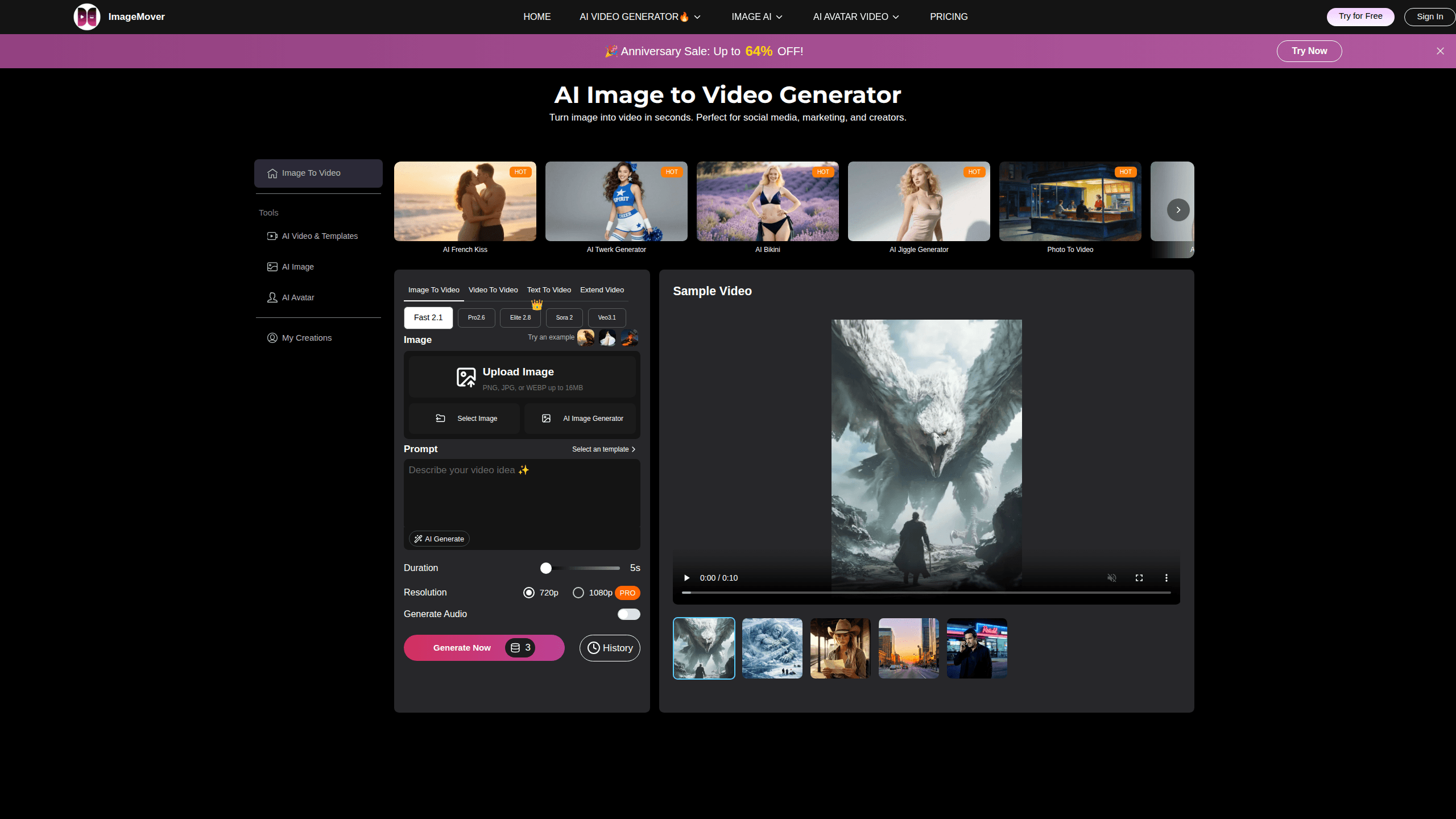
Image To Video AI Imagemover is a browser-based tool that turns a still photo into a short animated video. You upload an image, pick an AI model such as Sora 2 or Veo 3.1, and set the length and resolution before downloading the finished result. It suits creators, marketers, and small teams who need quick video clips without editing software or a camera.
About Image To Video AI Imagemover
What Is Image To Video AI Imagemover
Image To Video AI Imagemover is an online image-to-video generator. It takes a single photo and animates it into a short clip, with motion, camera movement, and AI-generated sound effects. You don't install anything; the whole workflow runs in a browser.
The main problem it solves is time. Making even a five-second video usually means shooting footage, editing, and adding audio, which is a lot of work for something that might only run in a feed for a couple of seconds. Here you start from a picture you already have, and the tool handles motion and sound automatically, so that makes it useful for social posts, product ads, and portraits that need a bit of life.
The biggest limitation is length. Clips come out short, so it works better for loops, teasers, and single shots than for storytelling that runs several minutes. You also can't fully predict what the AI will do to a photo, and that uncertainty means a few retries are often part of the process before you land on something usable.
Getting Started
- Open imagemover.ai in a browser and sign in or create a free account.
- Upload an image in PNG, JPG, or WEBP format, up to 16MB.
- Pick a model (Fast 2.1, Pro 2.6, Sora 2, or Veo 3.1) and adjust duration, resolution, and start or end frames.
- Preview the generated clip, then extend it or regenerate a new version if you want changes.
- Download the finished video to your device.
Product Information
A quick look at Image To Video AI Imagemover's pricing, supported platforms, and performance.
Best for
The users, tasks, and scenarios where this tool fits best.
Users
- Social media creators
- Marketers and small brands
- Hobbyists and beginners
Tasks
- Animating a product shot
- Turning a portrait into a talking-avatar style clip
- Making a looping social post
Scenarios
- Last-minute content before a launch
- Testing an ad concept
- Filling a content calendar gap
Key features
Multiple AI video models
Image To Video AI Imagemover lets you choose between Fast 2.1, Pro 2.6, Sora 2, and Veo 3.1. Each model trades off speed, realism, and control differently, so you can match the tool to the job. Need a draft fast? Pick a fast model. Finishing a clip that has to look polished? Reach for Pro or the third-party options.
Custom start and end frame control
Most basic tools animate a single image and stop there, but this one lets you set both a starting frame and an ending frame before it fills in the motion between them. That gives you more say over how a scene begins and resolves, which matters for transitions and before-and-after sequences.
Automatic AI sound effects
Videos come with ambient audio and sound effects generated by the AI, so you don't have to source a track or edit audio separately. It saves a post-production step. You'll still want to check that the audio fits the mood of your clip.
Consistent character and scene control
The tool aims to keep characters, products, and backgrounds steady across frames. When it works, the result looks more like real footage and less like a slideshow of shifting shapes. Consistency depends on image quality. A clean, well-lit photo helps a lot.
Built for social formats
The workflow targets short-form output for TikTok, YouTube Shorts, and similar feeds. Creators working in vertical formats can generate clips from photos already in a camera roll, which cuts down on the footage they need to capture.
Browser-based workflow
Everything runs online with no install and no local GPU. You upload, generate, preview, and download in the same tab. That lowers the barrier for people on basic laptops who want to test an idea quickly. No setup. No drivers. Just open a tab.
Pros and cons
Pros
- No install or editing software needed, since it runs in a browser.
- Access to several named models, including Sora 2 and Veo 3.1, from one place.
- Start and end frame control gives more direction than single-image tools.
- Automatic sound effects cut a step out of post-production.
- Supports PNG, JPG, and WEBP images up to 16MB, covering most camera and phone photos.
Cons
- Output length is short, so long-form storytelling isn't a good fit.
- Pricing isn't shown clearly on the public site, which makes budgeting harder before you start.
- No API, so you can't automate batches into your own workflow.
- Results vary by model and image, so you may need several attempts to get a usable clip.
Frequently asked questions
It turns a still image into a short AI-generated video. You upload a photo, pick a model, set a few options, and download the animated result, complete with motion and sound effects.
Related content
Explore related tools, skills, and articles for Image To Video AI Imagemover.
Image To Video AI Imagemover Alternatives

X Ray Interpreter
X-ray Interpreter · ImageX Ray Interpreter is a web-based AI radiology tool that turns X-rays, CT scans, MRI, ultrasound, and PET images into plain-language reports. You upload a scan, get a preliminary X-ray interpretation in moments, then ask follow-up questions if something needs explaining. It works as a second opinion and a learning aid, not as a medical diagnosis.

Aieasypic
AIEasyPic · ImageAIEasyPic is an AI image generator that turns plain text prompts into finished artwork in seconds. You can also train custom models on your own photos, swap faces in existing images, and create short video clips from text, all from a browser. It suits casual creators who want quick visuals and hobbyists who want to build a personal model without touching any code.

Chargen
Chargen · ImageChargen is an AI character generator and worldbuilding toolkit built for Dungeons & Dragons and other tabletop RPGs. It turns a one-line idea into a painted character portrait, spins up NPCs, monsters, maps and encounters from the same session, and keeps every creature's details close at hand. The tabletop RPG art side runs on a credit system called Gold, while the text generators stay free for everyone.