
ImageAI.QA
Image Describer · Image · AI Detection
ImageAI.QA, now branded Image Describer, turns photos into written descriptions, generator prompts, tags, or alt text. It runs in a browser, needs no install, and gives you three free images a day.
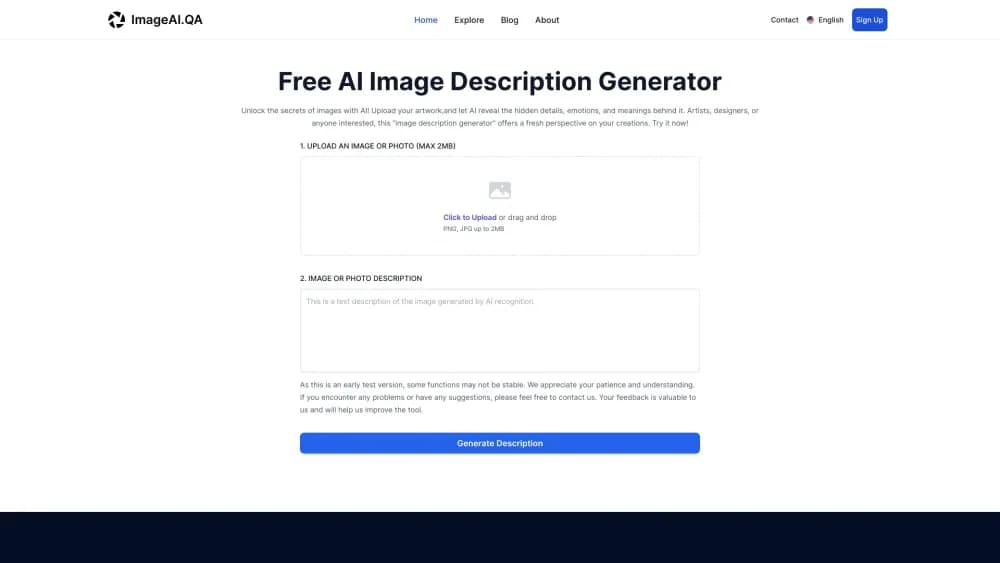
About ImageAI.QA
What Is ImageAI.QA
ImageAI.QA is a web tool for putting an image into words. You upload a photo, screenshot, chart, or piece of art, choose a prompt or write your own question, and the service returns text you can paste into a document, a product listing, or an alt attribute.
The product now lives at imagedescriber.app, and the old imagedescriptiongenerator.xyz address redirects there. The interface, help pages, and API docs all use the Image Describer name, so treat the two names as one service. Nothing gets installed: the tool runs in a desktop browser and also accepts screenshots pasted from the clipboard. It is the quickest way to describe images with AI when you only have a picture and no caption.
The scope goes past simple captioning. One upload can become a Midjourney prompt, a set of tags for a photo library, an alt text string, or a chat thread where you ask follow-up questions about the picture.
A few limits matter before you build a routine around it. Files cap at 4MB and must be at least 300 by 300 pixels, everything happens in the browser, and the free allowance is small. Results also vary by image type. Clean product shots and legible charts come out well. Blurry photos and busy scenes tend to produce hedged, generic text.
Getting Started
- Open imagedescriber.app and drop in a PNG, JPG, or WEBP file, or paste a screenshot straight from the clipboard.
- Pick a template such as Describe Picture, Image to Prompt, or AI Image Tag, or type your own question about the image.
- Press the generate button and wait a few seconds while the model writes the answer.
- Copy the text in one click, or keep asking questions in the chat view when the first answer misses a detail.
- Create an account and buy credits once the daily free allowance runs out.
Product Information
A quick look at ImageAI.QA's pricing, supported platforms, and performance.
Best for
The users, tasks, and scenarios where this tool fits best.
Users
- Online sellers
- Content and social teams
- Accessibility and QA staff
Tasks
- Writing alt text for a website
- Turning a reference image into a prompt
- Reading a chart or a table
Scenarios
- Sorting a photo library after a shoot
- Rebuilding a style from a screenshot
- Drafting copy from sample product photos
Key features
Prompt Templates for Common Jobs
The tool opens with a list of ready-made tasks instead of a blank chat box. Describe Picture writes a paragraph about the scene, while other templates ask for a title, a summary, a tweet, or a table reading. This suits people who know the output they want but not the wording that gets an AI to produce it.
Chat With the Image
After the first description, you can keep asking questions about the same upload. "What color is the jacket?" and "Where was this photo likely taken?" both work, and the answers stay anchored to the image rather than drifting into general knowledge. The free tier allows three conversations a day without an account.
Image to Prompt With Model Presets
This mode turns a picture into a text prompt for image generators. Presets cover General, Flux, Midjourney, and Stable Diffusion, and each one formats the wording and parameters for its target model. It's the fastest route from a saved reference to something you can reuse. The result still needs a test render.
Tagging at Batch Scale
The AI image tagging side of the product handles more than one file at a time. You can push a folder of photos through and get tags, titles, and SEO descriptions back, which is the part that saves real hours for photographers and catalog managers. Batch runs consume one credit per image.
Alt Text and Text Extraction
A dedicated alt text generator writes short accessibility strings, and the main describer can pull text out of an image while keeping its layout. That covers receipts, slides, signage, and screenshots of documents. Translation of on-image text is also offered, which helps when the source photo is in another language.
Developer API
The image description API takes a base64 image, a prompt, and a language code, then returns the generated text as JSON. The endpoint is POST https://api.imagedescriber.app/api/v1/generate_content with a bearer token. API credits are sold once and don't expire, and new keys start with 10 free test images.
Pros and cons
Pros
- One upload feeds several outputs, so a description, a prompt, tags, and alt text come from the same pass instead of four tools.
- The free tier needs no login and covers three images a day, which is enough to judge the output quality on your own photos.
- Batch tagging makes the product useful for libraries and catalogs, not just one-off experiments.
- The API is documented with cURL and Python examples, and paid API credits are a one-time purchase rather than a subscription.
- The interface and output are available in seven languages, including Japanese, Korean, and Chinese.
Cons
- Uploads stop at 4MB and 300 by 300 pixels minimum, so full-resolution RAW files and small thumbnails are both out.
- The credit system is confusing at first: subscriptions and one-time packs sit side by side, and the headline prices belong to the largest bundle.
- Long or cluttered scenes often come back with vague filler, and the model sometimes guesses at context it can't see.
- There's no desktop or mobile app, so offline work and camera-roll uploads from a phone are not part of the flow.
Frequently asked questions
ImageAI.QA is a browser-based AI image description generator. It reads an uploaded picture and returns a written description. The same account also covers image to prompt conversion, tagging, alt text, and an API. The service now operates under the Image Describer name at imagedescriber.app.
Related content
Explore related tools, skills, and articles for ImageAI.QA.
ImageAI.QA Alternatives

Google EmbeddingGemma 2
Google DeepMind · Writing · Image · CodingGoogle EmbeddingGemma 2 is a 740M-parameter open model that turns text, code, images, audio, and video frames into vectors in one 768-dimension space, running on phones and laptops.

Tractionwave
TractionWave · Image · MarketingTractionWave is an AI attention heatmap tool for static ads. Upload a PNG or JPG and it returns predicted attention, ranked hotspots, and fixes before you spend budget.

Imejis.io
Imejis.io · Image · MarketingImejis.io is an AI design studio for agents and marketing teams. Describe an image in plain words, and it writes the copy, builds the layout, reflows it to every size, then exports a finished file.