

Image Mate
ImageMate · Image
ImageMate is an AI photo organizer that tags, describes, and renames your images in bulk. It runs on your local files and writes the results into standard metadata fields.
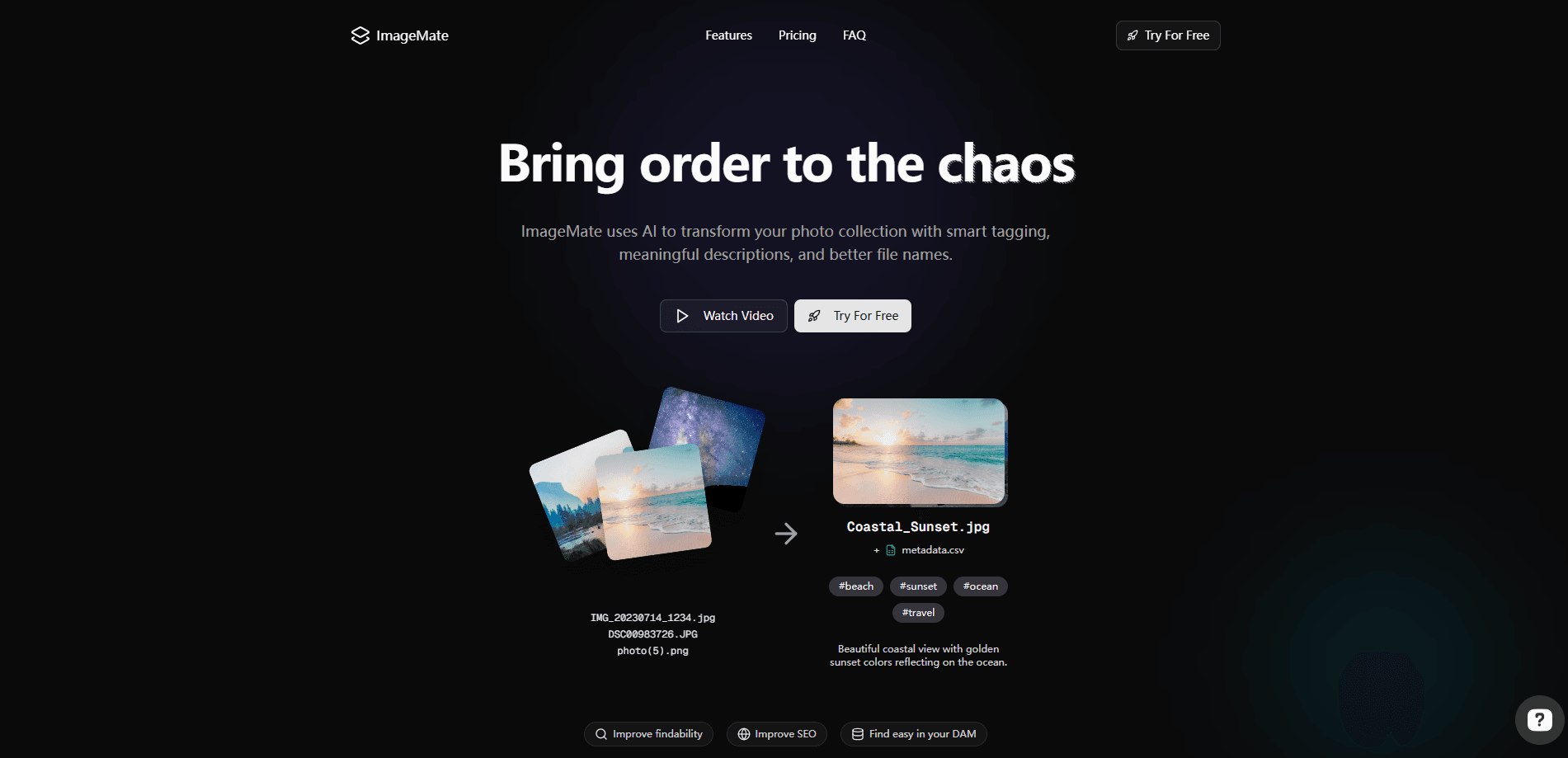
About Image Mate
What Is ImageMate
ImageMate is an AI tool for organizing large photo collections. It reads what's inside each image, then applies tags and descriptions automatically and turns generic filenames like IMG_20230714_1234.jpg into names that actually say what the photo shows. Point it at a folder and it works through the whole set on your own machine.
The problem it targets is scale. A photographer or a team sitting on thousands of unnamed files can find nothing by searching, because the files carry no meaning. Tagging that many images by hand takes days or weeks. As an image tagging tool, ImageMate does the reading for you and writes the results into the file metadata, so a catalog becomes searchable right away.
The limit to weigh is that ImageMate organizes and describes images; it doesn't edit them. It won't retouch, resize, or generate new photos. Treat it as a metadata and cataloging layer that sits on top of whatever editor you already use.
Getting Started
- Create an account and pick a folder of images to process locally.
- Choose what you want written, such as tags, descriptions, or new filenames, and customize the naming pattern.
- Run the batch and let ImageMate analyze each image and apply the metadata.
- Review the results in your file manager and the metadata editor, then export the CSV if you need a summary.
- Keep or adjust the tags and repeat the run on other folders as your collection grows.
Product Information
A quick look at Image Mate's pricing, supported platforms, and performance.
Best for
The users, tasks, and scenarios where this tool fits best.
Users
- Photographers managing large shoots
- Small teams sharing a photo library
- Marketers and content creators
- Librarians and archivists
Tasks
- Renaming generic files
- Adding searchable tags
- Writing image descriptions
- Updating metadata in bulk
Scenarios
- A wedding photographer sorting thousands of shots after an event
- An e-commerce seller cataloging product images
- A family digitizing years of photos
- A content team stocking a shared library
Key features
Automated File Naming
ImageMate reads what's in each image and renames it based on content, following a naming pattern you set. A folder full of DSC00983726.JPG and photo(5).png becomes something like Mountain_Lake.jpg or Coastal_Sunset.jpg, which is the difference between a pile of files and a browsable library.
Automated Image Tagging
AI analyzes every image and applies relevant tags with no manual work. This batch image tagging lands in the metadata, so your normal file search or digital asset manager picks the labels up right away instead of you building them by hand.
Image Description Generator
For each image, ImageMate writes a short description based on the visual content. Those descriptions are useful on their own and can feed alt text or captions, which saves writing them one by one.
Metadata Editor
As an AI metadata editor, ImageMate writes tags and descriptions to standard EXIF, IPTC, and XMP fields, and you also get a CSV of all the metadata. Because the data lives inside the files, it travels with the images and stays with them if you move them elsewhere.
Batch Processing
ImageMate works through hundreds or thousands of images in a single run. The tedious sorting that would take a person days happens in one pass, which is what makes it practical for a large collection.
Local, Folder-Aware Processing
Processing runs on your local files, and folder structure is preserved. Your originals stay in place while their metadata gets filled in, so nothing gets scrambled into a cloud library you didn't ask for.
Simple Credit-Based Pricing
You pay by credit, with each image costing one credit, and 20 free credits to start. There's no monthly commitment and credits don't expire, so you top up only when you have a batch to run.
Searchable Image Catalog
With tags and descriptions applied across the set, the collection turns into a searchable catalog. A digital asset management tool or a plain file search can find an image by what it shows rather than by a filename nobody remembers, which makes it a solid pick when you want photo catalog software that reads the content itself.
Pros and cons
Pros
- Turns generic filenames into descriptive names based on image content
- Tags and descriptions are written into EXIF, IPTC, and XMP, so they travel with the files
- Runs on local files and preserves folder structure, keeping originals in place
- Handles hundreds or thousands of images per batch
- Credit pricing with 20 free credits and no monthly commitment
Cons
- It organizes and describes images but doesn't edit, retouch, or generate them
- Each image costs a credit, so cost tracks the size of your library
- Automatic tags still need a review pass if you want a strict, consistent taxonomy
Frequently asked questions
ImageMate organizes photo collections with AI. It tags, describes, and renames images in bulk, so a large folder of unnamed files becomes a catalog you can search by what each image shows.
Related content
Explore related tools, skills, and articles for Image Mate.
Image Mate Alternatives

Google EmbeddingGemma 2
Google DeepMind · Writing · Image · CodingGoogle EmbeddingGemma 2 is a 740M-parameter open model that turns text, code, images, audio, and video frames into vectors in one 768-dimension space, running on phones and laptops.

Tractionwave
TractionWave · Image · MarketingTractionWave is an AI attention heatmap tool for static ads. Upload a PNG or JPG and it returns predicted attention, ranked hotspots, and fixes before you spend budget.

Imejis.io
Imejis.io · Image · MarketingImejis.io is an AI design studio for agents and marketing teams. Describe an image in plain words, and it writes the copy, builds the layout, reflows it to every size, then exports a finished file.