

Img2html
Img2html · Image · Coding
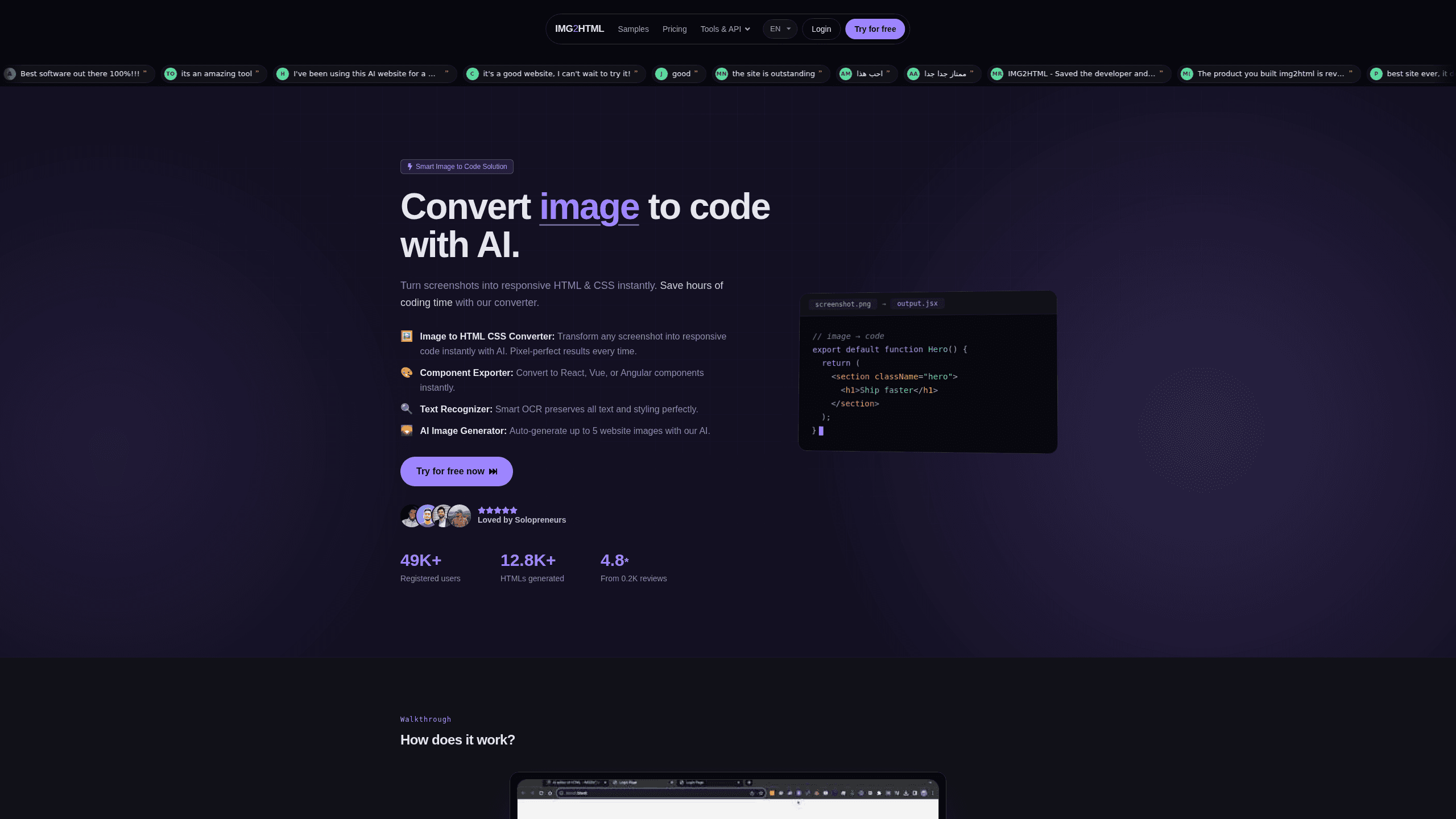
Img2html is an online AI image to HTML converter that turns screenshots, mockups and design images into clean, responsive HTML and CSS code. You upload a picture, the tool reads the layout and figures out what sits where, and you get working markup back. There's no plugin to install and no template library to pick from. The site says the same conversion quality applies across every pricing tier, and credits don't reset with the month. That last part matters more than it sounds. It's quick. It's hands-off.
About Img2html
What Is Img2html
Img2html is a browser-based image to code tool. It takes a flat image, a screenshot or a design mockup, and generates HTML and CSS that tries to match it. The pitch is simple: instead of rebuilding a layout by hand, you hand over the picture and let the model do the first pass.
It's built for the gap between "I have a design" and "I have code." That gap is normally closed by a front-end developer reading a Figma file or a JPEG and typing out divs by hand, block by block, until the page matches the picture. Img2html aims to skip most of that typing, which matters most for one-off pages, quick prototypes and landing pages built from a reference image.
That saves real time. Not all of it, but a lot.
The main limit is that it works from pixels, not from a design file, which means the model can only reconstruct what it can actually see in the image you hand it. There's no layer tree, no component library and no design tokens to inherit, so the output reflects what the model can see. Complex states, interactions and precise spacing usually still need a human pass. And since every job runs through the same credit system, heavy use adds up.
Keep that in mind before you buy.
Getting Started
- Open the Img2html site and go to the converter.
- Upload a screenshot, mockup or design image, or drop the file into the upload area.
- Let the AI read the layout and generate the HTML and CSS.
- Copy the generated code into your project, or download the output for editing.
- Adjust spacing, fonts and any details the model got wrong, then test the page in a browser.
Product Information
A quick look at Img2html's pricing, supported platforms, and performance.
Best for
The users, tasks, and scenarios where this tool fits best.
Users
- Front-end developers who need a fast first pass on a layout from a screenshot, as long as they expect to clean up the output.
- Designers who want to turn a mockup into something clickable without waiting on an engineer, provided they're comfortable reading HTML, editing CSS and testing the result at several screen sizes before showing it to anyone.
- Solo founders and makers building a landing page from a reference image, with the caveat that anything interactive needs manual work.
- Agencies handling lots of small, one-off pages where typing the markup from scratch is wasted time.
Tasks
- Converting a screenshot to HTML when you only have the image and no design file to work from.
- Turning a landing page mockup into a responsive starting point before you add real content.
- Prototyping a single page for a client review so they can click something instead of looking at a static image.
- Rebuilding a competitor's page layout as a study exercise, using the generated CSS as a reference point for how the original was likely structured.
Scenarios
- You're handed a JPEG of a page and asked to "just build it." Img2html gets you most of the way there before you open an editor.
- You're testing three different hero section designs and want all three coded up quickly to compare them live. Speed matters here.
- You're a designer learning front-end and want to see how a layout you already know turns into CSS.
Key features
Image to HTML and CSS Conversion
The core job: feed it an image, get back HTML and CSS. The converter reads text, blocks, images and overall structure from the picture and rebuilds them as markup. Screenshots in, code out. It handles screenshots, mockups and design exports, which covers most of what people actually have on hand when they need code. It's an image to HTML converter first and an AI HTML generator second.
No Template Library
Img2html doesn't match your image against a set of prebuilt templates. The site is explicit that the layout is generated from what's in the image, not picked from a library. That's the difference between a converter and a theme picker, and it's why odd or custom layouts still get a real attempt rather than a forced fit. Your mockup to code result follows the mockup, not a template.
Responsive Output
The generated code aims at a responsive result, not a fixed-width copy of your image. That matters because a pixel-perfect desktop screenshot is useless on a phone. You'll still want to check breakpoints yourself, but you start from something that's meant to adapt rather than something you have to rebuild from scratch when the viewport changes. Still, check it.
No Plugins or Install
Everything runs in the browser. There's nothing to install, no extension to add and no build step to wire up. You open the site, upload an image and get code. For occasional use, that low friction is the whole point. No install. No setup.
Credits That Don't Expire Monthly
Img2html runs on a credit system, and unused credits carry over instead of resetting when the month rolls over. If your workload is bursty, you're not forced to burn leftover credits before a deadline. The site also states that conversion quality is the same on every tier, so paying more buys volume rather than a better model. Good news for anyone who works in bursts.
Flat Pricing Tiers
Pricing is split into simple tiers with the same conversion quality across all of them. The differences come down to how many conversions you get, not to locked-away features. That makes the buying decision mostly about volume, which is easier to figure out than weighing feature lists. Simple as that.
Built for Layout Reconstruction
The tool is tuned for turning a visual layout into structured code, which is narrower and more useful than a general-purpose image AI. It's not trying to describe your image or edit it. It's trying to give you divs, styles and structure you can actually ship after a cleanup pass. Is it a pixel-perfect clone? No. It's a draft you finish. Use it, fix it, ship it. That's the workflow.
Pros and cons
Pros
- Turns a screenshot or mockup into HTML and CSS without any design file, which covers the common case where you only have an image and nothing else to work from in your editor.
- Runs entirely in the browser with no plugin or install, so trying it costs nothing but a minute.
- Credits carry over month to month, so bursty users don't lose unused balance.
- Same conversion quality on every plan, so you're picking a volume, not a feature tier.
- Handles custom layouts instead of forcing your image into a prebuilt template.
Cons
- Works from pixels, not a design file, so it can't read layers, components or spacing rules the way a Figma import can.
- Generated code almost always needs a manual cleanup pass for spacing, fonts and edge cases, so it's a head start rather than a finished page.
- Interactive behavior, states and live content aren't something an image can express, so anything beyond a static layout is on you.
- Pricing details are thin on the public site, so you may need to sign up to see exact credit amounts per tier.
Frequently asked questions
It converts an image into HTML and CSS code. You upload a screenshot, mockup or design, and it generates markup that approximates the layout in the picture. Think of it as a first draft of a page, produced from a flat image.
Related content
Explore related tools, skills, and articles for Img2html.
Img2html Alternatives

X Ray Interpreter
X-ray Interpreter · ImageX Ray Interpreter is a web-based AI radiology tool that turns X-rays, CT scans, MRI, ultrasound, and PET images into plain-language reports. You upload a scan, get a preliminary X-ray interpretation in moments, then ask follow-up questions if something needs explaining. It works as a second opinion and a learning aid, not as a medical diagnosis.

Aieasypic
AIEasyPic · ImageAIEasyPic is an AI image generator that turns plain text prompts into finished artwork in seconds. You can also train custom models on your own photos, swap faces in existing images, and create short video clips from text, all from a browser. It suits casual creators who want quick visuals and hobbyists who want to build a personal model without touching any code.

Chargen
Chargen · ImageChargen is an AI character generator and worldbuilding toolkit built for Dungeons & Dragons and other tabletop RPGs. It turns a one-line idea into a painted character portrait, spins up NPCs, monsters, maps and encounters from the same session, and keeps every creature's details close at hand. The tabletop RPG art side runs on a credit system called Gold, while the text generators stay free for everyone.