

Imgedify
Imgedify · Image
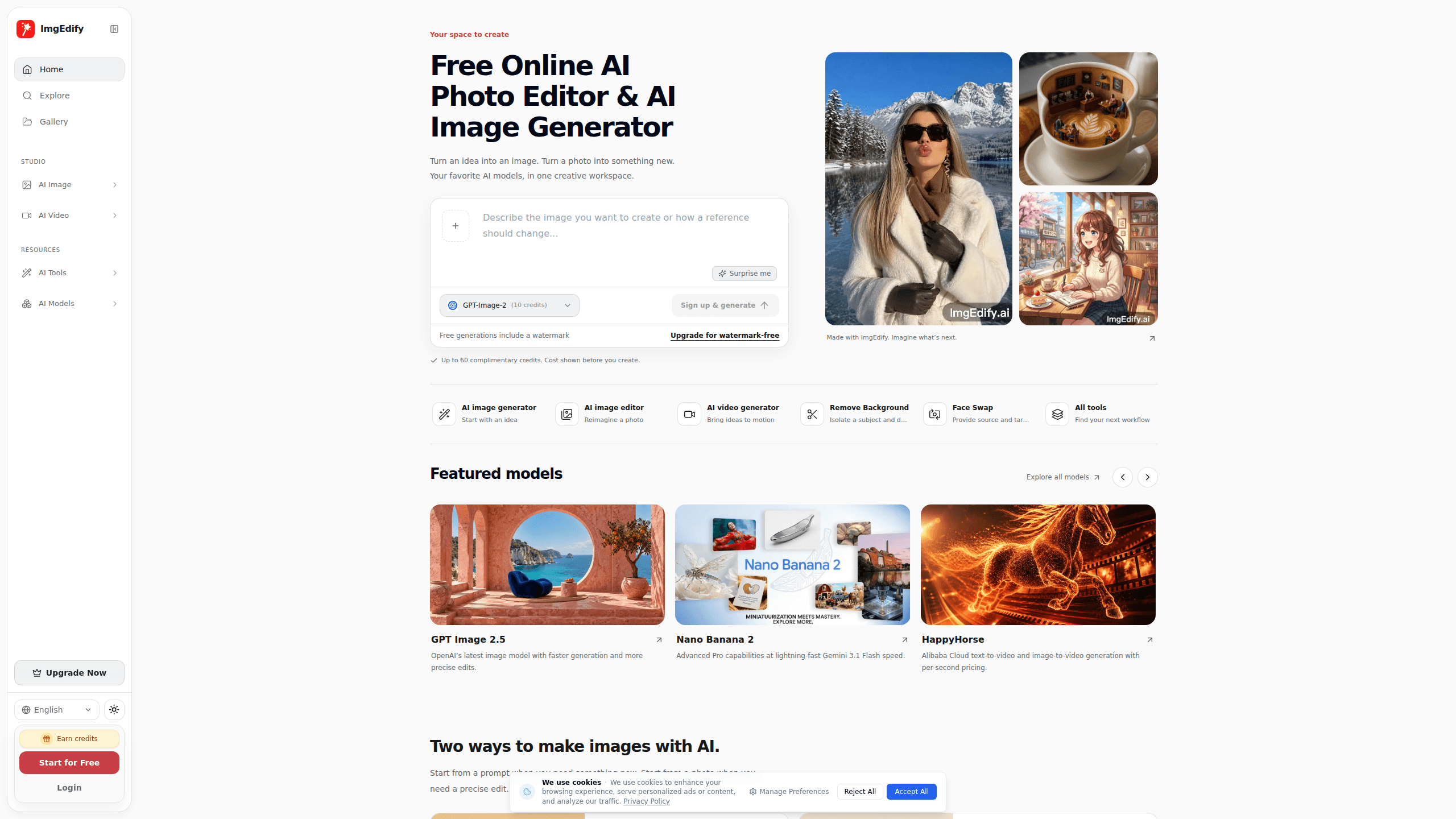
Imgedify is a web-based AI photo editor and AI image generator that puts several well-known image models in one workspace. You can turn a text prompt into a new picture, or upload a photo and describe the change you want while keeping the parts you care about. New accounts get up to 60 complimentary credits, and the credit cost of a generation shows before you hit the button. That last detail matters. Few tools tell you the price before you spend it.
About Imgedify
What Is Imgedify
Imgedify is an online creative workspace for AI image work, built for people who want both generation and editing without juggling five different subscriptions. Instead of locking you to one model, it lets you pick from options like Nano Banana Pro and GPT-Image-2, so a single prompt can be run through the engine that suits the job. The site also carries a set of focused utilities like background removal, face swap, and image resizing that sit beside the main tools.
The core split is simple. Start from a prompt when you need something new, or start from a photo when you need a precise edit. That second path is the more interesting one: keeping a subject's identity, composition, or layout intact while you restyle or rewrite details is where most casual generators fall apart and where Imgedify leans into reference-guided editing instead of pretending one prompt can do everything.
The main limit is that nothing runs without an account. You can set up a prompt, model, aspect ratio, and reference image first, but the site asks you to sign up before any generation or edit is submitted. Pricing also works on credits, not a flat unlimited plan, so heavy users need to watch how many each task burns. Dabbling is cheap. The free starting balance covers a fair amount of experimentation.
Getting Started
- Create an account on imgedify.com. You can draft your prompt and settings before signing up, but generation needs a login.
- Pick your entry point. Use text to image for ideas from scratch, or the AI image editor when you're starting from an uploaded photo.
- Choose a model and check the credit cost. The button shows what the task will spend before you commit.
- Adjust the prompt, aspect ratio, and any reference image until the preview looks right.
- Generate, then download the result. Free-tier runs may carry a watermark until you upgrade.
Product Information
A quick look at Imgedify's pricing, supported platforms, and performance.
Best for
The users, tasks, and scenarios where this tool fits best.
Users
- Casual creators testing AI art
- Social media and content makers
- Photo hobbyists doing precise edits
Tasks
- Generating images from text
- Editing an existing photo
- Removing backgrounds for clean cutouts
- Swapping faces in group or single photos
Scenarios
- Building a first AI image for a project
- Prepping store or listing photos
- Rapid concept iteration
Key features
Text to Image Generation
Type a prompt describing subject, lighting, and style, and the site turns it into a finished image. You pick the model before generating, so you can match the engine to the look you want. It's the fastest way to go from a rough idea to something you can actually use, and each run shows its credit cost first. No surprises.
Prompt-Based Photo Editing
Upload a photo, describe the change, and let the model rework it. The pitch is preservation: keep composition, identity, or layout while you restyle or rewrite specific details. That reference-guided approach handles the edits where a plain generator would drift away from your original, which is exactly the kind of small correction most people give up on and redo from scratch. It saves rework.
Multiple AI Models in One Place
Imgedify puts several engines under one roof, including Nano Banana Pro and GPT-Image-2. According to the site, these target high-fidelity results and complex prompt adherence. Which one should you pick? For photorealistic work, lean toward Nano Banana Pro. Craft-heavy prompts and text rendering suit GPT-Image-2. Being able to switch models without switching accounts is the practical win here.
Background Removal and Face Swap
Two focused tools handle common jobs fast. Remove Background isolates a subject and exports a clean transparent result, while Face Swap takes source and target photos for guided replacement. Both sit beside the main editor rather than hiding in a separate product. Simple as that.
Browser-Based File Utilities
A set of local tools handles prep work before you generate: resizing, compression, HEIC to JPG, and WebP conversion. These run in your browser, so your files stay on your device and no AI account is needed. Handy when a photo is too big or in the wrong format to upload cleanly, and worth knowing about even if you never touch the AI features at all.
Credit-Based Pricing With Upfront Costs
Paid plans run about $7.92 to $29.92 per month and scale credits up to 4,000, which covers everything from a casual creator who makes a handful of images a week to a professional running full batches across several models without topping up. The generation button shows the model cost before submission. No guessing. Failed tasks that produce no result shouldn't be charged, per the site's FAQ.
Pros and cons
Pros
- Free to start with up to 60 complimentary credits, so you can test the models before paying.
- Generation and editing live in one workspace, which saves juggling separate AI tools.
- Credit cost is visible before you generate, which keeps spending predictable.
- Local file utilities run in the browser and keep your photos on your device.
- Multiple models on the same account let you compare styles without extra sign-ups.
Cons
- An account is required before any generation or edit, which blocks quick no-signup trials.
- Credits run out on heavy use, so frequent creators will need a paid plan sooner than expected.
- Free-tier downloads may carry a watermark, and watermark-free output is tied to upgrading.
- The library of models is narrower than dedicated AI art platforms, so niche styles may not be covered.
Frequently asked questions
Yes. You can prepare a prompt, model, aspect ratio, and reference image first, but the site asks you to sign up before any AI generation or editing request is submitted.
Related content
Explore related tools, skills, and articles for Imgedify.
Imgedify Alternatives

Google EmbeddingGemma 2
Google DeepMind · Writing · Image · CodingGoogle EmbeddingGemma 2 is a 740M-parameter open model that turns text, code, images, audio, and video frames into vectors in one 768-dimension space, running on phones and laptops.

Tractionwave
TractionWave · Image · MarketingTractionWave is an AI attention heatmap tool for static ads. Upload a PNG or JPG and it returns predicted attention, ranked hotspots, and fixes before you spend budget.

Imejis.io
Imejis.io · Image · MarketingImejis.io is an AI design studio for agents and marketing teams. Describe an image in plain words, and it writes the copy, builds the layout, reflows it to every size, then exports a finished file.