
Indie Hacker Stacks
Pieter (@pieterbuilder) · Productivity · Marketing · Other
Indie Hacker Stacks is a free directory where indie makers publish the exact tools behind their products, plus a tool index ranked by how many builders actually pick each one.
About Indie Hacker Stacks
What Is Indie Hacker Stacks
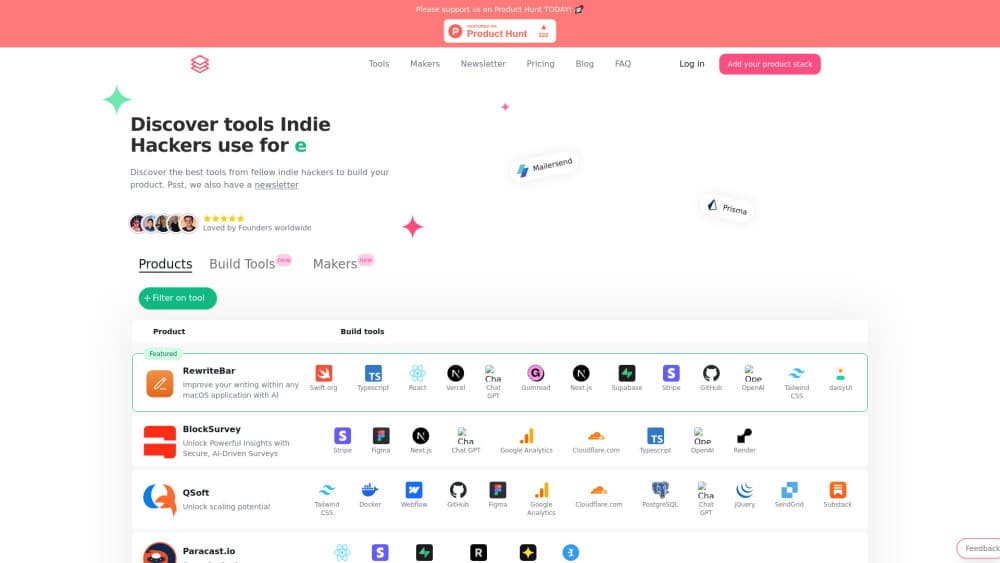
Indie Hacker Stacks is a tech stack directory built for people who ship products alone or with a tiny team. Each listed product comes with a stack card: hosting, front end, back end, database, payments, email, analytics. Scroll one product page and you see the whole build in a single glance, no guesswork and no Wappalyzer scan.
The problem it solves is a common one. Most indie hacker tech stack advice runs on opinion. You can read a hundred threads about whether to pick Vercel or Render, Stripe or Lemon Squeezy, and still have no idea what working products do. Here the answer comes from shipped products. React shows up on more than 2,600 listings, Tailwind CSS on more than 2,700, and Stripe on more than 1,600 as of this writing.
The limit is depth. Entries are self-reported by makers, so a stack card tells you what someone chose, not how well it worked out. Revenue, traffic, and post-launch regrets stay off the page. Treat the data as a signal about adoption, not proof of quality.
Getting Started
- Open indiehackerstacks.com and browse the homepage feed or the Tools tab without signing in.
- Filter by tool or category to see which products share a piece of your planned stack.
- Create an account and submit your own product with its tool list to claim a free listing.
- Pick a plan if you want unlimited products or a featured slot, then keep the stack card updated as your build changes.
Product Information
A quick look at Indie Hacker Stacks's pricing, supported platforms, and performance.
Best for
The users, tasks, and scenarios where this tool fits best.
Users
- Solo founders and indie hackers
- Developers new to shipping a paid product
- SEO and growth freelancers
Tasks
- Choosing hosting and payments for a first launch
- Researching a competitor's build
- Promoting a new product
Scenarios
- Early planning on a side project
- Validating a tool choice before migration
- Building domain authority for a young site
Key features
Stack Cards on Every Product Page
Each entry pairs a short product description with the tools it uses, shown as small labeled chips. You can scan ten products in a minute and spot patterns fast, such as how often Next.js and Tailwind CSS appear together.
Usage-Ranked Tool Index
The Tools tab works as a developer tool directory that also counts how many listed products use each option, then sorts by that number. Vercel, Supabase, PostgreSQL, and Stripe sit near the top, while niche picks like Pirsch or Kamal show single or low double digit counts. The counts give you a rough popularity read instead of a vendor claim.
Eleven Stack Categories
Tools are grouped into hosting, no-code builders, programming languages, analytics, front-end libraries, back-end frameworks, email services, databases, styling and UI components, payment providers, and a general bucket. Each group lists five names up front with a link to the rest, which keeps the page short enough to skim.
Free Listing With a Dofollow Backlink
The Pro plan costs nothing and covers one product with lifetime placement plus a dofollow link. For a solo project that needs early signals, this is the cheapest part of a launch checklist, and it stays live without a renewal date.
Collections and Private Stacks
Collections group products around a theme, so you can follow a thread like AI video tools or browser-only utilities. Private stacks let you keep a build list out of the public feed until you're ready to show it.
Newsletter and Deals
A newsletter surfaces new listings and tool picks, and a deals section collects discounts from vendors in the directory. Both are optional, and neither is needed to use the core directory.
Pros and cons
Pros
- Free tier is genuinely usable: one product, lifetime placement, and a dofollow backlink at no cost.
- Usage counts come from real listings, so the tool index reflects adoption instead of paid placement.
- Category grouping covers the full build, from hosting to payment providers, in one place.
- Lifetime placement means a listing doesn't expire and doesn't need monthly upkeep.
- Premium pre-sale at $40 for unlimited products is cheap compared with most product launch directory fees.
Cons
- Stack data is self-reported, so anyone who likes to build in public will notice gaps after a rebuild.
- No revenue, traffic, or outcome data sits beside the stack, which limits how much you can learn from a single page.
- Premium is sold as a pre-sale with a limited seat count, so availability depends on when you buy.
- Some features are still marked coming soon, which means the roadmap can shift under you.
Frequently asked questions
It's a directory where indie makers list their products and the tools used to build them, plus a tool index that ranks options by how many listed products use each one.
Related content
Explore related tools, skills, and articles for Indie Hacker Stacks.
Indie Hacker Stacks Alternatives

Base Code
Base44 (Wix) · Coding · ProductivityBase Code is a shared cloud development environment from Base44. Teammates describe changes to an existing GitHub codebase in chat, preview them live and send them back as pull requests.

Knocket
Knocket (Tencent RTC team) · Productivity · Business · ChatbotKnocket is a free live chat and contact page tool that lets visitors message you from your website, app, or a shareable link, with every reply handled from Telegram or one inbox.

FloorGen
Vinit Kumar (FloorGen) · Productivity · China AIFloorGen is a browser-based floor plan maker that turns a sentence or a sketch into an editable 2D plan and a 3D walkthrough. Export to PDF, DXF or video, and draw without an account.