

Intellectra
Intellectra · Leaning
Intellectra is an all-in-one platform where coaches, creators, and experts host courses, sell digital products, and run a community, with an AI tutor called LectraBrain built in.
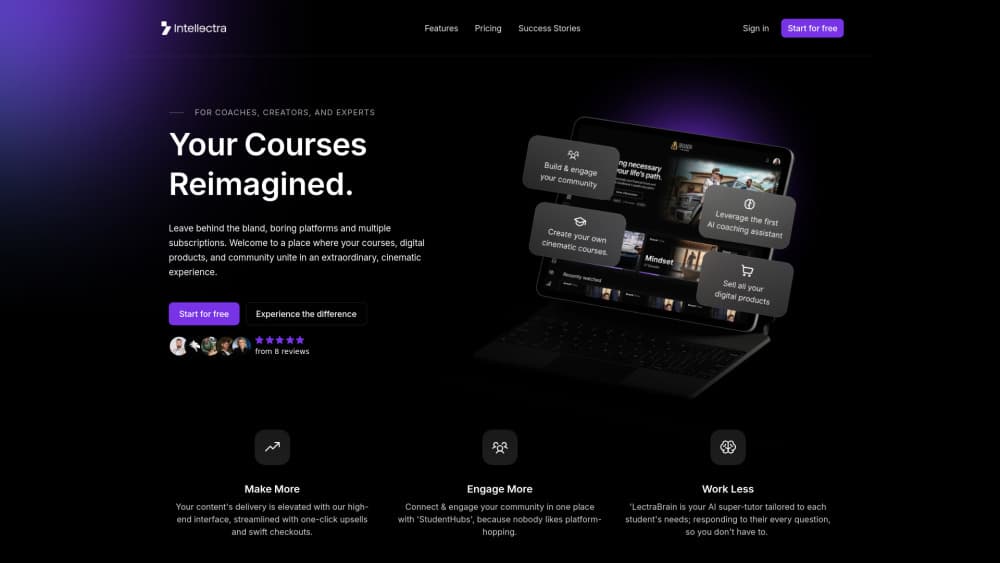
About Intellectra
What Is Intellectra
Intellectra is an AI course platform and community platform aimed at coaches, creators, and experts who want to sell knowledge instead of stitching together several subscriptions. It bundles course hosting, digital product sales, and a member community into one product with a streaming-style interface.
The pitch is consolidation. Instead of paying for a course builder, a community app, and an email tool separately, a creator runs everything from one dashboard and one brand. The AI Tutor called LectraBrain answers student questions inside lessons, which cuts down on repetitive support work.
The limits are worth knowing up front. The free entry point and the core tier are built for solo creators and small audiences, so very large teams or enterprises that need granular permissions may outgrow it. Pricing is also creator-oriented rather than per-seat, which is a good fit for one brand but not always for agencies handling many clients.
Getting Started
- Create an account at intellectra.io and pick the free plan or the paid LectraCore tier.
- Upload course videos and digital products, then organize them into modules and lessons.
- Turn on LectraBrain for a lesson by pasting the lesson script so the AI tutor answers in line with the content.
- Customize branding, set up a StudentHubs community space, and connect a custom domain.
- Publish the offer and turn on payments, upsells, and email campaigns to start selling.
Product Information
A quick look at Intellectra's pricing, supported platforms, and performance.
Best for
The users, tasks, and scenarios where this tool fits best.
Users
- Coaches and course creators
- Experts selling digital products
- Community-led creators
Tasks
- Hosting an online course
- Answering student questions
- Selling and upselling offers
Scenarios
- Launching a first paid course
- Moving off scattered tools
- Running a livestream or cohort
Key features
LectraBrain AI tutor
LectraBrain is an AI assistant that answers student questions inside a lesson. The creator pastes the lesson script into the builder, and the tutor responds based on that material, so answers stay tied to the actual course. It can be given a name, an avatar, and behavior rules such as which topics to avoid.
StudentHubs community
StudentHubs is the built-in community layer where members post, message, and join events. Because it lives inside the same platform as the courses, students don't bounce to Discord, Telegram, or a Facebook group, and the creator keeps engagement and data in one place.
Cinematic course builder
Lessons live in a streaming-style interface rather than a plain, templated page. The builder supports modules, drip content that unlocks over time, and certificates on completion, which helps a paid course feel more finished than a standard page of embedded videos.
Monetization and upsells
The platform adds one-click upsells, internal offers, and bundles so buyers see related products at checkout. Customers can also become affiliates through Master Resell Rights, letting a creator turn buyers into promoters for an assigned cut of sales.
Custom branding and domain
Creators set logos, colors, and content covers, then connect a custom domain so the whole experience carries their own name. That matters for anyone whose course is the front door to their brand rather than a page on someone else's site.
Livestreams and email campaigns
Livestreams and built-in email campaigns cover the launch and retention side. The paid tier includes unlimited emails and up to 1,000 users, then adds cost per extra 1,000 users, so a creator can run announcements and follow-ups without a separate email tool.
Mobile app
Intellectra offers companion apps on the App Store and Google Play, so students open courses, communities, and live sessions from a phone. For audiences that learn on mobile, that removes a desktop-only barrier.
Pros and cons
Pros
- Consolidates course hosting, community, and email into one subscription instead of three.
- LectraBrain answers lesson-level questions, which reduces repetitive student support.
- Free plan and a 30-minute setup lower the cost of testing before paying.
- One-click upsells, bundles, and affiliate resell rights push revenue beyond the first sale.
- Custom branding, custom domain, and mobile apps keep the experience under the creator's own name.
Cons
- No published third-party API, so it can't be wired into an existing custom stack.
- The core tier caps users at 1,000 before extra fees apply, which bites as an audience grows.
- It's built for solo creators and small teams, so large organizations with complex permissions may need something else.
- The premium done-for-you services are high-ticket and aimed at established creators, not beginners.
Frequently asked questions
Intellectra is an all-in-one platform for coaches, creators, and experts to host courses, sell digital products, and run a community, with a built-in AI tutor called LectraBrain.
Related content
Explore related tools, skills, and articles for Intellectra.
Intellectra Alternatives

HireKey
HireKey · Voice & Language · Productivity · LeaningHireKey is an AI job search copilot built by a former tech recruiter. It checks role fit, tailors resumes, runs interview practice and tracks every application.

Lune
Retrograde Labs · Productivity · LeaningLune is a research search engine for scientific AI agents. It runs as an MCP server that lets Claude, ChatGPT and Cursor search peer-reviewed computer science papers and cite them.
Coddy
Coddy · Coding · LeaningCoddy is a gamified platform to learn to code through short interactive lessons in 20+ languages, with a browser editor, an AI tutor and free certificates.