

Jitera
Jitera · Productivity
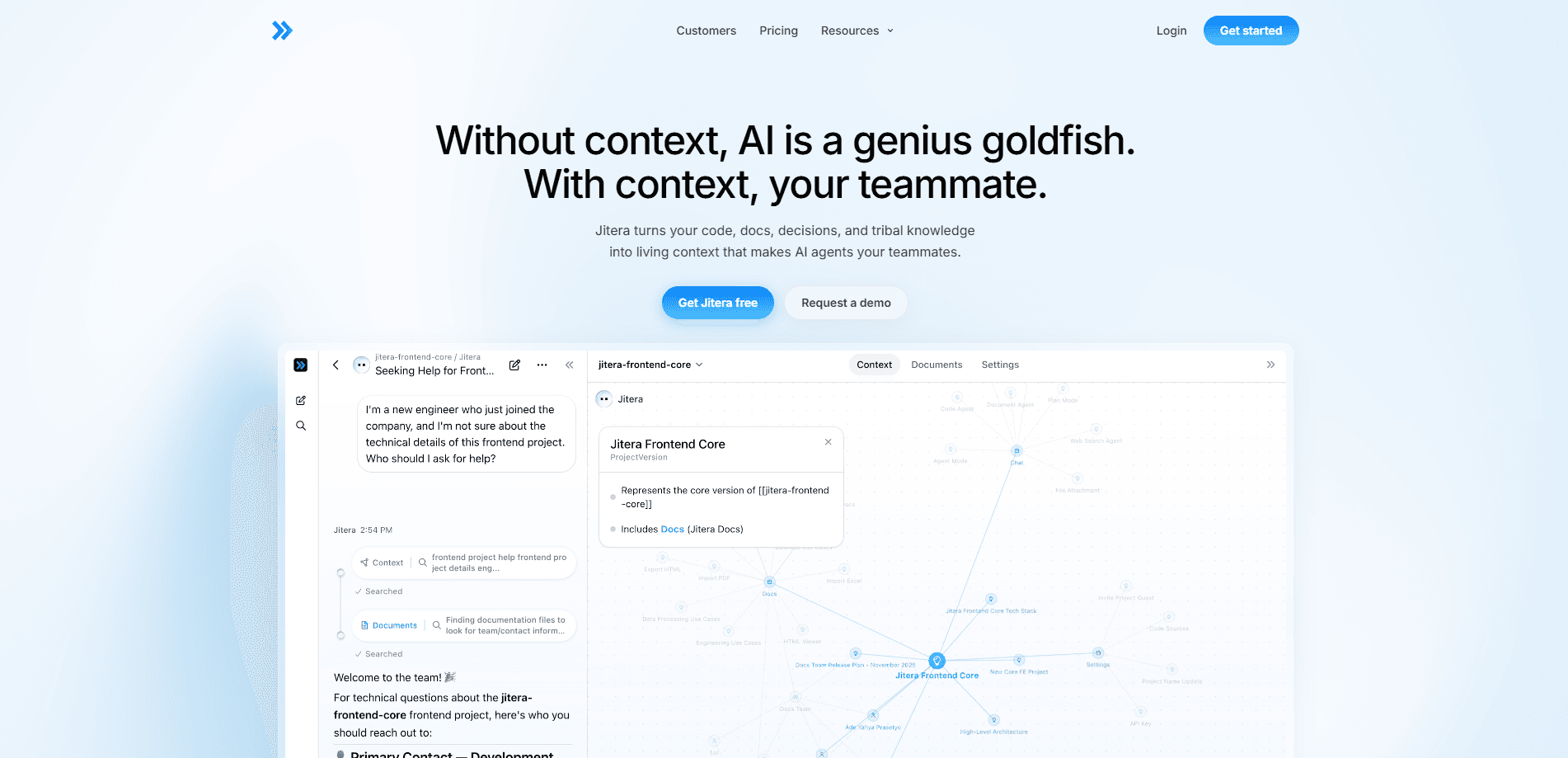
Jitera is an AI workspace and context platform that turns a team's code, docs, decisions, and tribal knowledge into shared "living context." Instead of pasting background into a chat window every time, you let customizable AI agents read from that context map, remember what your team decided, and automate parts of the software workflow with less guesswork. It targets product and engineering teams who want AI agents for software development that actually know their project, because an agent with no history of your codebase and prior decisions tends to produce confident, generic output that your team then has to correct by hand. Think of it as a team knowledge base that AI can read, not just search. That's the pitch.
About Jitera
What Is Jitera
Jitera is a workspace built around one idea: AI agents are only as useful as the context they can see. The platform collects your organization's memory in one place and maps how teams, projects, and decisions connect to each other. Agents work from that map top to bottom, so a task like "update the onboarding flow" comes with the relevant history attached instead of a blank slate.
That context layer is the difference between a generic chatbot and a teammate. When your agents know why a decision was made six months ago, they stop re-litigating it. The trade-off is real. Context only helps if your team keeps it current. Feed in stale docs and half-finished specs, and the agents inherit the same confusion your new hires get.
You also import your existing material rather than starting from scratch. Jitera pulls in PDFs, Word files, Excel sheets, HTML pages, and more straight into the workspace, so agents stay in sync with the files your team already works with. Nothing is magic here. It's a well-organized memory layer with AI on top, and it rewards teams willing to maintain it. That's it. Treat it like an AI coding workspace with a memory attached.
Getting Started
- Create your workspace at jitera.com and invite teammates.
- Import your existing docs (PDFs, Word, Excel, HTML) so the workspace has real material to work with.
- Build the context map by linking teams, projects, and decisions so agents can trace how work connects.
- Configure your AI agents with the tasks and permissions that fit your workflow.
- Run a small task end to end, check the output against what your team expected, then widen the scope.
Product Information
A quick look at Jitera's pricing, supported platforms, and performance.
Best for
The users, tasks, and scenarios where this tool fits best.
Users
- Product and engineering teams
- Team leads and project managers
- New hires
Tasks
- Onboarding an agent to a codebase or product
- Updating a feature with history attached
- Drafting specs and internal docs
- Answering repetitive "how does this work" questions
Scenarios
- A team juggling many ongoing projects where nobody remembers why an old decision was made.
- A growing company where tribal knowledge lives in people's heads.
- Scattered documentation spread across PDFs, spreadsheets, and wikis that agents can't see.
- Kicking off a new project that reuses patterns from previous ones.
Key features
Context Map
The context map is a visual view of how your teams, projects, and decisions connect. Agents read it from top to bottom, which means a task starts with the surrounding history already in hand. For your team, it doubles as a shared picture of what the organization actually knows. That picture is the whole point.
Document Import and Sync
Jitera imports your existing files, including PDFs, Word documents, Excel sheets, and HTML pages, directly into the workspace. Your agents work from the latest version of each file rather than a stale snapshot. That matters when a spec changes mid-sprint and you don't want agents building against the old one. Rebuilding a knowledge base by hand is a chore. Jitera skips it.
Customizable AI Agents
You set up agents around the tasks your team actually runs, not a fixed menu. Each agent draws on the shared context, so two colleagues asking similar questions get consistent answers. The flexibility is the point, and it's also the work: someone has to configure agents well for the payoff to show. That takes time. A badly configured agent is just a fast wrong answer.
Shared Team Memory
The workspace holds decisions as first-class entries rather than burying them in a thread. When someone asks why a feature works a certain way, the answer is in the context, not in a departed colleague's memory. This is the feature that most directly targets "tribal knowledge" loss. People leave. Context shouldn't.
Workflow Automation
Agents automate parts of the software workflow, from documentation to repetitive updates, using the context they've been given. The goal is less re-explaining and fewer generic, off-target outputs. It won't replace your review process, but it cuts the busywork around it. You still approve the work. That last part matters.
Pros and cons
Pros
- Puts code, docs, and decisions into one shared context that agents and people both read.
- Document import means you don't rebuild your knowledge base from zero.
- Customizable agents fit different team tasks instead of forcing one workflow.
- The context map makes organizational knowledge visible, which helps new hires and leads alike.
Cons
- Value depends on upkeep. Stale or incomplete docs weaken every agent that draws on them.
- Pricing details are hard to pin down from public sources, so you'll want to confirm current plans before committing.
- A single user gets far less from it than a team, which limits it for solo developers.
Frequently asked questions
Jitera is an AI workspace that gathers your team's code, docs, and decisions into shared context, then lets AI agents use that context to help with software tasks. In short, it gives agents the background they'd otherwise be guessing at. Why does that matter? Because most AI tooling fails on project-specific work, not on generic prompts.
Related content
Explore related tools, skills, and articles for Jitera.
Jitera Alternatives

Base Code
Base44 (Wix) · Coding · ProductivityBase Code is a shared cloud development environment from Base44. Teammates describe changes to an existing GitHub codebase in chat, preview them live and send them back as pull requests.

Knocket
Knocket (Tencent RTC team) · Productivity · Business · ChatbotKnocket is a free live chat and contact page tool that lets visitors message you from your website, app, or a shareable link, with every reply handled from Telegram or one inbox.

FloorGen
Vinit Kumar (FloorGen) · Productivity · China AIFloorGen is a browser-based floor plan maker that turns a sentence or a sketch into an editable 2D plan and a 3D walkthrough. Export to PDF, DXF or video, and draw without an account.