
Jobfy
Jobfy · Productivity · AI Assistant
Jobfy is an AI resume builder that reshapes your resume for each posting, keeps the layout readable for ATS software, and tracks applications in one place.
About Jobfy
What Is Jobfy
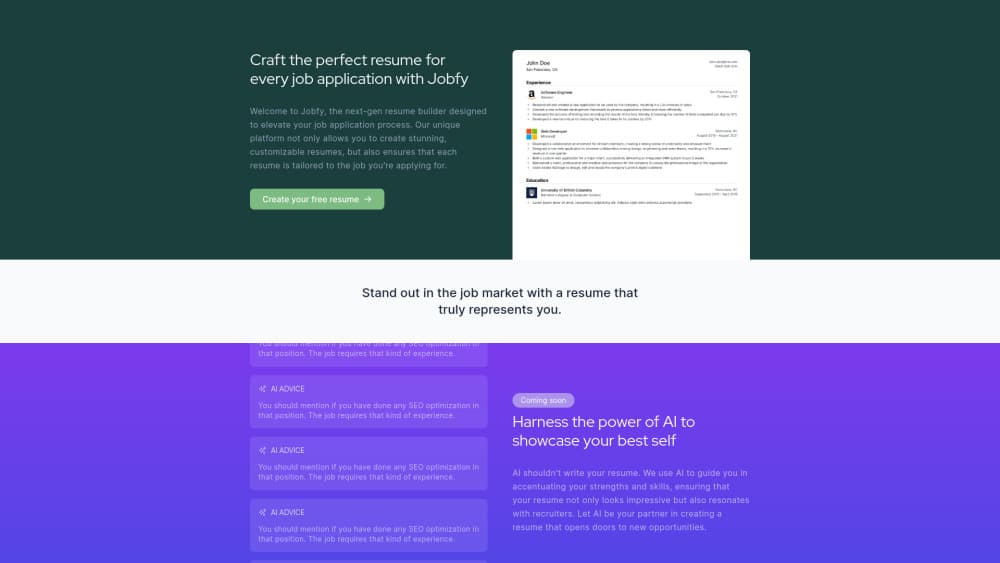
Jobfy is a browser based resume builder aimed at people who send a different application every week. The site bills itself as a next-gen resume builder, and the core claim is narrow: rather than one master CV sent everywhere, you get a resume adjusted to the job you're applying for.
The product addresses a real bottleneck. Recruiters scan a page in seconds, and applicant tracking systems read it before they do. A resume that looks fine in a design tool can fall apart once a parser strips the columns and reads the text out of order. Jobfy handles both ends by keeping the structure parseable and by pointing out where your wording misses what the posting asks for.
Two limits matter before you commit. The site marks parts of its AI assistance as coming soon, so some guidance isn't live yet. And the company doesn't publish plan pricing on the public pages, which makes budgeting harder than it should be.
Getting Started
- Open jobfy.io and start a free resume, or pick a template from the library.
- Fill in the standard sections: contact details, experience, education, and skills.
- Add the job you're targeting so the builder can compare your text against it.
- Read the AI advice on your bullet points and rewrite the weak ones in your own words.
- Export the finished file, then log the application in the job application tracker.
Product Information
A quick look at Jobfy's pricing, supported platforms, and performance.
Best for
The users, tasks, and scenarios where this tool fits best.
Users
- First time job seekers
- Career switchers
- Design minded applicants
Tasks
- Tailoring one resume to one posting
- Fixing a resume that keeps getting filtered
- Building a page from scratch
- Keeping a search organized
Scenarios
- A week of applications before a deadline
- Coming back to the market after a long gap
- Applying to a creative role that screens digitally
Key features
Job Specific Resume Tailoring
The builder compares your draft to the posting you're targeting and points out where the wording drifts from what the employer asked for. You decide what to change. That keeps the final text in your voice instead of producing a page that reads like it was assembled from a keyword list.
AI Advice Instead of AI Writing
Jobfy takes an unusual position for a resume product: the AI doesn't write the resume. It reads a section and suggests what to add, in the way an editor would flag a missing detail. The examples on the site show short prompts, such as reminding you to mention relevant experience the posting expects. You still do the writing.
ATS Friendly Resume Structure
Every layout keeps standard section headings, selectable text, and a reading order that survives parsing. That matters because most large employers filter with applicant tracking software first. A resume that parses cleanly gets scored on content rather than rejected on formatting.
Resume Templates and Full Customization
The library covers ready made layouts you can fill in and adjust, and the editor goes further than most: you can tweak the design with HTML and CSS or start from a blank page. Resume customization at that level is rare in this category, and it's the feature that separates Jobfy from drag and drop builders.
Job Application Tracker
Applications pile up fast, and the details blur by the second week. The tracker keeps each submission in one list with the role, the company, and where it stands. It's a simple addition, but it removes the spreadsheet most people build by hand after ten applications.
Free Resume Builder
You can create and export a resume without paying, which lets you test the tailoring workflow on a real posting before deciding whether the paid tier is worth it. The site doesn't ask for card details to start.
Pros and cons
Pros
- Tailoring is built into the workflow, so each application gets its own tailored resume without a manual rewrite.
- The ATS friendly resume structure is the default, not an optional export mode you have to find.
- HTML and CSS access gives you control over spacing and type that template menus don't offer.
- The AI advice model keeps you as the author, which makes the final resume easier to defend in an interview.
- A free tier and a built in job application tracker cover the whole loop from draft to follow up.
Cons
- The site labels several AI features as coming soon, so the guidance you read about isn't fully available yet.
- No pricing is published on the public pages, which leaves you guessing until you reach the payment step.
- Editing with HTML and CSS assumes you know what you're doing, and a broken style can wreck the layout an ATS needs.
- There's no documented mobile app, so everything runs in a browser tab.
Frequently asked questions
You can create a resume for free, and the site doesn't ask for a card to start. The company hasn't published what the paid tier includes or what it costs, so treat the free tier as the part you can plan around today.
Related content
Explore related tools, skills, and articles for Jobfy.
Jobfy Alternatives

Base Code
Base44 (Wix) · Coding · ProductivityBase Code is a shared cloud development environment from Base44. Teammates describe changes to an existing GitHub codebase in chat, preview them live and send them back as pull requests.

Knocket
Knocket (Tencent RTC team) · Productivity · Business · ChatbotKnocket is a free live chat and contact page tool that lets visitors message you from your website, app, or a shareable link, with every reply handled from Telegram or one inbox.

FloorGen
Vinit Kumar (FloorGen) · Productivity · China AIFloorGen is a browser-based floor plan maker that turns a sentence or a sketch into an editable 2D plan and a 3D walkthrough. Export to PDF, DXF or video, and draw without an account.