

jpgHi
jpgHi · Image
jpgHi is a browser AI image upscaler that enlarges photos, anime art, and product shots up to 16x on cloud GPUs. It charges by tokens, with 5 free tokens per month and packs from $6.
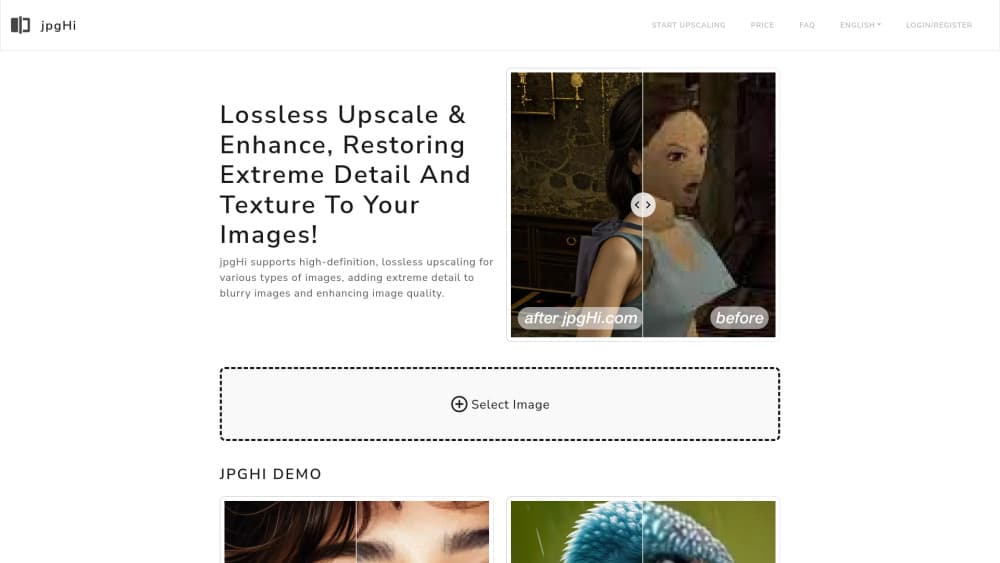
About jpgHi
What Is jpgHi
jpgHi is a web app for one job: taking an image that's too small, soft, or pixelated and giving back a larger version with believable detail. You upload a file, tell it whether the picture is a photo or artwork, pick a scale from 2x to 16x, and let a cloud GPU do the work. No install, no editor timeline, no layers. The AI upscaling runs on a cloud GPU, so the work happens off your machine.
It solves the problem that comes up after the camera or the screenshot: a 500px product photo that has to fill a detail page, a phone shot of a poster that has to go to print, a scan of a family photo that's been copied down through messaging apps. Stretching those images in a normal editor makes them soft or blocky. Image upscaling with a trained model does something different: jpgHi predicts the texture and edges a larger version would have and draws them in.
The limit is the honest one for this category. Every extra step of scale means more guessed detail, and the site says so itself: higher factors can add detail that wasn't in the original. On people, that shows up as pores and hair strands that look right at a glance and slightly synthetic up close. On flat artwork, the artwork model holds up better. Sharp black outlines and fine hatching can still drift.
Getting Started
- Open jpghi.com in a browser. The interface is also available in Chinese, Japanese, Spanish, Portuguese, French, German, Korean, Russian, and several other languages.
- Create a free account so tasks and tokens attach to something. Registration needs an email address.
- Select an image. The uploader rejects files over 30MB and images with a side longer than 8,000px.
- Choose the image type, Photo or Artwork, then drag the scale slider to 2x, 4x, 6x, and up to 16x. The button shows the output size and the token cost before you start.
- Adjust Creativity, Image Similarity, HDR, and Sharpness if the defaults look off. There's also an optional prompt box for hints about what the image should contain.
- Start the job and wait. The task list keeps your jobs for three days, and finished files are ready to download from there.
Product Information
A quick look at jpgHi's pricing, supported platforms, and performance.
Best for
The users, tasks, and scenarios where this tool fits best.
Users
- Online sellers with weak product photos
- Anime and illustration fans
- People restoring family photos
Tasks
- Making a small image big enough to print
- Cleaning up a compressed screenshot
- Preparing artwork for a store listing
- Testing whether an old photo is worth saving
Scenarios
- A marketplace listing due tomorrow and only a low-res photo on hand
- Sorting a folder of scanned family photos on a Sunday
- Prepping a poster or a print run from a client's low-res asset
Key features
Separate Photo and Artwork Models
Photo mode works as a photo upscaler for skin, hair, foliage, and fabric, the textures where a plain resize falls apart. Artwork mode handles flat color, clean outlines, and cel shading, so anime frames and vector-style illustrations keep their shape. Picking the wrong one is the most common reason a result looks off, and it's a one-click fix before you start.
Scale from 2x to 16x in Steps of 2
The slider runs in even steps: 2x, 4x, 6x, 8x, 10x, 12x, 14x, 16x. The output dimensions and the token cost update as you move it, so the trade between size and spend is visible before you commit. A 2x pass on a clean source often beats a 16x upscale of a soft one.
Four Detail Sliders and an Optional Prompt
Creativity controls how much new detail the model is willing to invent, and Image Similarity pulls the result back toward the original. HDR and Sharpness adjust contrast and edge definition after upscaling. The prompt field takes a short description of the picture, which helps on unusual subjects where the model would otherwise guess wrong.
Cloud GPU Processing, No Hardware Needed
The AI upscaling runs on the site's servers, so a laptop with integrated graphics handles the same jobs as a workstation. Nothing installs, and the browser tab can close while the job continues. That also means your upload speed and the queue matter more than your own machine.
Token Pricing With a Free Monthly Allowance
Every job costs tokens based on image type, scale factor, and pixel count, and the cost is shown on the start button. The free tier gives 5 tokens per month with slow processing and a watermark. Paid packs run from 180 tokens for $6 up to 1,200 tokens for $30, valid for one month to twelve months.
Failed Jobs Return Their Tokens
If a task fails, deleting it puts the tokens back in your balance. Deleting a job that's still processing doesn't, which is worth knowing before you clear the queue in a hurry. The task list shows the last three days of activity with the settings used for each job.
Pros and cons
Pros
- Output goes up to 16x, which is more headroom than most online upscalers offer, and the site shows the finished pixel dimensions before you spend tokens.
- The artwork model is a real second path, not a filter, so anime frames and illustrations come back with clean lines instead of the smeared look photo models give them.
- Token packs don't auto-renew, and the 500 and 1,200 packs stay valid for six and twelve months, so light users aren't paying a monthly subscription.
- Images are deleted right after processing, and failed jobs refund their tokens when you remove them.
Cons
- The free tier is thin: 5 tokens a month, slower queue, and a watermark on every output. It's enough to test one small image, not to finish a project.
- Large jobs are slow. A 16x pass can take 30 to 60 minutes, and there's no email alert mentioned on the site, so you end up checking the tab.
- Token cost rises with both scale and pixel count, which makes budgeting awkward when you're batching several images of different sizes.
- It's web only. No desktop app, no Photoshop plugin, and no documented API, so anything automated has to go through the browser.
Frequently asked questions
It enlarges an image with an AI model and adds detail as it goes, up to 16x the original dimensions. It doesn't generate pictures from text, swap faces, or make video. The prompt box only nudges the upscaler, it doesn't create a new image.
Related content
Explore related tools, skills, and articles for jpgHi.
jpgHi Alternatives

Storytailor®
Storytailor Inc. · Writing · Image · LeaningStorytailor is an AI story generator for kids that turns a drawing or a small idea into a personalized children's book you can read, listen to, and play out together.

X Ray Interpreter
X-ray Interpreter · ImageX Ray Interpreter is a web-based AI radiology tool that turns X-rays, CT scans, MRI, ultrasound, and PET images into plain-language reports. You upload a scan, get a preliminary X-ray interpretation in moments, then ask follow-up questions if something needs explaining. It works as a second opinion and a learning aid, not as a medical diagnosis.

Aieasypic
AIEasyPic · ImageAIEasyPic is an AI image generator that turns plain text prompts into finished artwork in seconds. You can also train custom models on your own photos, swap faces in existing images, and create short video clips from text, all from a browser. It suits casual creators who want quick visuals and hobbyists who want to build a personal model without touching any code.