

KalPal: AI Nutrition Coach
Trodel LLC · AI Assistant
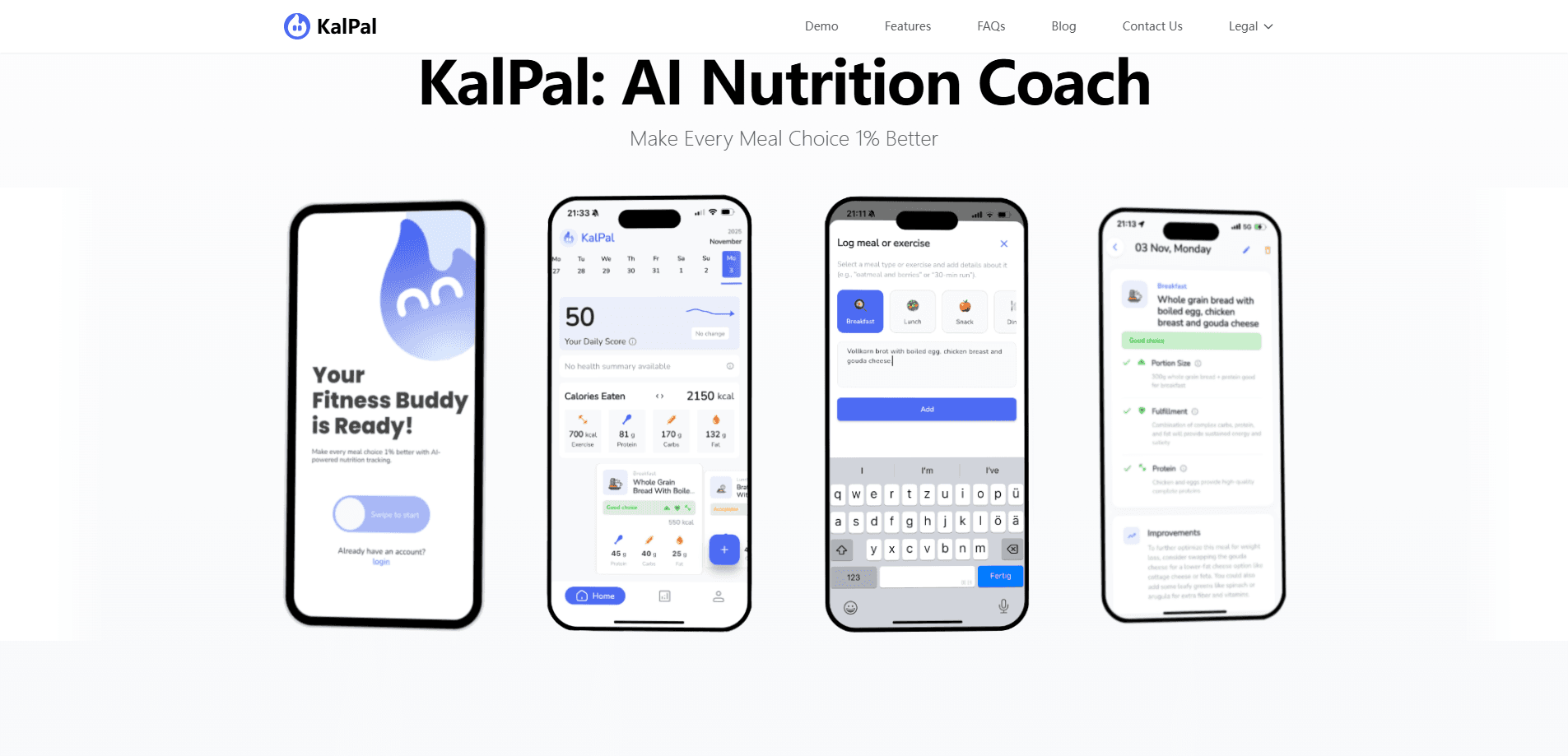
KalPal: AI Nutrition Coach is a nutrition tracking app for iOS and Android built by Trodel LLC. Instead of scanning barcodes or hunting through food databases, you type what you ate in plain language, and the AI breaks the meal into calories, macros, and micronutrients. It pairs that conversational meal logging with a daily 0 to 100 Health Score, activity sync, and gentle meal feedback. So how well does that approach hold up? Better than you might expect, if you value speed over precision.
About KalPal: AI Nutrition Coach
What Is KalPal: AI Nutrition Coach
KalPal is an AI nutrition app that treats logging like a conversation rather than a data-entry chore. You describe a meal the way you'd tell a friend, something like "two eggs, toast, and coffee," and the app returns an instant breakdown of calories, protein, carbs, fat, and micronutrients. No scrolling through lists. No barcode scanner to hunt down.
The core pitch is what the company calls its "1% better" approach. KalPal isn't built around strict calorie counting or a crash diet, so it works more like an AI calorie counter that coaches than a rigid budget you break and abandon. It grades your meals, surfaces a daily Health Score, and nudges you toward small swaps, so the goal is steady improvement across your nutrition tracking rather than perfection you abandon after a week.
The main limitation is that KalPal still needs a subscription to reach its full value. The AI meal analysis, coaching, and insights sit behind a paid plan after a short free trial. And the nutrition estimates are just that. Estimates. The developer points users with medical conditions to a healthcare professional rather than treating the app as clinical advice.
Getting Started
- Download KalPal from the App Store or Google Play, then create an account.
- Set your goal, whether that's losing, maintaining, or gaining weight, so the app can tune its recommendations.
- Log your first meal by typing what you ate in plain language, and review the calorie and macro breakdown the AI returns.
- Connect your activity data so workouts feed into the daily Health Score.
- Check the end-of-day Health Summary to see your totals and what could use more balance tomorrow.
Product Information
A quick look at KalPal: AI Nutrition Coach's pricing, supported platforms, and performance.
Best for
The users, tasks, and scenarios where this tool fits best.
Users
- People who've quit calorie trackers before because logging felt like a part-time job
- Anyone who wants a wellness-focused nudge rather than a strict diet
- Beginners who don't know their macros
Tasks
- Logging a meal in seconds
- Tracking macros without manual math
- Reviewing your day
- Connecting food to activity
Scenarios
- A quick breakfast log on the way out the door
- Eating out and unsure of the numbers
- Building better habits over months
- Maintaining weight after a loss
Key features
Conversational Meal Logging
This is the feature KalPal leads with, and it's the reason the app feels different from a standard calorie tracker. You type what you ate in everyday language, and the AI translates it into calories, macronutrients, and key micronutrients. Nothing to select from a list. No barcode to scan. Logging should take seconds, not minutes, and this is how the app delivers that.
Personalized Health Score (0 to 100)
KalPal gives you a single daily number that reflects how balanced your day was, not just how many calories you consumed. The score weighs nutrition, activity, and overall balance together, so a day with fewer calories but poor variety won't automatically look "best." Why bundle those three things? Because a balanced day matters more than a low number. It pushes you toward improvement over time rather than a perfect score you chase and lose.
Smart Activity Tracking
The app syncs with your workout and activity data and folds it into the picture. You can see how movement complements your meals on one dashboard, which matters if you're trying to understand why your weight moves the way it does. Exercise and nutrition, side by side. Not two separate apps.
Detailed Nutrient Insights
Beyond calories, KalPal breaks meals down into macronutrients like protein, carbs, and fats, plus micronutrients such as vitamins and minerals. Think of it as a macro tracking app that also watches the details most trackers skip. For anyone who's only ever counted calories, this is where the app earns its keep. You start to see that two meals with the same calorie total can look very different in quality.
AI-Powered Meal Grading
KalPal grades your meals and returns short, specific feedback, the kind of nudge that reads like "Great meal, try adding more greens for better balance." The suggestions are small on purpose. One better choice at lunch beats an all-or-nothing overhaul. That's the bet the app makes.
Customizable Goals
Whether you want to lose, maintain, or gain weight, the app adapts its recommendations to your habits and lifestyle. Goals adjust automatically as you go, so you're not fighting a fixed target that stopped matching your routine weeks ago. No extreme diets required. The developer frames this as sustainable progress instead.
Daily Health Summary
At the end of each day, KalPal lays out your calories, carbs, protein, and fiber and flags what needs more balance. It works like a nutrition dashboard you check once, rather than a wall of data you're expected to monitor all day. One screen. Then you move on. Seeing the totals in one place is what makes the next day's choices easier.
Pros and cons
Pros
- Conversational meal logging removes the database search and barcode scanning that make most trackers tedious.
- The 0 to 100 Health Score reframes progress around balance and habits instead of raw calorie counts.
- Macro and micronutrient breakdowns go past calories, so you can see food quality, not just quantity.
- Activity sync connects workouts to nutrition in a single dashboard.
- Available on both iOS and Android, with a 7-day free trial that doesn't ask for a credit card upfront.
Cons
- The AI features that make the app useful sit behind a paid subscription, so the free experience is limited.
- Nutrition estimates are AI-generated approximations, which means they're fine for spotting trends but not precise enough for medical or clinical use.
- There's no public API, so you can't pull KalPal's data into your own tools or dashboards.
Frequently asked questions
KalPal is an AI nutrition coach and calorie tracker that logs your meals from plain-language descriptions and turns them into calorie, macro, and micronutrient data. It adds a daily Health Score, meal grading, and activity tracking to help you improve your eating habits over time.
Related content
Explore related tools, skills, and articles for KalPal: AI Nutrition Coach.
KalPal: AI Nutrition Coach Alternatives

Iplan AI
Iplan AI · Productivity · AI AssistantIplan AI is an AI travel planner that turns a few trip details into a full day-by-day itinerary in seconds. You answer questions about your destination, interests, budget, and travel companions, and the tool builds a plan you can edit, share, and carry with you on any device. It targets travelers who want a solid draft without spending hours in spreadsheets and browser tabs. Think of it as an itinerary generator that does the tedious part for you.

Screenhelp
Screenhelp · Productivity · AI AssistantScreenhelp is an AI screen assistant that turns a single keyboard shortcut into real-time help. You press Ctrl+Shift+Space, it captures what's on your screen, and it streams an answer into a private panel in about two seconds. Think of it as an AI screenshot helper you trigger on demand. It runs on Mac, Windows, and the web, starts free with 30 answers a month, and stays invisible during screen sharing on Zoom, Teams, and Google Meet.

Rainbow
Rainbow · AI AssistantRainbow is an AI weather forecast app built around short-term precipitation nowcasting. Its engine pushes min-by-min rain and snow predictions up to four hours ahead, blending live satellite and radar feeds into hyperlocal forecasts. The app adds live rain radar, a seven-day outlook, precipitation alerts, home-screen widgets, and a hurricane tracker, and it runs on both Android and iOS with a free tier plus paid upgrades.