

Cranberry Apps
Cranberry Apps · Productivity
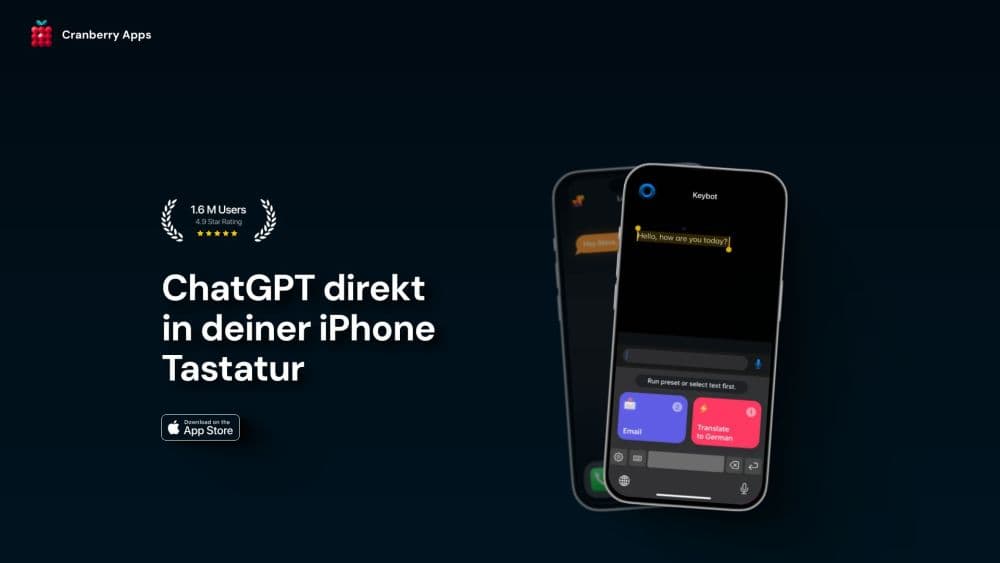
Keybot is an AI keyboard for iPhone and iPad that rewrites, translates, and answers questions inside any app, with presets you can tune to your own voice.
About Cranberry Apps
What Is Keybot
Keybot is an iOS keyboard extension from Cranberry Apps, a Berlin studio that builds small productivity apps. You install it like any other keyboard, switch to it with the globe key, and from then on every text field on your phone has a writing assistant sitting underneath it. There's no separate editor, and no copying text between apps.
The problem it solves is friction. Most AI writing tools assume you'll leave the conversation, paste your draft somewhere else, fix it, and bring it back. Keybot keeps the fix where the writing happens, so a clumsy reply in Messages or a rushed email in Gmail gets rewritten with two taps.
The limits are worth knowing before you pay. Keybot runs on a subscription, so there's no free tier beyond the download itself. It covers iPhone and iPad only, and the AI features need a network connection because the rewriting happens on Cranberry's servers or on OpenAI's, depending on your plan.
Getting Started
- Download Keybot from the App Store and open the app once. It's free to install.
- Go to Settings, then General, then Keyboard, then Keyboards, and add Keybot. Turn on Allow Full Access so the keyboard can reach the AI service.
- Open Keybot and pick a plan. Starter covers everyday rewriting, and Pro adds the heavier models and more requests per month.
- In any app, tap the globe icon until Keybot appears, type your text, then hit the wand to rewrite, shorten, translate, or ask a question.
Product Information
A quick look at Cranberry Apps's pricing, supported platforms, and performance.
Best for
The users, tasks, and scenarios where this tool fits best.
Users
- People who answer work messages from a phone
- Non-native English speakers
- Students and job seekers
Tasks
- Softening a blunt reply
- Cutting a long email into a chat message
- Switching languages mid-conversation
Scenarios
- Coordinating with a client whose language you speak slowly
- Typing one-handed on a commute
Key features
Rewriting Inside Any App
The core trick is that Keybot lives in the keyboard, so it works in Messages, WhatsApp, Gmail, Slack, and anywhere else with a text field. Select what you typed, tap the wand, and choose a rewrite, a shorten, or a grammar pass. Nothing gets copied out and pasted back, which is the part that usually breaks the habit.
Custom Presets You Build Yourself
Keybot ships with presets for common jobs, such as a more formal email or a shorter message, and you can write your own. A preset is a saved instruction, so a support agent can keep one for refund replies and a founder can keep one for investor updates. Custom presets are what turn the AI writing keyboard into something you use daily instead of once.
Questions Without Leaving the Chat
The keyboard includes a chat mode, so you can ask for a fact, a name, or a quick explanation in the middle of a conversation. This is the ChatGPT keyboard behavior most people expect, with the difference that the answer can go straight into the field you're typing in.
Translation and Language Switching
Keybot translates text before you send it, and it keeps the original in view while you decide. That pairing of translation with rewriting is what separates a rephrase keyboard from a plain translator. For anyone working across two languages, this removes the copy, switch app, paste, copy, switch back loop that makes people give up and send the clumsy version.
Bring Your Own OpenAI Key
Buying the API Key Access unlock for $12.99 lets you connect your own OpenAI account, so requests bill to your OpenAI usage instead of a Keybot subscription. It's the cheaper route for heavy users who already pay OpenAI, and it's a one-time purchase rather than a monthly charge.
A Keyboard That Stays Familiar
The layout follows the standard iOS keyboard, which means the adjustment period is short. Autocorrect, emoji, and dictation keep working, and the AI actions sit on a row above the keys instead of replacing them. On iPad the same extension stretches to the larger keyboard, so the experience matches across devices.
Pros and cons
Pros
- Works inside apps that have no AI of their own, including banking apps and older corporate tools.
- Presets cut repeated prompting, which is the main reason people abandon AI writing tools after a week.
- The one-time $12.99 Keybot API key unlock can cost less than a year of subscription for heavy users.
- The standard layout keeps typing speed intact, and switching back to the stock keyboard takes one tap.
Cons
- There's no free plan. You pay before you find out whether the rewrite style suits you.
- Rewritten text leaves your device for processing, so work chats under a confidentiality policy are a poor fit.
- iPhone and iPad only, with no Android or desktop version, which rules out anyone splitting time between phone and laptop.
Frequently asked questions
It puts an AI assistant inside the iOS keyboard. You can rewrite, shorten, fix grammar, translate, or ask a question in any app, and the result lands in the text field you were already using.
Related content
Explore related tools, skills, and articles for Cranberry Apps.
Cranberry Apps Alternatives

Base Code
Base44 (Wix) · Coding · ProductivityBase Code is a shared cloud development environment from Base44. Teammates describe changes to an existing GitHub codebase in chat, preview them live and send them back as pull requests.

Knocket
Knocket (Tencent RTC team) · Productivity · Business · ChatbotKnocket is a free live chat and contact page tool that lets visitors message you from your website, app, or a shareable link, with every reply handled from Telegram or one inbox.

FloorGen
Vinit Kumar (FloorGen) · Productivity · China AIFloorGen is a browser-based floor plan maker that turns a sentence or a sketch into an editable 2D plan and a 3D walkthrough. Export to PDF, DXF or video, and draw without an account.