
KickRender
KickRender · Image
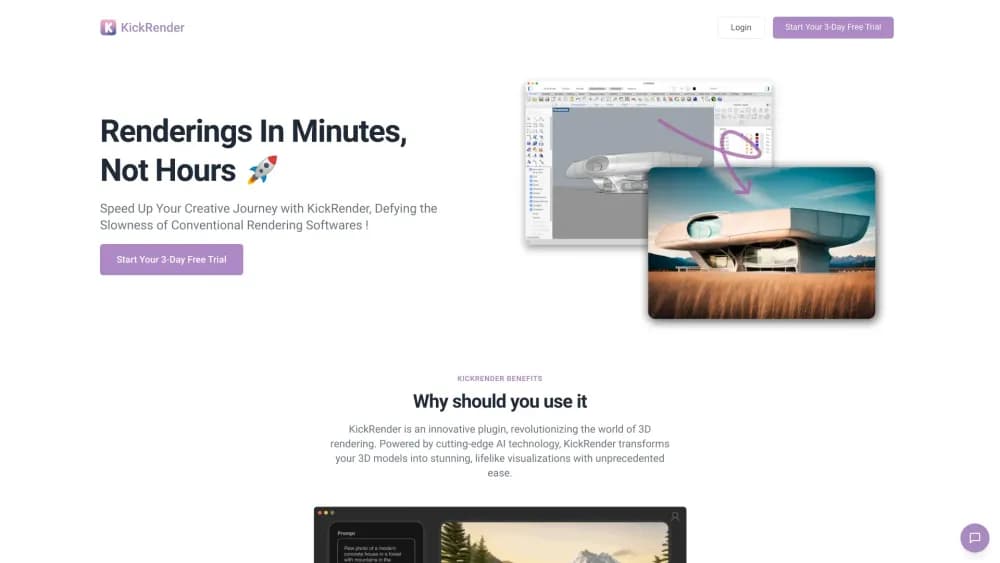
KickRender is a browser-based AI rendering tool that turns uploaded 3D models into photorealistic architectural renders in minutes, with regional prompts and 1K to 4K output.
About KickRender
What Is KickRender
KickRender is AI rendering for architects and interior designers who already have a model and need pictures of it fast. You export your scene as 3DM or FBX, upload a 3D model to render in the browser, and describe the mood you want. The service returns a rendered image in place of a conventional ray-traced pass.
The problem it targets is the gap between a finished model and a presentable image. Traditional architectural rendering software asks for materials, lights, cameras, and render time. KickRender asks for a model and a sentence. For competition boards, client check-ins, and early option studies, that trade is often worth it.
Two limits shape the fit. The output is an interpretation of your geometry, so small details can drift, and you can't hand the file to a contractor as a measured drawing. It's also a cloud service with credit-based pricing, which means a large batch of renders costs real money and needs a connection.
Getting Started
- Open kickrender.com and create an account. There's nothing to install, since everything runs in the browser.
- Export your model from SketchUp, Rhino, Revit, Archicad, or Vectorworks as 3DM or FBX, then upload the file.
- Pick a camera angle, orientation, aspect ratio, and resolution. Add a text prompt for style and lighting, or attach reference images if you have a look in mind.
- Use regional prompting to apply separate instructions to specific objects or areas, such as a different material on one wall.
- Generate, compare variations, then iterate on top of a render you like until the image is ready for a deck.
Product Information
A quick look at KickRender's pricing, supported platforms, and performance.
Best for
The users, tasks, and scenarios where this tool fits best.
Users
- Architects in small studios
- Interior designers
- Competition teams
Tasks
- Turning a SketchUp massing model into a presentable exterior
- Producing interior design visualization for a client meeting
- Testing facade options early
- Upgrading an old render for a proposal
Scenarios
- A design review tomorrow morning
- Pitching to a client who can't read plans
- Exploring a renovation before detailing it
Key features
Regional Prompting
You can attach different prompts to different parts of the image, so one wall gets brick while the floor stays polished concrete. This is the feature that separates KickRender from a single-prompt image generator. It gives you control without rebuilding materials in a modeling app.
Image and Text References
A prompt alone rarely pins down a look. You can supply reference images for atmosphere, style, or lighting and let the model blend them with your geometry. Useful when a client sends a mood board and expects the render to match it.
Browser-Based Workflow
Nothing gets installed and no GPU is required on your machine. Upload a model, render, download. That makes it workable on a laptop in a meeting room, which is where a lot of design decisions actually happen.
3DM and FBX Import
The two formats cover exports from most architectural tools, including SketchUp, Rhino, Revit, Archicad, and Vectorworks. If your SketchUp rendering or Rhino rendering workflow already ends in a 3DM file, you're one upload away. Revit rendering works the same way through an FBX export.
Resolution and Framing Control
Each render can be set to 1K, 2K, or 4K, with a choice of orientation and aspect ratio. A 1K pass is enough for a quick check, while 4K holds up on a printed board or a large screen.
Iterative Generation
You can build a new generation on top of a previous render instead of starting over. Small adjustments accumulate, which is how most design conversations actually move.
Pros and cons
Pros
- Renders arrive in minutes, which changes how often you can afford to test an idea.
- Regional prompting gives object-level control that most text-to-image tools lack.
- The browser workflow removes hardware requirements and install steps.
- Multiple reference images make it easier to match a client's stated direction.
- Pay as you go rendering suits studios with uneven workloads better than a fixed seat license.
Cons
- Output is an AI interpretation, so thin elements and exact dimensions can shift. You can't treat a render as a construction reference.
- Credit costs add up during heavy exploration, and pricing is tied to render volume rather than seats.
- Everything depends on a clean export. Messy geometry or missing materials produce weaker results, and there's no in-app modeling to fix it.
- No public API is documented, so studios that want to automate batches can't plug it into their own pipeline.
Frequently asked questions
It takes a 3D model you upload and generates a photorealistic image of it from a written prompt plus optional reference images. You're not rendering with lights and materials in the traditional sense. You're describing a result and letting the model produce it.
Related content
Explore related tools, skills, and articles for KickRender.
KickRender Alternatives

Google EmbeddingGemma 2
Google DeepMind · Writing · Image · CodingGoogle EmbeddingGemma 2 is a 740M-parameter open model that turns text, code, images, audio, and video frames into vectors in one 768-dimension space, running on phones and laptops.

Tractionwave
TractionWave · Image · MarketingTractionWave is an AI attention heatmap tool for static ads. Upload a PNG or JPG and it returns predicted attention, ranked hotspots, and fixes before you spend budget.

Imejis.io
Imejis.io · Image · MarketingImejis.io is an AI design studio for agents and marketing teams. Describe an image in plain words, and it writes the copy, builds the layout, reflows it to every size, then exports a finished file.