

Kodo
Kodo · Image
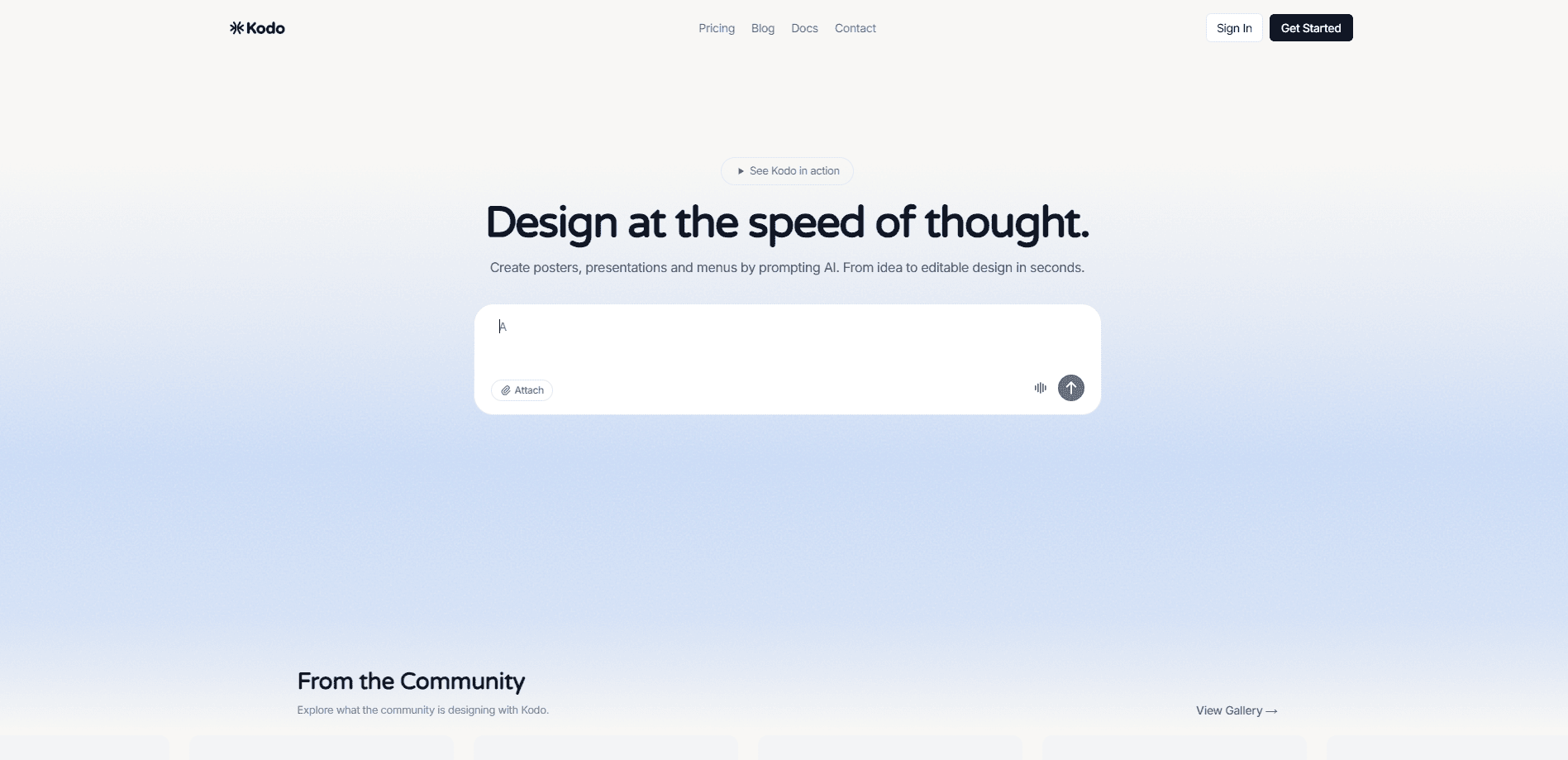
Kodo is an AI design tool that turns a short text description into a finished design you can actually edit. The pitch is simple: text to design, no layers to build from scratch. Instead of handing back a flat image, it acts as an editable design generator, building posters, slides, menus, and social media graphics as layered files where you can move text, swap colors, adjust spacing, and fix a typo without regenerating the whole thing. Think of it as an AI poster maker for people who need decent-looking visuals fast but don't want to learn Photoshop or dig through template libraries.
About Kodo
What Is Kodo
Kodo is a chat-based AI design tool from an independent developer, launched publicly on Product Hunt in March 2026, where it picked up more than 380 upvotes and a third-place finish for the day. It sits in a spot that Midjourney and Canva leave open. Midjourney gives you a gorgeous image you can't touch. Canva gives you a template you have to reshape. Kodo gives you editable design assets, built from scratch for your prompt.
The problem it solves is small but constant. A founder needs a launch graphic. A marketer needs three social covers by Friday. A restaurant owner needs a one-page menu. None of these jobs justify hiring a designer or spending an afternoon in a tool built for professionals. Kodo lets you describe the thing, get a real design file, and nudge it until it's right.
The main limitation is that it's a young product. There's no deep team collaboration, no version history you'd find in Figma, and the free tier caps how much you can generate. It's a fast first-draft machine, not a replacement for a full design suite.
Getting Started
- Go to usekodo.ai and sign in with your email or a connected account.
- Type what you want in plain language, for example "a bold coffee shop poster for a weekend sale."
- Review the generated design and click into any element you want to change.
- Edit text, colors, layout, and spacing directly on the canvas.
- Download the finished design, or keep iterating with follow-up prompts.
Product Information
A quick look at Kodo's pricing, supported platforms, and performance.
Best for
The users, tasks, and scenarios where this tool fits best.
Users
- Solo founders and small teams
- Marketing and social media managers
- Non-designers at small businesses
Tasks
- Turning a rough idea into a polished first draft
- Fixing a single element
- Producing everyday marketing assets
Scenarios
- Last-minute event promotion
- Testing many visual directions quickly
- Content calendars for social media
Key features
Chat-to-Design Generation
This is Kodo's core loop. You type a description in a chat box and it returns a finished layout, no dragging-and-dropping first. A prompt like "minimal tech conference banner, dark background, neon accents" comes back as a composed design rather than a blank canvas. The value is speed. You skip the setup phase and start from something concrete.
Layered, Editable Output
The real difference from most AI image tools is that Kodo's output isn't one flat picture. Text, shapes, images, and background sit on separate layers you can select and change. That means a typo fix is a typo fix, not a full regeneration that might also move the logo you liked. So what does that buy you in practice? Control after the first generation. For anything that needs a second round of edits, this matters more than raw visual quality.
No Template Dependency
Kodo builds each layout from your prompt instead of filling in a stock template. Two prompts for the same kind of poster can come back with different structures, which helps when you're trying to stand out rather than blend into a wall of familiar Canva layouts. It also means your design won't look like everyone else's. It can take a prompt or two to land the style you want.
Multi-Format Design Support
The tool handles more than posters. It generates presentation slides, menus, and social media images, so a single workflow covers the common marketing formats. For a small team, that's one tool instead of three. The catch is that each format benefits from a prompt written for it, so you'll get better results describing "a five-slide product overview" than a vague request.
Prompt-Based Iteration
Once you have a first design, you refine it with follow-up prompts or by hand. Ask for a warmer color palette, a smaller headline, or more breathing room, and Kodo adjusts. This blends the speed of AI generation with the control of a manual editor, which is where most competing tools force you to pick one or the other.
Pros and cons
Pros
- Output is genuinely editable, so small changes don't mean starting over.
- Prompts replace template hunting, which speeds up the first draft.
- Handles posters, slides, menus, and social graphics in one place.
- The free tier is usable for occasional projects and quick tests. No credit card required to try it.
- No design training needed to get something presentable.
Cons
- Heavy daily use runs into generation limits, and the free tier is best for light work.
- It's a young product, so advanced collaboration and version control are limited, which matters if you work in a larger team.
- Getting a specific look can take a few prompt rounds, since there's no template library to fall back on.
- It won't match a professional designer for complex, brand-critical work, so treat it as a fast draft tool rather than a full studio.
Frequently asked questions
Kodo turns a written description into an editable design. You type what you want, and it returns a layered poster, slide, menu, or social graphic that you can then change by hand or with more prompts. This Kodo review covers what it does best, where it falls short, and who should bother.
Related content
Explore related tools, skills, and articles for Kodo.
Kodo Alternatives

Google EmbeddingGemma 2
Google DeepMind · Writing · Image · CodingGoogle EmbeddingGemma 2 is a 740M-parameter open model that turns text, code, images, audio, and video frames into vectors in one 768-dimension space, running on phones and laptops.

Tractionwave
TractionWave · Image · MarketingTractionWave is an AI attention heatmap tool for static ads. Upload a PNG or JPG and it returns predicted attention, ranked hotspots, and fixes before you spend budget.

Imejis.io
Imejis.io · Image · MarketingImejis.io is an AI design studio for agents and marketing teams. Describe an image in plain words, and it writes the copy, builds the layout, reflows it to every size, then exports a finished file.