

Kolors
Kuaishou Technology · Image
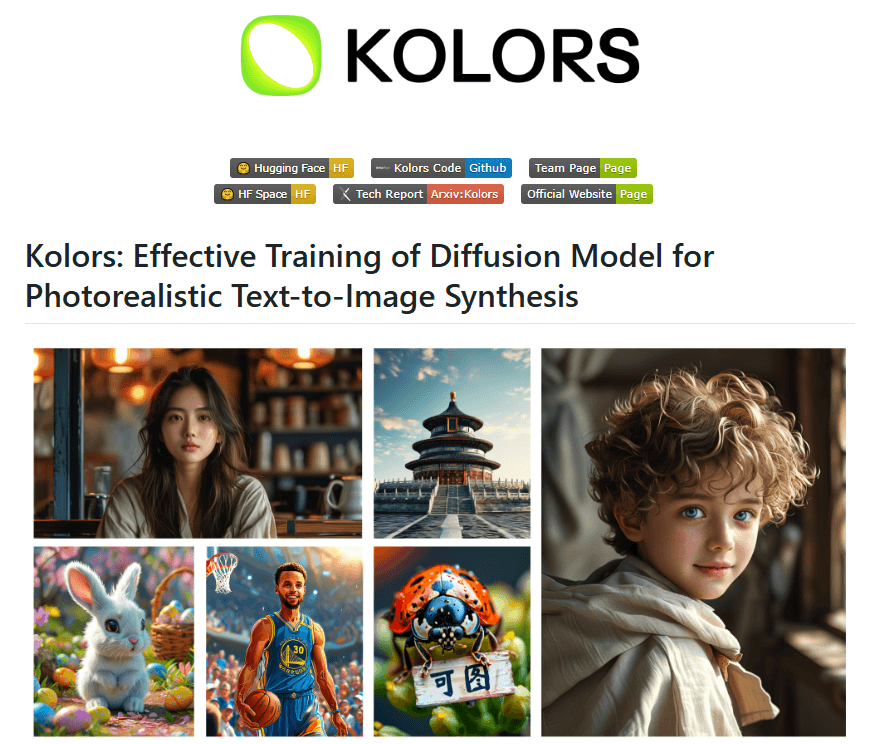
Kolors is Kuaishou's open-source text-to-image model. It reads Chinese and English prompts and can draw both scripts inside the image.
About Kolors
What Is Kolors
Kolors is a large text-to-image generation model from the Kuaishou Kolors team, built on latent diffusion and trained on billions of image-text pairs. As an AI image generator, Kuaishou released it in July 2024 under an open license, and the weights sit on Hugging Face, ModelScope and the official GitHub repo. You can run it on your own hardware, use it inside ComfyUI, or open the free web app at kolors.kuaishou.com and just type a prompt.
The model's standout trait is language. Most image models of its generation wire up an English-only text encoder, so a Chinese prompt comes back garbled or ignored. Kolors instead uses a bilingual language model as its text encoder, with a 256-token context window. That lets it follow long, layered prompts and understand Chinese concepts directly. It was also one of the first open models to draw real Chinese characters, Chinese calligraphy included, rather than English-only lettering.
What holds it back is the same openness that makes it useful. There is no single button that turns Kolors into a polished product. If you want images fast, the web app is fine. If you want control, you build a workflow: pick a checkpoint, add a LoRA or a ControlNet, manage your own GPU. The newest version, Kolors 2.1, has moved further toward a hosted option through Kuaishou's Kling platform and API, but the well-known free version is still the earlier open model.
Getting Started
- For a quick try, open kolors.kuaishou.com, sign in with a phone number or Kuaishou account, and go to AI Creation
- Type your idea in the prompt box, in Chinese or English, then pick a style preset, aspect ratio and how many images you want
- Hit generate and download the results you like, or use Style Customization to upload a photo and restyle it without writing a prompt
- To run it locally, clone the official GitHub repo, pull the weights and the text encoder, then load the model in ComfyUI or a diffusers script
Product Information
A quick look at Kolors's pricing, supported platforms, and performance.
Best for
The users, tasks, and scenarios where this tool fits best.
Users
- Chinese-speaking creators
- Open-source tinkerers
- Graphic and poster designers
- Portrait and illustration artists
Tasks
- Chinese prompt generation
- Text-in-image design
- Style transfer on a photo
- Custom fine-tuning
- Controlled composition
Scenarios
- A poster needs a slogan in Chinese
- A local studio has no cloud budget
- An illustrator wants a consistent character
- A marketer tests a campaign concept
- A developer builds an image feature
Key features
Bilingual Prompt Understanding
Kolors uses a language model as its text encoder instead of an English-only one, so it handles Chinese and English prompts on equal footing. The 256-token window is roughly three times what older encoders allow, which matters when a prompt names multiple subjects, colors and positions. In practice this means a long, specific Chinese description lands closer to what you pictured. The team reports this encoder is where the model pulls ahead on complex prompts.
Chinese Text and Calligraphy Rendering
Drawing correct characters is hard for image models, and Chinese is harder still given the scale of the character set and the stroke detail. Kolors was built to handle it, and it renders Chinese words and even calligraphy inside the scene. English lettering works too, so poster and cover work is in reach without cutting the text in afterward. Complex characters can still fail on a given run, so treat multi-character phrases as a case to reroll rather than a guarantee.
Style Presets and Image Customization
The web app ships with ready-made styles such as Pixar, blind-box cartoon, anime, and high-definition realism, so you land on a look without engineering a prompt. Style Customization takes it further: upload a photo and pick a theme like clay, watercolor or childhood portraiture, and it restyles the image without any prompt at all. That path suits people who want a result, not a workflow.
Open Weights and Local Inference
The model weights are open, so you can download them and run everything offline. The base model is comparatively small, but the text encoder adds real weight, so plan on more disk than a plain Stable Diffusion setup. On ComfyUI, 8GB of VRAM is a workable floor and 12GB or more is comfortable, with quantized text encoders for smaller cards. Running local means no per-image cost and no content sent to a server.
ControlNet, LoRA and IP-Adapter Support
The team released the pieces that make a diffusion model controllable: ControlNet for canny, depth and pose, an inpainting model, IP-Adapter for image prompting, IP-Adapter-FaceID for identity, and Dreambooth-LoRA training code. Together they turn Kolors from a prompt box into a tool you can steer. If you have used these add-ons on Stable Diffusion, the workflow will feel familiar.
Fits Your Existing Toolchain
Kolors plugs into ComfyUI, Gradio and the diffusers library, so it slots into setups people already run rather than asking for a new one. It is on both Hugging Face and ModelScope, which helps if your network favors one over the other. For teams shipping a product, the Kling API exposes Kolors 2.1 as a hosted call, which trades the local setup for a per-run price.
Pros and cons
Pros
- Reads Chinese prompts directly, so Chinese-speaking users skip the translate-and-hope step
- Draws readable Chinese and English text inside an image, which covers poster and signage work
- Open weights let you run it locally with no per-image fee and no data leaving your machine
- Mature support for ControlNet, LoRA, IP-Adapter and inpainting, so you can steer results
- Free web app gives a no-setup way to try it before committing hardware
Cons
- No single polished product: the local route means picking checkpoints, add-ons and managing a GPU
- The bundled text encoder makes local installs heavier than a plain Stable Diffusion setup, so weaker cards need quantized models
- Complex multi-character phrases can still come out wrong and need multiple reruns
- Version split creates confusion, since the widely used free model and the newer Kolors 2.1 hosted API are different paths
Frequently asked questions
Yes, on two levels. The web app at kolors.kuaishou.com is free to use with an account, and the model weights are open, so you can run it locally without paying per image. The newer Kolors 2.1 through the Kling API is priced per run, and you'll need to check current rates.
Related content
Explore related tools, skills, and articles for Kolors.
Kolors Alternatives

Google EmbeddingGemma 2
Google DeepMind · Writing · Image · CodingGoogle EmbeddingGemma 2 is a 740M-parameter open model that turns text, code, images, audio, and video frames into vectors in one 768-dimension space, running on phones and laptops.

Tractionwave
TractionWave · Image · MarketingTractionWave is an AI attention heatmap tool for static ads. Upload a PNG or JPG and it returns predicted attention, ranked hotspots, and fixes before you spend budget.

Imejis.io
Imejis.io · Image · MarketingImejis.io is an AI design studio for agents and marketing teams. Describe an image in plain words, and it writes the copy, builds the layout, reflows it to every size, then exports a finished file.