
Kolors Virtual Try On
Kuaishou (Kolors team) · Image
Kolors Virtual Try On is a free AI virtual try-on tool that places any garment you upload onto a photo of a real person, so you can preview outfits without a fitting room.
About Kolors Virtual Try On
What Is Kolors Virtual Try On
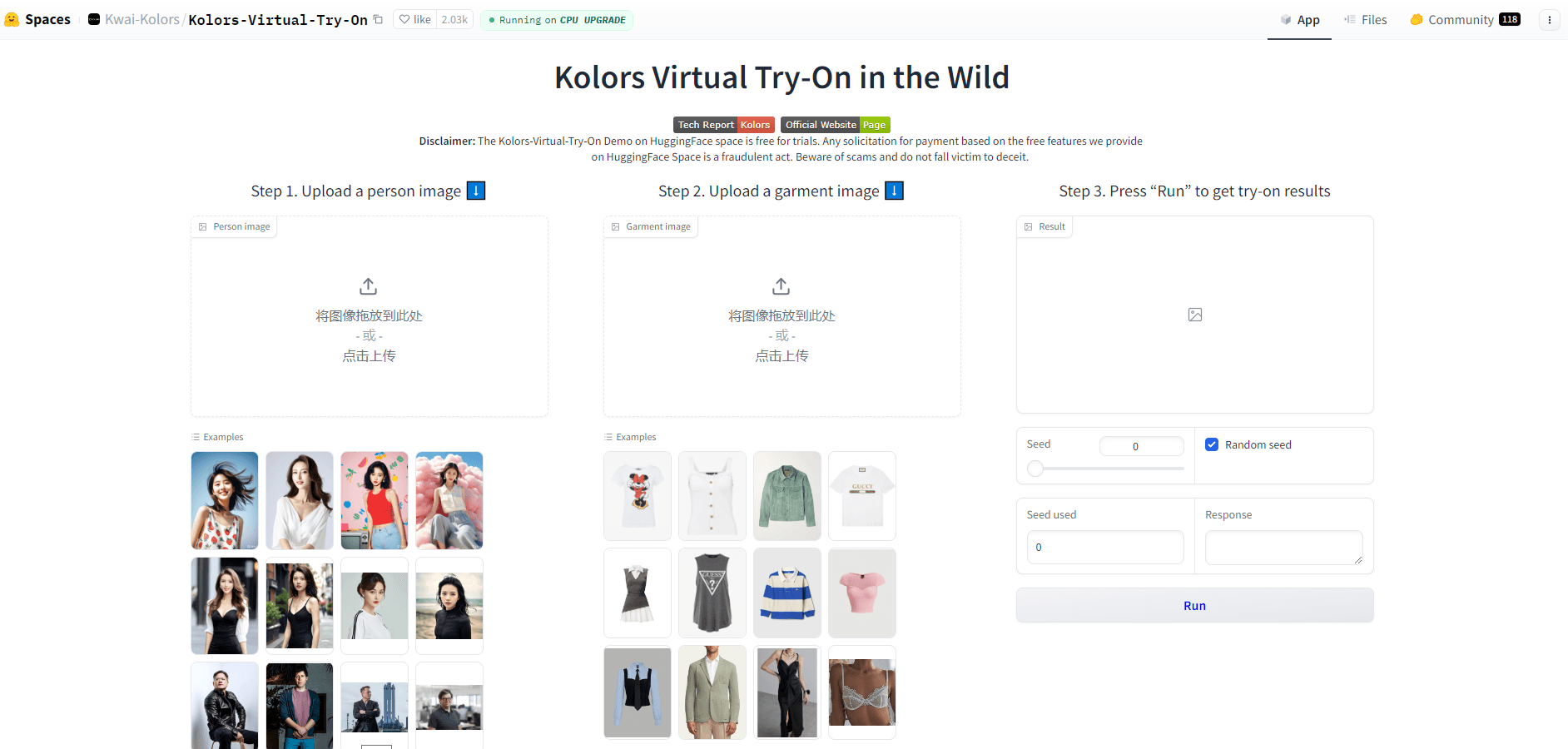
Kolors Virtual Try On is an AI virtual try-on tool built by the Kolors team at Kuaishou, the company behind the Kolors image model. You give it two images: one of a person and one of a garment. The tool then generates a new photo where that person wears that piece of clothing, matching the fit to the person's body while keeping the garment's original shape and pattern intact rather than pasting it on like a flat sticker.
Kuaishou's Kolors team built this tool on top of a serious image model, so the underlying generation quality is higher than most free browser demos you'll stumble across. The appeal is simple. Online shopping means guessing how a jacket or dress will look on your own body, and returns are a hassle. This tool skips the guesswork by letting you try on clothes online on a real photo instead of a store model. No fitting room. No guess.
It runs as a free web demo on Hugging Face, so there's nothing to install, no extension to add, and no account to create before you can start testing it. The catch is that it's a demo, not a polished commercial product. Expect queues at busy times, and the output quality depends heavily on your input photos. Cluttered backgrounds, objects blocking your body, or low-resolution garment shots all tend to produce worse results. Garbage in, garbage out.
Getting Started
- Open the Kolors Virtual Try On Space on Hugging Face in a browser. No account is required for the demo.
- Upload a clear photo of a person. A front-facing, full or half-body shot with a clean background works best.
- Upload a flat photo of the garment you want to try, ideally with no other items or people in frame.
- Run the generation and wait for the result, which may take a moment if the Space is busy.
- Download or screenshot the output image to keep the try-on for reference.
Product Information
A quick look at Kolors Virtual Try On's pricing, supported platforms, and performance.
Best for
The users, tasks, and scenarios where this tool fits best.
Users
- Online shoppers
- Fashion bloggers and content creators
- Clothing sellers and small brands
Tasks
- Previewing a dress or top on your own body shape before ordering it online.
- Testing how a bold print or color reads against your skin tone and hair.
- Building a quick visual mood board of outfit combinations for a client or post.
Scenarios
- You're browsing a clothing site late at night and want to see the item on yourself before adding it to the cart.
- You're planning an outfit for an event and want to compare two dresses without ordering both.
- You run a small clothing shop and need product images fast, without hiring a model.
Key features
Two-Image Virtual Try-On
The core function takes a person photo and a garment photo and merges them into one image. It separates the clothing from its original shot and fits it onto the person, which is what lets you use your own picture rather than a stock model. In short, it's an AI clothes changer you drive with two uploads.
Clothing Detail Preservation
The tool uses a dedicated network to capture the details of a garment, like its cut, pattern, and texture. That means a striped shirt keeps its stripes and a textured jacket keeps its surface look instead of turning into a flat color block. Details matter here, because a try-on that loses the fabric texture tells you nothing useful about how the real item will feel.
Pose and Body Matching
It reads the person's pose and body shape as a guide, so the clothing bends and drapes to fit how you're standing. You don't have to be in a stiff, straight-on pose for the result to line up. Stand how you like.
Background Retouching
The demo includes background repair, which helps the try-on look natural when your original photo has a busy or uneven backdrop. It works best when the background is simple, but it handles more than a plain wall. Good input means good virtual try-on clothing output.
Text-to-Garment Generation
Alongside photo-based try-on, the Kolors line supports generating clothing from a text description. You can describe a style in words and get a garment image to work with, which is handy when you can't find the exact piece you want to preview.
Free Browser Access
Everything runs in the browser through a Hugging Face Space, with no download, no signup, and no cost for the demo. That makes it one of the easiest AI fashion tools to try if you just want to test the idea before committing to anything.
Pros and cons
Pros
- Free to use with no account, install, or credit card.
- Runs entirely in the browser on any device with internet access.
- Uses your own photo, so results reflect your body and pose.
- Keeps garment patterns and textures rather than flattening them.
- Backed by the Kolors image model from Kuaishou.
Cons
- It's a research demo, so wait times can be long when the Space is busy.
- Output quality drops sharply with cluttered backgrounds or blocked bodies, so results are hit or miss on casual photos.
- There's no official API or pricing page, so you can't easily build it into your own app or rely on uptime.
Frequently asked questions
Yes. The public demo on Hugging Face costs nothing and needs no account. You just upload photos and generate. The free Space can be slow during peak hours, so pick a quiet time if speed matters.
Related content
Explore related tools, skills, and articles for Kolors Virtual Try On.
Kolors Virtual Try On Alternatives

Google EmbeddingGemma 2
Google DeepMind · Writing · Image · CodingGoogle EmbeddingGemma 2 is a 740M-parameter open model that turns text, code, images, audio, and video frames into vectors in one 768-dimension space, running on phones and laptops.

Tractionwave
TractionWave · Image · MarketingTractionWave is an AI attention heatmap tool for static ads. Upload a PNG or JPG and it returns predicted attention, ranked hotspots, and fixes before you spend budget.

Imejis.io
Imejis.io · Image · MarketingImejis.io is an AI design studio for agents and marketing teams. Describe an image in plain words, and it writes the copy, builds the layout, reflows it to every size, then exports a finished file.