

kuku
kuku (kuku-mom) · Productivity · Leaning
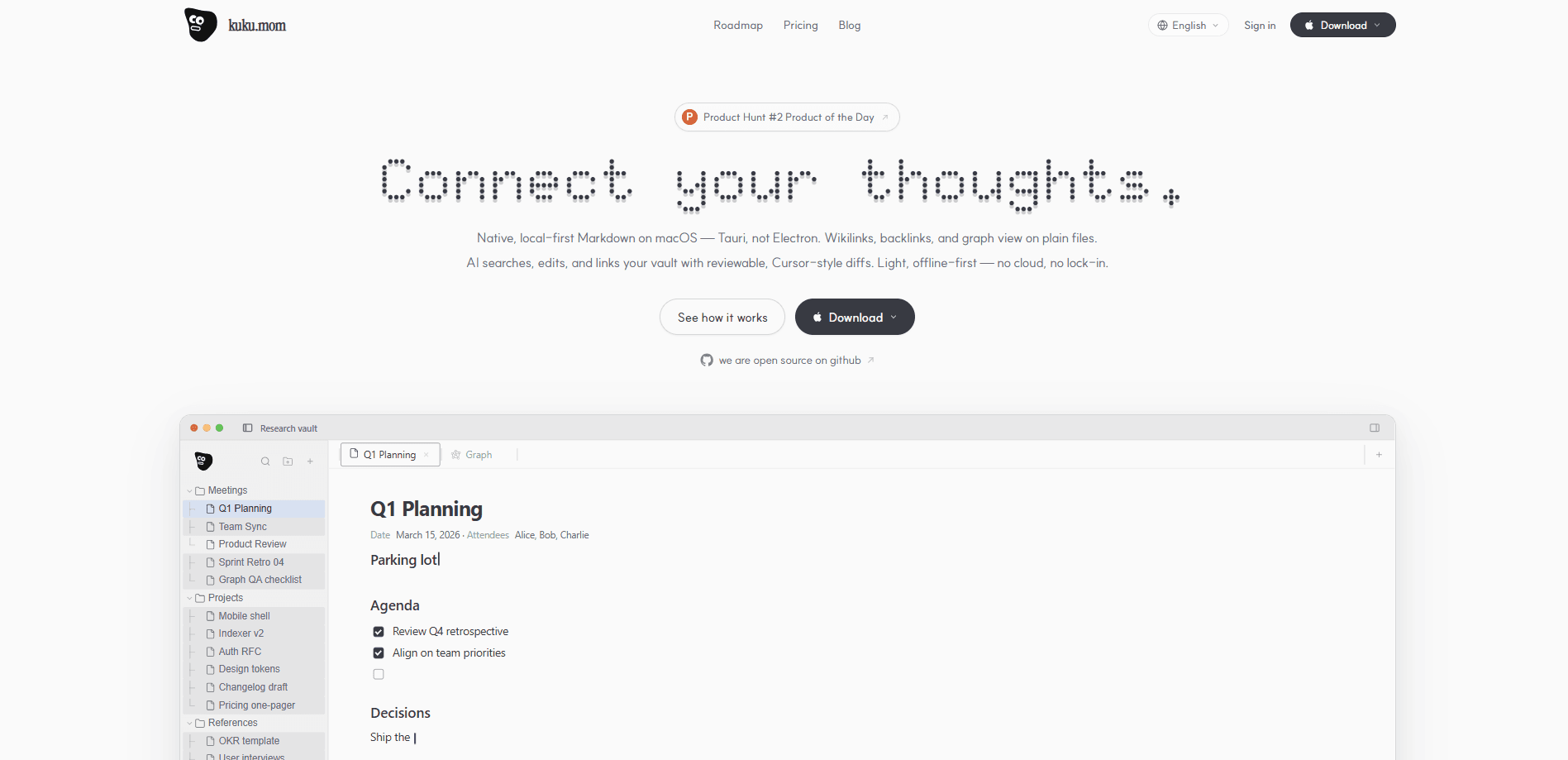
kuku is a local-first Markdown workspace for macOS that treats your notes as plain text notes while layering wikilinks, backlinks, and a graph view on top. Light on resources. Built with Tauri instead of Electron, it works offline, and its AI assistant reads, edits, and links your vault using reviewable, Cursor-style diffs. Juggling a folder of Markdown files, a separate AI chat window, and a cloud service you don't fully trust? kuku is the answer to that stack.
About kuku
What Is kuku
kuku is a local-first macOS Markdown editor and AI note-taking app, aimed at people who already keep their notes as plain files. Instead of locking your writing inside a proprietary database, it sits on top of the folders you already have and adds the connective tissue most Markdown editors skip. Wikilinks and backlinks work on those same .md files. The graph view draws the links between them, so you can see how one note relates to another.
The bigger idea is AI that stays close to your files. kuku's assistant searches your vault, answers questions from your own notes, and edits documents through diffs you review before anything changes. You can bring a Gemini API key and run AI features locally, or let requests route through kuku's own account once managed sync is set up. Your files remain readable Markdown either way. Nothing is trapped if you walk away.
The main catch is platform. kuku runs on macOS only right now, with Windows and Linux listed as coming soon. Work across a Mac and a Windows PC? You won't have a matching client on the other side today. There's also a practical habit shift. The app assumes you're comfortable keeping offline notes as files rather than inside a single app-managed library.
Getting Started
- Download the macOS build from the official kuku site or the project's GitHub releases, then drag the app into your Applications folder.
- Point kuku at an existing folder of plain text notes, or let it create a new vault. Files stay where they're stored on disk.
- Add a Gemini API key in settings if you want AI chat and editing before managed sync is available.
- Open a note and use the quick search (⌘K) to jump between files, then write
[[wikilinks]]to connect related notes. - Try an AI edit, review the diff it proposes, and accept only the changes you want.
Product Information
A quick look at kuku's pricing, supported platforms, and performance.
Best for
The users, tasks, and scenarios where this tool fits best.
Users
- Markdown veterans
- Privacy-conscious note-takers
- Researchers and writers juggling long projects
Tasks
- Building a second brain app
- Searching notes fast
- AI-assisted editing
Scenarios
- Planning work like a Q1 roadmap
- Keeping a research vault
- Working on a plane or with spotty Wi-Fi
Key features
Local-first Markdown editing
Everything you write lives in plain .md files and folders you choose, and kuku reads and edits them in place. Open the same files in any other editor. Back them up however you like. Leave the app without a migration project. For anyone burned by apps that hold notes hostage, the file-based model is the whole point.
AI with reviewable diffs
The assistant doesn't just answer questions. It searches your vault, reads relevant files, and proposes edits as diffs you accept or reject, the same way you'd review a code change. That keeps AI useful for rewriting and restructuring without handing it blind control over your notes. You can bring your own Gemini key to run this locally.
Wikilinks, backlinks, and graph view
Type [[note name]] and kuku links the two files, then shows you every note pointing back at the current one. The graph view turns those connections into a map. Handy for spotting clusters and orphan notes in a large vault. Plain Markdown folders lack that structure by default.
Instant vault search
A single keystroke opens search across your whole vault, and answers come back in roughly a second. The search also learns from past sessions, surfacing earlier answers as suggestions for new questions. Work in long threads of thought? That recall matters more than raw keyword matching.
Offline-first, no cloud required
kuku runs locally and doesn't send your data without permission, so the editor and file features work with no internet connection. Your offline notes stay local by default. Cloud sync is an opt-in upgrade, not a requirement. Sensitive notes deserve that. It's the difference between usable and not.
Managed sync and second brain
Once you're on a paid tier, kuku syncs workspaces, devices, and key envelopes, not just file copies. Markdown, wikilinks, backlinks, graph state, and the context AI has already used all stay aligned, so your vault reads as one continuous memory across machines. The free plan covers a single Mac. Sync is what makes multi-device work.
Multiple model providers
The team plan lists support for OpenAI, Claude, Google Gemini, Meta, and Mistral models. Teams can route AI requests to whichever provider fits their budget or policy. It's a step up from the single-key approach on the free tier, and it matters most for shared team vaults.
Pros and cons
Pros
- Plain Markdown files mean no lock-in. Your notes stay readable in any editor, so leaving costs nothing.
- Native macOS build on Tauri runs lighter than Electron-based note apps. That helps on older Macs.
- AI edits arrive as reviewable diffs, so you keep control instead of accepting changes blindly.
- Offline-first design keeps the editor and file features working with no connection.
- Open source on GitHub, so the code is publicly inspectable.
Cons
- macOS only. Windows and Linux users can't use it yet. Cross-platform teams get no matching client.
- The free tier's managed sync is sized around roughly 5,000 indexed nodes. A large vault outgrows that fast.
- AI features on the free plan need your own Gemini API key. That adds a setup step and separate billing.
- No public API for programmatic access, so you can't script against your vault today.
Frequently asked questions
kuku is a local-first Markdown note-taking and knowledge management app for macOS. It stores your notes as plain text files and adds wikilinks, backlinks, a graph view, and an AI assistant that can search and edit those files.
Related content
Explore related tools, skills, and articles for kuku.
kuku Alternatives

Base Code
Base44 (Wix) · Coding · ProductivityBase Code is a shared cloud development environment from Base44. Teammates describe changes to an existing GitHub codebase in chat, preview them live and send them back as pull requests.

Knocket
Knocket (Tencent RTC team) · Productivity · Business · ChatbotKnocket is a free live chat and contact page tool that lets visitors message you from your website, app, or a shareable link, with every reply handled from Telegram or one inbox.

FloorGen
Vinit Kumar (FloorGen) · Productivity · China AIFloorGen is a browser-based floor plan maker that turns a sentence or a sketch into an editable 2D plan and a 3D walkthrough. Export to PDF, DXF or video, and draw without an account.