

Label Your Data
Label Your Data · Image · Coding
Label Your Data is a data annotation platform where ML teams upload image, video, or text data and get labeled training sets back, with a free pilot to start.
About Label Your Data
What Is Label Your Data
Label Your Data is a data annotation platform for teams building computer vision and machine learning models. You upload raw data, pick an annotation type, and download the labeled results. The work runs on managed annotators, so you don't hire or train a labeling team yourself.
It covers more than images. The platform handles video, 3D point clouds, aerial and satellite imagery, and text and audio for NLP work, which means a single vendor can take on a project that would otherwise need two or three specialized providers stitched together. That range matters if your project mixes formats. You keep everything in one place instead of juggling vendors. For teams doing computer vision data labeling, that's the main draw.
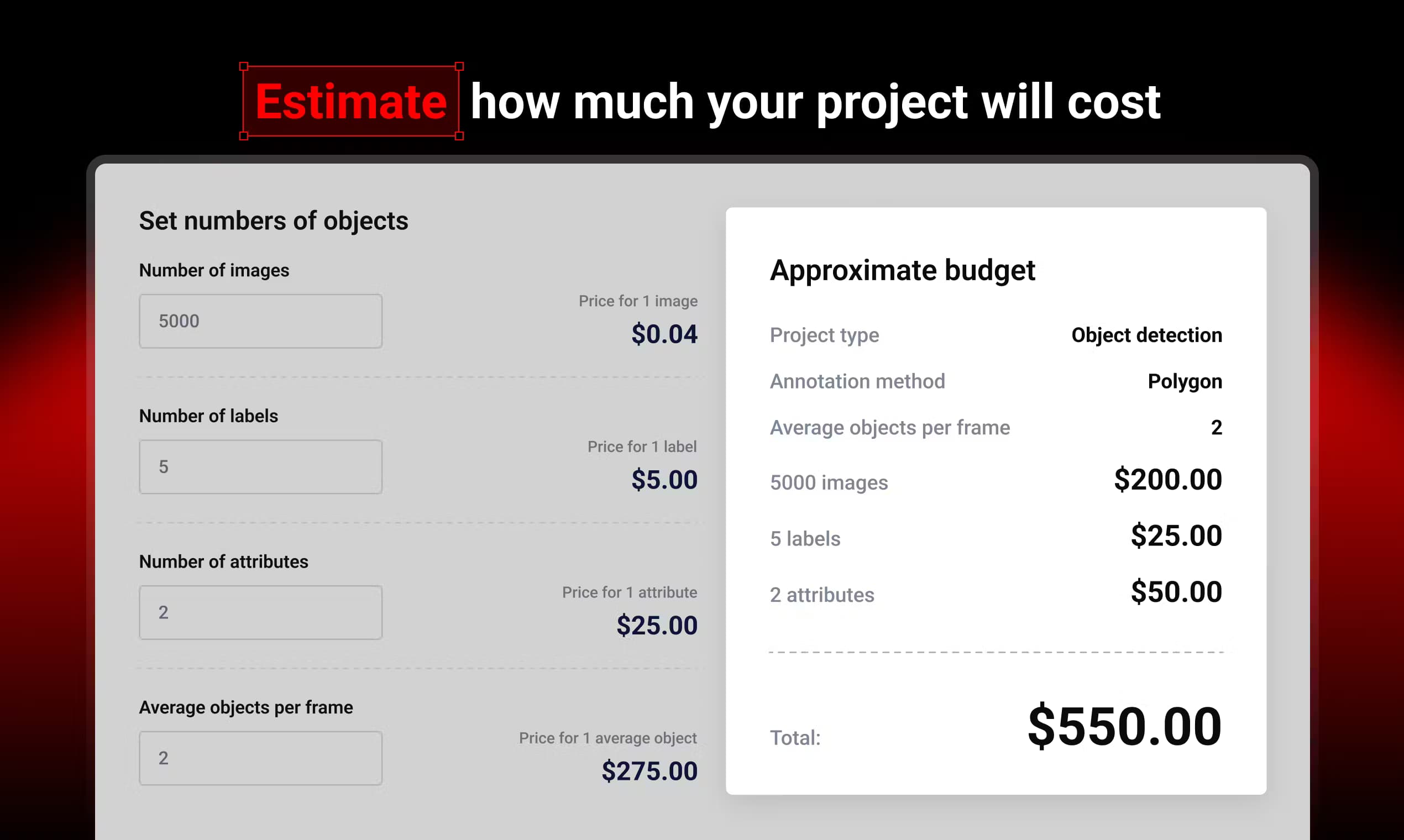
The catch is commitment. Pricing moves with object counts and annotation type. Costs shift as your dataset grows, and there's no flat public price list. You estimate through a cost calculator first, then confirm with a pilot before scaling. The free pilot caps at 10 images or frames, which is fine for a quick quality check but not for a production dataset. Enough to test quality? Yes. Enough to finish a real job? No.
Founded to serve AI startups and research teams that need on-demand labels without a full-time crew, it now works with 200+ customers across mobility, retail, robotics, and healthcare. It's managed. You don't build a labeling team.
Getting Started
- Create an account on the platform and set up your first annotation project.
- Choose the annotation type that fits your data, like bounding boxes, polygons, or keypoints.
- Run a free task on up to 10 images or frames to test the setup and quality.
- Upload the rest of your dataset once the pilot looks right.
- Track progress and download the completed labeled data when it's ready.
Product Information
A quick look at Label Your Data's pricing, supported platforms, and performance.
Best for
The users, tasks, and scenarios where this tool fits best.
Users
- ML engineers
- AI startups
- Data leads
- Research teams and students
- AI project managers
Tasks
- Object detection labeling
- Image segmentation
- Keypoint and pose annotation
- Text and audio annotation
Scenarios
- Pre-launch model training
- Scaling past a pilot
- Multi-format projects
- Tight-budget experimentation
Key features
Multiple Annotation Types
The platform supports bounding boxes, polygons, keypoints, and cuboids, so you can match the method to your data. Object detection, segmentation, and pose estimation all run through the same workflow. That saves you from stitching together separate tools for each task.
Free Pilot Task
You can test the platform with a no-cost trial on 10 images or frames. It's a low-risk way to check annotation quality and turnaround before committing. Just don't expect it to cover a production dataset.
Cost Calculator
A built-in calculator estimates project cost before you start. Pick your application field, annotation method, and object count, then see an approximate total. For custom jobs, you send a request and get a manual quote.
Instruction Generator
You create annotator guidelines from a pre-made template instead of writing rules from scratch. Clear instructions cut down on back-and-forth and rework, which matters when a single misread label rule can mean redoing thousands of annotations across an entire batch. The tradeoff, per client reviews, is that instructions still sometimes need sharpening.
API Access
An API connects the platform to your existing ML pipeline for data upload and download. If your team already automates training runs, this keeps labeling from becoming a manual step in the chain.
Team Access
Team-based permissions let you assign roles and manage who touches what. Project managers get a shared view instead of chasing updates over email. Simple, and it works.
Pros and cons
Pros
- Covers image, video, 3D, and text annotation under one platform.
- Free pilot lets you judge label quality before paying.
- Cost calculator gives a rough budget view upfront.
- Clients cite fast turnaround and flexible scope on unusual tasks.
Cons
- No flat public pricing, so costs are hard to predict without a quote.
- Some client reviews mention instructions that needed clarifying.
- Free trial caps at 10 images or frames, too small for real testing.
Frequently asked questions
It's a data annotation service for AI training data and training datasets. Teams upload raw image, video, or text data and get labeled results back for machine learning models.
Related content
Explore related tools, skills, and articles for Label Your Data.
Label Your Data Alternatives

Google EmbeddingGemma 2
Google DeepMind · Writing · Image · CodingGoogle EmbeddingGemma 2 is a 740M-parameter open model that turns text, code, images, audio, and video frames into vectors in one 768-dimension space, running on phones and laptops.

Tractionwave
TractionWave · Image · MarketingTractionWave is an AI attention heatmap tool for static ads. Upload a PNG or JPG and it returns predicted attention, ranked hotspots, and fixes before you spend budget.

Imejis.io
Imejis.io · Image · MarketingImejis.io is an AI design studio for agents and marketing teams. Describe an image in plain words, and it writes the copy, builds the layout, reflows it to every size, then exports a finished file.