

LeadJarvis
LeadJarvis · Productivity · Marketing
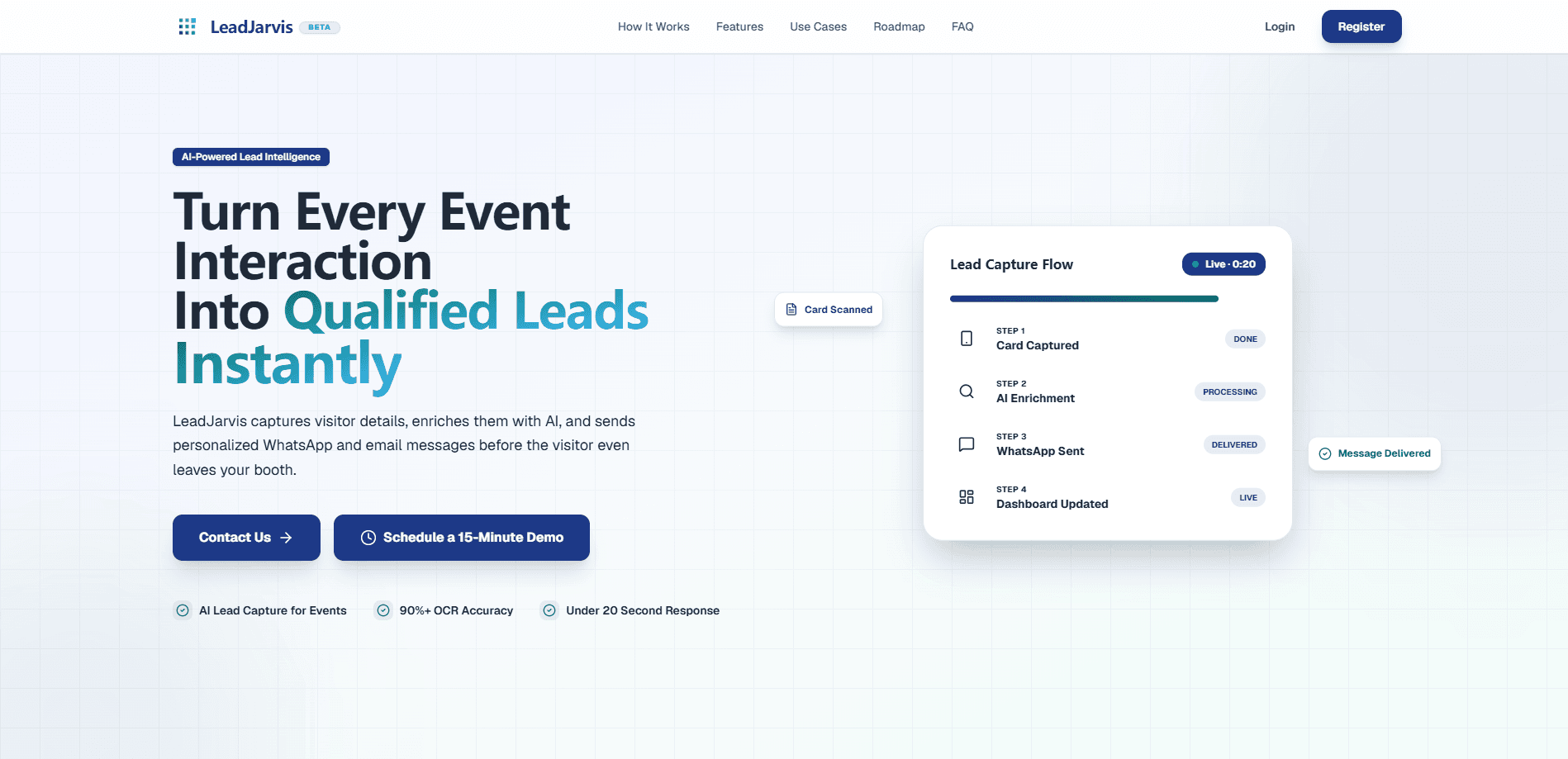
LeadJarvis is an AI event lead capture platform that turns a business card or badge photo into a live prospect record. The tool runs fast OCR on the card, pulls in LinkedIn and company details, pushes the contact into your CRM, and fires off a personalized WhatsApp or email follow-up, all inside about 20 seconds. It's built for teams who work the floor at trade shows and need to reach people while the conversation is still warm.
About LeadJarvis
What Is LeadJarvis
LeadJarvis is an event lead capture tool aimed at the specific mess of trade shows, expos, and conferences. The old approach is familiar to anyone who's worked a booth. Collect a stack of cards. Stuff them in a bag. Hope someone types them up before the leads go cold. LeadJarvis compresses that whole chain into seconds.
The product does three things and does them in sequence. First, it reads a business card or badge through OCR, which the company says takes under two seconds. Second, it enriches the contact with LinkedIn and company context so you're not staring at a name with no idea who the person is. Third, it sends a follow-up through WhatsApp, Telegram, or email, and syncs the record to your CRM without anyone retyping it.
The main limitation is scope. This is a live-event tool, not a general contact manager. It leans on the quality of the photo you take, and the follow-up channels it supports are the three messaging routes above. So what happens if your workflow depends on a native Salesforce app, or offline capture with no connectivity? Check those specifics before committing.
Getting Started
- Create an account on the LeadJarvis site and connect the CRM you already use so records have somewhere to land.
- Set up your outreach channels, linking WhatsApp, Telegram, or an email sender, and write a follow-up template you're happy to send from the floor.
- At the event, snap a photo of a business card or badge. The OCR pass runs immediately and pulls the contact fields out of the image.
- Review the enriched profile, which fills in LinkedIn and company data, then confirm the follow-up. LeadJarvis sends it while you move on to the next person.
Product Information
A quick look at LeadJarvis's pricing, supported platforms, and performance.
Best for
The users, tasks, and scenarios where this tool fits best.
Users
- Sales teams at trade shows
- Solo founders working expos
- Marketing and events coordinators
Tasks
- Scanning business cards
- Enriching contacts
- Sending instant follow-ups
Scenarios
- Working a busy booth
- Covering a multi-day expo
- Meeting a high-value prospect
Key features
Business card and badge OCR
The scanner pulls contact details straight from a photograph of a business card or event badge. LeadJarvis says the OCR pass finishes in under two seconds, which matters on a show floor where you're already holding a conversation. You point the camera, take the shot, and move on.
Contact enrichment
A raw card gives you a name and a phone number. LeadJarvis adds LinkedIn and company context on top, so you can tell whether the person is a decision-maker or someone collecting swag. That context is what makes a follow-up message worth reading. Otherwise it's a generic hello.
Instant multi-channel follow-up
The follow-up goes out through WhatsApp, Telegram, or email, the channels people actually check, and the pitch is that a message arriving seconds after the meeting lands far better than one arriving after the event. You set a template and the tool personalizes the send.
CRM sync without manual entry
Records move into your CRM automatically. Nobody spends the evening after the show transcribing cards. For teams that judge performance by what's in the pipeline, this keeps the numbers honest and the list current.
Six-step capture-to-outreach workflow
LeadJarvis frames the whole process as a six-step chain. Card in, engaged prospect out. It's short by design. The fewer places a lead can fall through, the fewer you lose.
Built for live event pressure
The product is scoped to the speed and noise of live events rather than the calm of an office, and it stays there: fast capture, immediate enrichment, immediate outreach. That focus is the sell, and it's also the boundary.
Pros and cons
Pros
- Follow-up lands in seconds, which is when a prospect still remembers the conversation.
- OCR and enrichment remove the retyping step that usually kills event lead lists.
- WhatsApp and Telegram support matches how people actually respond outside email.
- Automatic CRM sync keeps post-event cleanup to a minimum.
Cons
- Pricing isn't published, so you'll have to contact the team to find out what it costs.
- It's narrower than a full sales platform, so don't expect pipeline management or reporting beyond capture and handoff.
- Capture quality depends on the photo you take, and a blurry card is still a blurry card.
Frequently asked questions
It captures a lead at an event by scanning a business card or badge, enriches that contact with LinkedIn and company data, syncs it to your CRM, and sends a personalized follow-up through WhatsApp, Telegram, or email. The whole sequence runs in about 20 seconds.
Related content
Explore related tools, skills, and articles for LeadJarvis.
LeadJarvis Alternatives

Base Code
Base44 (Wix) · Coding · ProductivityBase Code is a shared cloud development environment from Base44. Teammates describe changes to an existing GitHub codebase in chat, preview them live and send them back as pull requests.

Knocket
Knocket (Tencent RTC team) · Productivity · Business · ChatbotKnocket is a free live chat and contact page tool that lets visitors message you from your website, app, or a shareable link, with every reply handled from Telegram or one inbox.

FloorGen
Vinit Kumar (FloorGen) · Productivity · China AIFloorGen is a browser-based floor plan maker that turns a sentence or a sketch into an editable 2D plan and a 3D walkthrough. Export to PDF, DXF or video, and draw without an account.