
LegalForce (リーガルフォース) AI Contract Review Platform
LegalOn Technologies, Inc. · Productivity · Business
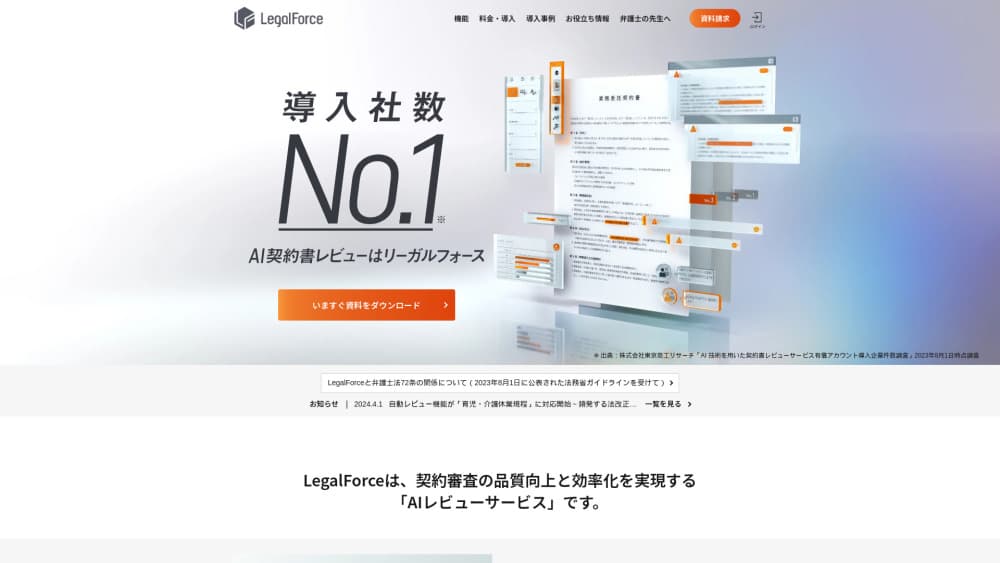
LegalForce is an AI contract review platform from LegalOn Technologies. It scans Word and PDF contracts for risky clauses, suggests redlines, and keeps past agreements searchable.
About LegalForce (リーガルフォース) AI Contract Review Platform
What Is LegalForce
LegalForce is the Japanese AI contract review platform built by LegalOn Technologies, the Tokyo and San Francisco company formerly known as LegalForce, Inc. Upload an NDA, an outsourcing agreement, or a software license, and the system marks the clauses that need attention, explains the risk, and shows sample language you can copy into your own draft. The company released the commercial version on April 2, 2019, and has since grown it into a broader legal operations suite with matter intake, contract management, and electronic signature links.
The product targets the part of legal work that eats the most hours: the first read. In-house teams use this AI contract review software to catch missing clauses and non-standard wording before a lawyer opens the file. Firms use it to turn around client redlines faster. In AI legal tech Japan, it ranks among the best known names. The review logic comes from playbooks written and maintained by practicing attorneys, not from a generic language model run on raw contract text.
There are limits worth knowing up front. The interface, template library, and support are Japanese-first, and the deepest coverage is for contracts governed by Japanese law. English review is available as an option and follows New York law across 12 contract types, which is narrower than the Japanese side. Pricing is quoted by sales, so you can't test the full product without a demo call.
Getting Started
- Request a demo through the official site and agree on the contract types and user count your team needs.
- Have an administrator create accounts, then set which users can view which contract folders.
- Upload a contract as Word, PDF, or scanned PDF, pick the contract type and your side of the deal, and run auto review.
- Work through the flagged items, download the revised file to Word, or edit in the browser editor.
- Save the final version so it joins your searchable contract database.
Product Information
A quick look at LegalForce (リーガルフォース) AI Contract Review Platform's pricing, supported platforms, and performance.
Best for
The users, tasks, and scenarios where this tool fits best.
Users
- In-house legal teams at Japanese companies
- Small legal departments with one or two lawyers
- Law firms serving corporate clients
- Contract managers in procurement and sales
Tasks
- First-pass review of NDAs, service agreements, and outsourcing contracts
- Comparing third-party paper against your own template
- Clause research
- Checking subcontract and antitrust exposure
- Reviewing English contracts under New York law
Scenarios
- A two-person legal team handling a hundred vendor contracts a quarter
- Cross-border deals where English drafts arrive from overseas counterparts
- Rebuilding institutional knowledge after a senior lawyer leaves
Key features
Attorney-Built Auto Review
Auto review is the core of the product. Upload a contract and the AI highlights clauses that carry risk, marks missing provisions, and attaches a recommended response with sample wording. It works as a contract redlining tool as well as a checker: every flag comes with replacement wording you can drop into the draft. Coverage spans more than 70 contract types when you count Japanese and English documents, and the checkpoints are updated when laws change. Each flagged item carries a severity level, and administrators can adjust those levels so the output matches your own risk policy.
Custom Auto Review
Standard playbooks cover common risks. Custom auto review lets a team register its own review points, preferred positions, and fallback language, then apply them during every review. The feature is in open beta, and it depends on someone doing the upfront work of writing down your standards. Once that's done, junior staff get the same guidance a senior lawyer would give.
Contract Comparison
The comparison view takes a signed or previously reviewed contract as the baseline and shows what changed in the new draft. It works clause by clause or across the whole document, which is useful when a counterparty returns a marked-up version with edits buried in the middle. Results can be exported to Excel as a before-and-after table, a format many Japanese legal teams still use for internal approvals.
Clause Search and Template Library
Every uploaded contract is indexed at clause level. Type a keyword and the search returns the specific clause, not a whole document you then have to read. The same search reaches your company templates and the built-in library of more than 2,000 attorney-reviewed forms, including shareholder minutes and internal rules. English contracts can be searched from Japanese keywords, which saves a translation step during research.
Word Add-in and Document Checks
Most legal teams live in Word, so the add-in puts review and clause search inside the document. Edits sync back to LegalForce automatically. Separate checkers catch the errors that plague Japanese contracts: article numbering that shifts after an edit, defined terms used before they're defined, inconsistent use of kanji and hiragana, and mixed party labels. These sound small until you ship a contract with a broken cross-reference.
Matter Intake and Management
A dedicated email address pulls review requests and legal questions into a single queue. Each matter gets an owner, a status, a due date, and labels for requesting department, counterparty, and contract type. Teams can reply to email inside the platform, and comment notifications reach Microsoft Teams. Managers see workload across the team, and the data exports to CSV for reporting.
English Contract Review and Translation
English review is sold as an option and covers 12 contract types, mostly under New York law. The translation module displays a Japanese version next to the English text and exports a clause-level bilingual table. Both features are aimed at Japanese teams receiving English drafts, not at US buyers who want a US-first tool.
Pros and cons
Pros
- Review output is grounded in attorney-written playbooks, so suggestions come with sample clauses instead of a vague warning.
- Japanese contract checks go beyond risk detection to formatting issues like article numbering and defined terms, which most competitors skip.
- The knowledge base turns past contracts into searchable precedent, which helps when the person who negotiated a deal has moved on.
- Matter intake, review, storage, and e-signature links sit in one platform, so teams can drop a separate request tracker.
- Word add-in keeps the review workflow inside the editor lawyers already use.
Cons
- Pricing is quote-only, so you need a sales conversation before you can judge whether the platform fits your budget.
- Japanese-first design and support make it a weaker fit for legal teams outside Japan, especially those that work mostly in English.
- English coverage stops at 12 contract types, so cross-border work outside that list falls back to manual review.
- Several useful features, including custom auto review, translation, and the online editor, are still labeled open beta.
Frequently asked questions
It reviews contracts with AI. You upload a draft, choose the contract type, and the platform lists risky clauses, missing provisions, and suggested edits. It also stores reviewed contracts so you can search past language later.
Related content
Explore related tools, skills, and articles for LegalForce (リーガルフォース) AI Contract Review Platform.
LegalForce (リーガルフォース) AI Contract Review Platform Alternatives

Base Code
Base44 (Wix) · Coding · ProductivityBase Code is a shared cloud development environment from Base44. Teammates describe changes to an existing GitHub codebase in chat, preview them live and send them back as pull requests.

Knocket
Knocket (Tencent RTC team) · Productivity · Business · ChatbotKnocket is a free live chat and contact page tool that lets visitors message you from your website, app, or a shareable link, with every reply handled from Telegram or one inbox.

FloorGen
Vinit Kumar (FloorGen) · Productivity · China AIFloorGen is a browser-based floor plan maker that turns a sentence or a sketch into an editable 2D plan and a 3D walkthrough. Export to PDF, DXF or video, and draw without an account.