

LensGo
Lovino (formerly LensGo) · Image · Video
LensGo, now called Lovino, is a web app that turns prompts and photos into AI images and short videos using 50+ models, with a free daily credit and paid plans from $7.99/month.
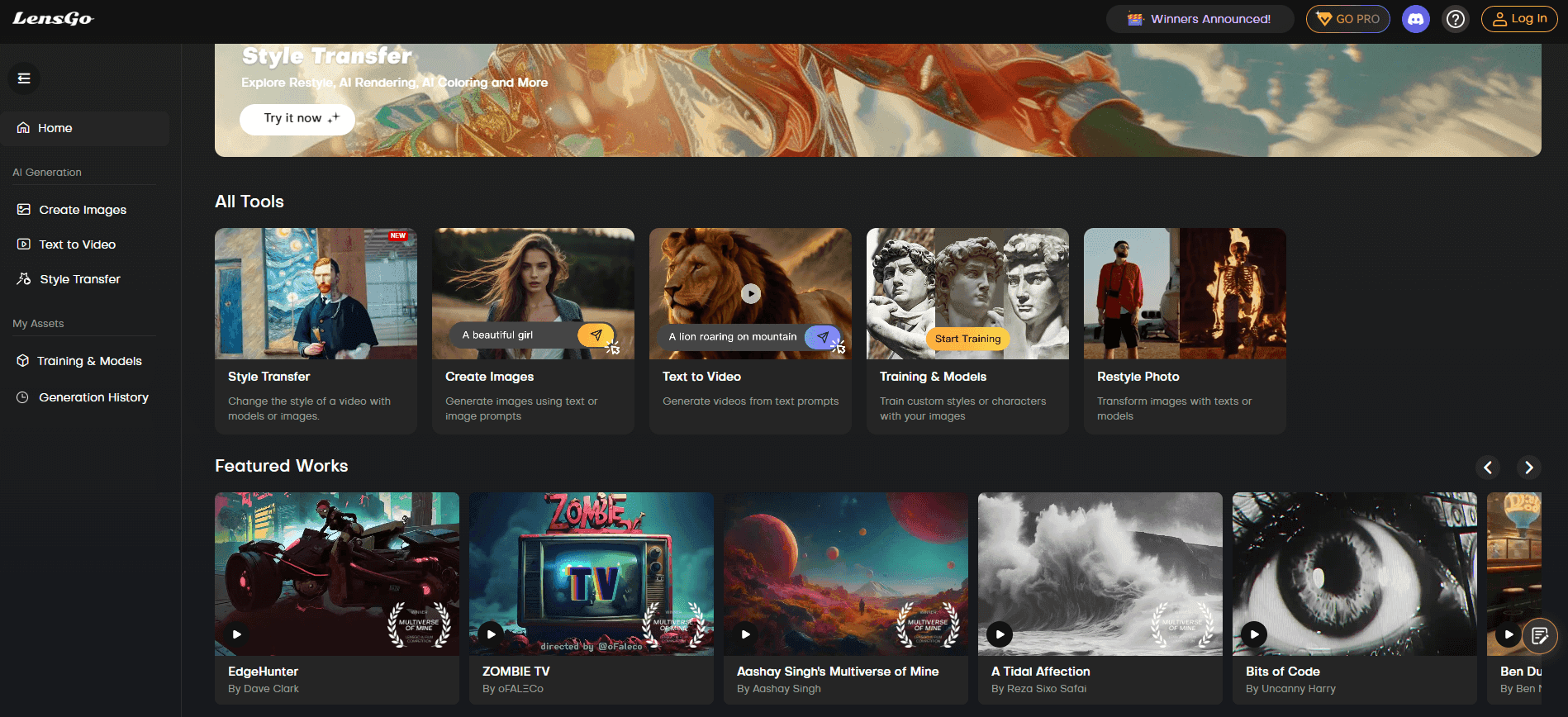
About LensGo
What Is LensGo
LensGo started as a browser-based AI image and video generator aimed at people who make social content, product shots and short ads. In 2026 the company renamed the product Lovino and moved it to lovino.ai. Existing accounts, credits and libraries carried over, and old LensGo links redirect to the new domain.
The pitch is simple. Instead of paying for several subscriptions, you get one credit balance and a single prompt bar that reaches models from different providers, including FLUX, GPT Image, Imagen, Veo, Kling and Seedance. Text-to-video, image-to-video and plain image generation all run through the same workspace. Somebody who needs a poster in the morning and a vertical video ad in the afternoon doesn't have to switch tools or learn four interfaces.
The limits matter too. Video generation draws on paid credits, so the free plan is mostly an image playground. Plan credits reset each billing month, and anything unused is gone when the next batch arrives. The rebrand also split the web: plenty of tutorials still describe the old LensGo layout.
Getting Started
- Open lovino.ai and sign in with Google or email. LensGo accounts work after a one-time login, and no credit card is needed for the free plan.
- Pick a mode: image, video, UGC Studio or the Flow canvas. If you only have a rough idea, describe it to Iris, the built-in agent, and let it plan the shots.
- Set the model before you generate. Free accounts can use the free image model list, while paid accounts unlock the full lineup and video models.
- Refine with Lens ID, upscaling or background removal, then download. Paid plans export without a watermark.
Product Information
A quick look at LensGo's pricing, supported platforms, and performance.
Best for
The users, tasks, and scenarios where this tool fits best.
Users
- Social media creators
- Small marketing teams
- Hobbyists testing AI visuals
Tasks
- Making product photos and ad stills
- Producing short video ads
- Keeping a character consistent
Scenarios
- A launch week with mixed assets
- Testing several models before committing
- Cleaning up client photos
Key features
50+ Image and Video Models in One Place
LensGo pools models from several providers behind one prompt bar and one credit balance. You can generate with FLUX Schnell for speed, GPT Image for text inside images, or Veo and Kling for motion. The practical gain is comparison: the same prompt on three models costs a few credits, not three subscriptions.
Iris, the Creative Agent
Iris is the AI creative agent behind the prompt bar. It takes a written brief and turns it into a shot list, writing prompts and choosing a model for each asset. Ask for a launch kit and it may return a label on Ideogram V3 Turbo, a poster on GPT Image 2 and a campaign still on FLUX. It helps when you know the outcome you want but not which model gets you there.
Lens ID for Consistent Characters
Lens ID builds a reusable identity reference from a photo, then applies it across images and video scenes. That solves the usual drift where a character's face changes between generations. It works best with clear, well-lit source photos, since blurry input carries through.
UGC Studio for Product Video Ads
Upload one product photo and UGC Studio produces a vertical 9:16 clip in a creator-style format made for TikTok and Reels. It removes the need for actors or a studio, at least for early creative testing. Video ads consume paid credits, so budget accordingly.
Flow Canvas for Multi-Step Work
The canvas is a visual workspace where you arrange generations, keep variations side by side and build a sequence from several shots. It suits projects that grow past a single image, such as a campaign set or a storyboard. Everything stays on one board, so you can revisit an earlier version without hunting through downloads.
Editing Utilities in the Same Tab
Upscaling, background removal, face swap, style transfer and object erasing sit next to the generators. You can fix a soft render or cut out a background without moving the file to another app. For light retouching that is enough; heavy compositing still belongs in a dedicated editor.
Pros and cons
Pros
- One subscription covers both AI image and AI video generation, which is rare at this price.
- The free tier is genuinely usable for testing, with 3 credits a day and no card required.
- Iris shortens the prompt-writing step for people who think in briefs rather than model names.
- Paid plans remove watermarks and grant commercial rights over what you generate.
Cons
- Plan credits reset each billing month, so unused credits vanish instead of rolling over.
- Free accounts get watermarked images and no meaningful video allowance, which limits real testing of the video side.
- The 2026 move to Lovino broke continuity with older tutorials and links, so expect some hunting for current steps.
Frequently asked questions
Yes, up to a point. The free plan gives you 3 credits every day and access to 21 free image models, with no credit card. Video generation and the full model lineup need a paid plan.
Related content
Explore related tools, skills, and articles for LensGo.
LensGo Alternatives

Google EmbeddingGemma 2
Google DeepMind · Writing · Image · CodingGoogle EmbeddingGemma 2 is a 740M-parameter open model that turns text, code, images, audio, and video frames into vectors in one 768-dimension space, running on phones and laptops.

Tractionwave
TractionWave · Image · MarketingTractionWave is an AI attention heatmap tool for static ads. Upload a PNG or JPG and it returns predicted attention, ranked hotspots, and fixes before you spend budget.

Imejis.io
Imejis.io · Image · MarketingImejis.io is an AI design studio for agents and marketing teams. Describe an image in plain words, and it writes the copy, builds the layout, reflows it to every size, then exports a finished file.