

Lenso.ai
Lenso.ai · Image · Coding
Lenso.ai is an AI reverse image search engine for faces, places, duplicates, and similar photos. It traces where a picture appears online, sends alerts on new matches, and offers an API.
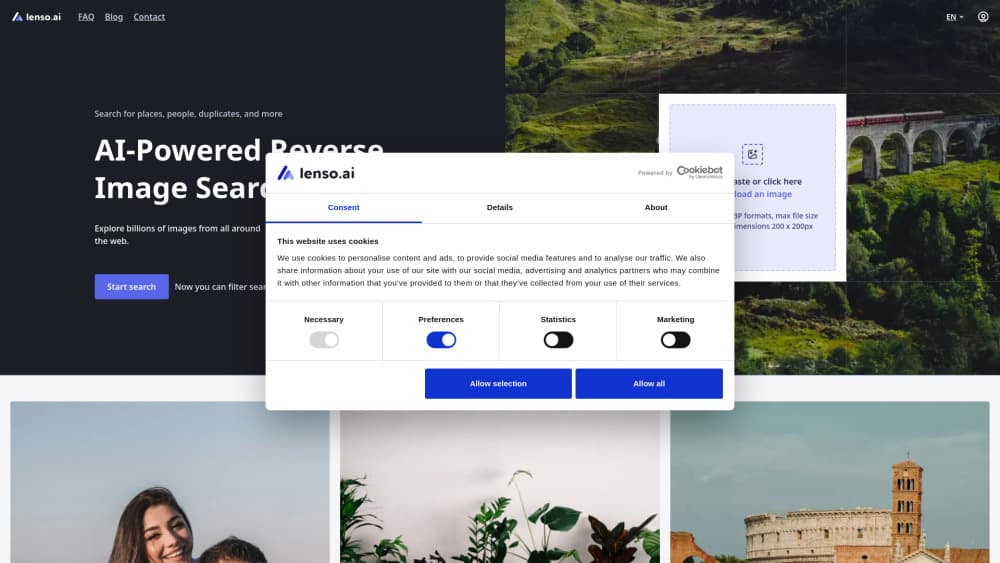
About Lenso.ai
What Is Lenso.ai
Lenso.ai answers a narrow question well: where else does this picture show up? You upload a photo, and the engine returns pages across the web that hold the same image, a cropped version, or something visually close. No keywords required.
Most reverse image tools treat every search the same way. Lenso splits the work into categories, with a separate model behind faces, places, duplicates, related shots, and near matches. That design matters for the face category. Lenso says its facial search matches facial details closely enough to find photos of one person, which is the use case most people arrive with.
The catch is coverage and access. Results only exist for pages Lenso has indexed, and the free tier limits how many source links you can unlock. Source URLs, alerts, and deeper result sets sit behind the paid plans.
Getting Started
- Open lenso.ai in a browser and create a free account.
- Upload an image, paste a URL, or drag a file into the search box.
- Pick a category such as People, Places, or Duplicates, and review the matches.
- Unlock source links to see the exact pages where the image appears.
- Save results to a collection, or set an alert to catch new matches later.
Product Information
A quick look at Lenso.ai's pricing, supported platforms, and performance.
Best for
The users, tasks, and scenarios where this tool fits best.
Users
- Photographers
- People worried about their own photos
- Brand and copyright teams
Tasks
- Finding the original source of a picture
- Checking whether a profile is fake
- Identifying a place from a photo
- Feeding image search into an app
Scenarios
- A photo used without permission
- Weekly brand monitoring
- Fact checking a viral picture
Key features
Search by Image Across Categories
Upload one photo and Lenso runs it through separate models for People, Places, Duplicates, Related, and Similar images. Each category returns a different result set, so a portrait search and a landmark search don't compete for the same slots. You can also search by text when you have a description instead of a file.
Face Search for Personal Photos
The People category focuses on facial details rather than overall composition, which is how it finds photos of the same person in different settings. This is facial recognition search applied to the open web, not to a private photo library. Lenso invites users to try face search for free, then pay to unlock the source pages. It's the fastest way to learn where a selfie has traveled.
Duplicate Finder and Source Tracing
Duplicate search looks for the same file or a lightly edited copy and ranks the pages that host it. Think of it as a duplicate image finder and an image source finder in one pass, since the same list of pages answers both questions. Lenso positions this as a copyright protection tool, and the output is practical: a list of domains plus links you can put in a claim. Exact copies are easier to prove than lookalikes, so this category carries the strongest evidence.
Research Mode and Advanced Filters
Research Mode digs past the results shown in a normal search and returns up to 10,000 matches for People and Duplicates, roughly ten times the standard depth. Advanced Filters narrow that pile by page language, domain, date range, image size, and a keyword in the page title. Both are Professional features, and both add a few seconds to each search.
Alerts and Saved Collections
You can attach an alert to a category and get an email when new matches appear, with 10 alerts on Starter and 50 on Professional. Unlocked results save automatically into collections, so a case built over several weeks stays in one place. Search links can also be copied and shared, and only you see the underlying query.
Image Search API for Developers
The Developer plan opens the same engines through a reverse image search API, with up to 5,000 calls a month covering image search and face search. Request counts appear in the user panel, so you can watch usage without building your own metering. It's aimed at teams embedding visual search into a product rather than at individuals.
DMCA Assist Mode
DMCA Assist collects the links and sources you select, drops them into an email template, and produces a message you can send to the host. It's a drafting aid, not legal advice, and it ships with Professional. For small creators without a lawyer on call, that template removes the most tedious part of a takedown.
Pros and cons
Pros
- Splitting search into categories produces cleaner results than one blended index, especially for faces.
- Duplicate search returns source pages you can cite in a takedown request.
- Collections and alerts turn a one-off search into ongoing monitoring.
- The API is available without an enterprise contract, at 5,000 calls a month on the Developer plan.
Cons
- The free tier caps unlocks, so most source links stay hidden until you subscribe.
- The API plan costs $2,800 a month, which rules it out for solo developers testing an idea.
- Research Mode and Advanced Filters require Professional, so serious filtering starts at $69.99 a month.
- Face search depends on indexed pages, and photos that only live in private profiles won't appear.
Frequently asked questions
Lenso.ai is a web based reverse image search engine. You upload a picture and it finds pages that carry the same image, a copy, a similar shot, or the same face, then links back to the source.
Related content
Explore related tools, skills, and articles for Lenso.ai.
Lenso.ai Alternatives

Google EmbeddingGemma 2
Google DeepMind · Writing · Image · CodingGoogle EmbeddingGemma 2 is a 740M-parameter open model that turns text, code, images, audio, and video frames into vectors in one 768-dimension space, running on phones and laptops.

Tractionwave
TractionWave · Image · MarketingTractionWave is an AI attention heatmap tool for static ads. Upload a PNG or JPG and it returns predicted attention, ranked hotspots, and fixes before you spend budget.

Imejis.io
Imejis.io · Image · MarketingImejis.io is an AI design studio for agents and marketing teams. Describe an image in plain words, and it writes the copy, builds the layout, reflows it to every size, then exports a finished file.