

AI Creative Toolbox
Links You Should Know · Image · Other
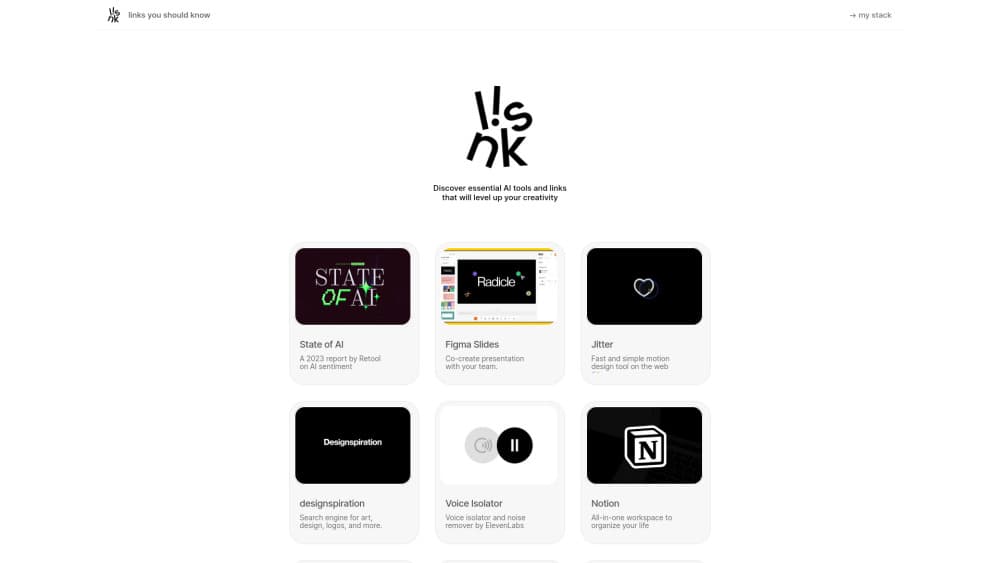
AI Creative Toolbox is a free, hand-picked directory of AI and creative tools at linksyoushouldknow.com, with a one-line note on each entry across design, video, music and writing.
About AI Creative Toolbox
What Is AI Creative Toolbox
AI Creative Toolbox is a curated AI tools directory, not an app you install. One editor keeps a running list of tools and resources worth opening, writes a short note on each, and publishes the whole thing on a single scrolling page. You click a name, you land on that tool's own site. That's the entire product.
The list leans toward people who make things. Image models, video generators, music tools, icon and type libraries, portfolio galleries, and blunt utilities like a video downloader sit side by side. Current entries include Figma Motion, Runway Aleph 2.0, Krea 2, Suno, Nano Banana Pro, and dozens of smaller independent projects. The notes carry opinion: one motion tool gets "the motion designer you didn't have to hire."
What sets it apart from an auto-generated tool list is the filter. Somebody decided each item earned its place, and the blurbs read like a designer talking to another designer. The trade-off is coverage. You get one person's taste, not a database, so niche categories and enterprise software get thin treatment.
There's also a second page, My Stack, where the curator lists the tools in their own daily workflow: what they use to browse, to write, to control a Mac, to upscale images. It's the closest thing here to a recommendation with skin in the game.
Getting Started
- Open linksyoushouldknow.com in any browser. No account, no email, no paywall.
- Scroll the feed. Each row is a name plus one sentence that tells you what the tool does or why it matters.
- Click the entry that fits your job. You go straight to the official product page, never to a landing page built for the directory.
- Open My Stack if you want the curator's own setup, which is useful when you're assembling a workflow rather than hunting one tool.
- Bookmark the site. New releases get added as they ship, so a monthly visit keeps the list current for you.
Product Information
A quick look at AI Creative Toolbox's pricing, supported platforms, and performance.
Best for
The users, tasks, and scenarios where this tool fits best.
Users
- Designers and art directors
- Indie founders and small marketing teams
- Writers, musicians and video editors
- People who follow AI releases
Tasks
- Picking a generator for a specific brief, such as turning a sketch into a clean image or a still into a moving shot
- Assembling a starter toolkit before a project begins
- Finding free assets, including fonts, 3D icons, illustrations and mockups
- Checking what shipped this month without reading five newsletters
Scenarios
- A client hands you a vague brief and you need three visual directions by tomorrow
- Budget is zero and you want to test free tiers before asking for a card
- You're stuck on art direction and need references more than software
Key features
Hand-Picked Entries With a One-Line Verdict
Every link comes with a short editorial note that says what the tool is good at. That single sentence does the work a review usually does: it tells you whether the tool fits a poster, a product shot, or a full campaign. You can scan fifty entries in a couple of minutes and shortlist three.
Coverage That Spans the Whole Creative Stack
The list runs from image and video generation to music, writing, 3D, icon sets, fonts and portfolio galleries. A typical page mixes a $20/month design app with a free icon family and a browser built around chat. That range is the point: most jobs need two or three tools, and they're already in the same place.
A Feed That Keeps Pace With New Releases
Entries get added as products ship, not on a quarterly refresh. Recent additions include OpenAI's GPT-6 Astra, Claude Sonnet 5, Framer 3.0 and Google's Nano Banana Pro. For anyone tracking the creative AI market, that cadence is worth more than a static catalog of two-year-old tools.
My Stack Shows the Curator's Real Workflow
A separate page lists the tools the editor actually uses day to day, grouped by job: browsing, writing, audio cleanup, image upscaling, 3D, and building the site itself. You see how the pieces combine, which is more useful than another ranked list. It also tells you which recommendations come from habit rather than a press release.
Free Browsing Without an Account
There's no signup wall, no trial timer and no email capture before you can read the list. Open the site, read, click through. That matters when you're comparing tools on a work laptop and don't want another login to manage.
Links That Point to the Official Source
Each entry goes to the product's own site or announcement, so you see current pricing and platform support instead of a stale summary. A few links carry an affiliate tag in the URL, which the directory doesn't always flag in the copy. Assume any outbound link might earn the site a commission and check the vendor page yourself before you pay.
Pros and cons
Pros
- The curation is the product. Someone with a design background filtered the noise, so the AI tool library reads like a shortlist from a colleague rather than a scraper dump.
- Notes are written in plain language and often include a judgment, which saves you from opening ten tabs to work out what a tool does.
- Freshness is strong. Model launches and design tool updates show up within days, so the list doesn't rot.
- Free with no account, including the My Stack page that shows a working combination of tools.
- Covers the whole pipeline, from ideation galleries to music generation to final mockups, so one visit can serve several stages of a project.
Cons
- There's no search, no category filter and no tag system. On a long feed that means scrolling, and finding a specific tool again later depends on your browser's find function.
- Entries carry no pricing, platform or rating data, so you still have to open each site to check whether it runs on Windows, has a free tier, or charges per render.
- Coverage reflects one editor's taste. Enterprise suites, localization tools and audio post-production get thin treatment compared with design and image generation.
- Some outbound links are affiliate links, and the disclosure lives in the URL rather than in the entry text, which is easy to miss.
Frequently asked questions
Yes. Browsing the directory costs nothing and needs no account, email address or card. There are no paid tiers, because there's nothing to upgrade.
Related content
Explore related tools, skills, and articles for AI Creative Toolbox.
AI Creative Toolbox Alternatives

Google EmbeddingGemma 2
Google DeepMind · Writing · Image · CodingGoogle EmbeddingGemma 2 is a 740M-parameter open model that turns text, code, images, audio, and video frames into vectors in one 768-dimension space, running on phones and laptops.

Tractionwave
TractionWave · Image · MarketingTractionWave is an AI attention heatmap tool for static ads. Upload a PNG or JPG and it returns predicted attention, ranked hotspots, and fixes before you spend budget.

Imejis.io
Imejis.io · Image · MarketingImejis.io is an AI design studio for agents and marketing teams. Describe an image in plain words, and it writes the copy, builds the layout, reflows it to every size, then exports a finished file.