

Live Portrait AI
Kuaishou Technology · Image · Video
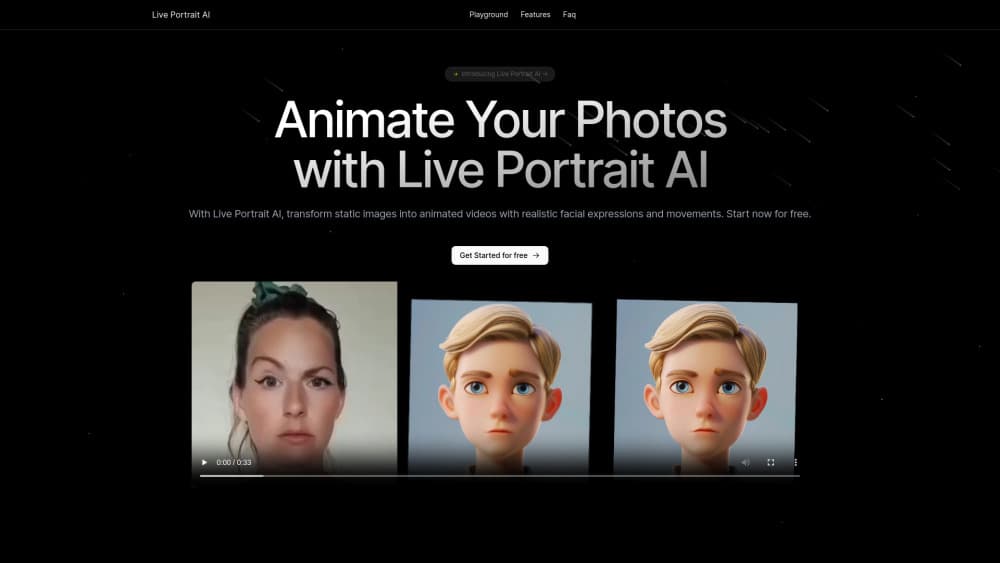
LivePortrait is a browser based live portrait AI tool that turns one still photo into a moving video, with eye and lip motion copied from a short reference clip.
About Live Portrait AI
What Is LivePortrait
LivePortrait is an AI portrait animation tool from Kuaishou Technology. It takes a single still image of a face and makes it move: blinking, smiling, tilting, and talking, all traced from a video you supply as the motion source. The research code is open source, and the hosted version at liveportrait.app wraps it in a browser interface so you don't need a GPU to try it.
The problem it solves is motion. A good photo freezes one expression forever, and shooting video of a subject isn't always possible. Old family pictures, paintings, anime stills, and pet photos can all be animated from one clean frame plus a few seconds of reference footage.
The limits matter as much as the results. Output looks best on front facing faces with even light, the free tier is explicitly marked unstable, and heavy or unusual angles tend to warp. LivePortrait reads a face, not a scene, so full body shots and busy backgrounds are wasted on it.
Getting Started
- Open liveportrait.app and sign in, or launch the free playground if you only want to test one image.
- Upload a portrait photo with a clearly visible face in PNG, JPEG, or WEBP format.
- Pick a clip from the built in motion library, or upload your own driving video.
- Adjust the eye and lip sliders if you want finer control, then generate.
- Preview the result, download the video, and share it.
Product Information
A quick look at Live Portrait AI's pricing, supported platforms, and performance.
Best for
The users, tasks, and scenarios where this tool fits best.
Users
- Social media creators
- Family historians
- Illustrators and anime fans
Tasks
- Making a talking head clip
- Fixing a closed eye or flat expression in a photo
- Adding motion to artwork
Scenarios
- Reviving an old family photo for an anniversary
- Producing quick content for a small brand
- Testing an idea before a full production
Key features
Photo to Video Animation
The core function takes one still frame and outputs a video where the face moves. You don't write a prompt or describe a mood. The motion comes from the reference clip, which makes results predictable and repeatable.
Driving Video Library and Custom Clips
LivePortrait ships with preset motion clips, and you can also upload your own driving video. Presets cover common beats such as a smile, a nod, or a slow blink. Custom clips let you match an existing performance, which is the difference between a generic loop and a shot that fits your edit.
Eye and Lip Retargeting
Two sliders control how far the eyes open and how wide the mouth goes. This is the part people use most, because a portrait that blinks at the wrong moment looks dead. Small adjustments fix a squint or a tight jaw without a second upload.
Multi Face and Multi Style Handling
The stitching module keeps several faces in one frame consistent, so a group photo doesn't tear at the edges between people. The same model also handles paintings, cartoons, statues, and pet portraits, which is why the tool shows up in meme and fan art circles.
Image Cleanup Before Animation
Blurry or washed out scans animate badly, so the hosted app offers cleanup, color, and upscale steps first. Running these before a face animation saves a retry, particularly with photos from the 1970s or earlier.
Browser Based Workflow
Everything runs in the browser, and results arrive in seconds for short clips. You don't install Python, download model weights, or own a discrete GPU, which is the main reason people pick the hosted version over the GitHub repo.
Pros and cons
Pros
- No hardware needed: the hosted app handles the compute, so a laptop or phone browser is enough.
- Motion is easy to control: a reference clip and two sliders cover most needs, with no prompt writing.
- Works beyond real faces: paintings, anime frames, statues, and pets animate with the same tool.
- Fast turnaround: short clips usually finish in seconds, which makes iteration cheap.
- Free tier to test: you can judge output quality before paying for credits.
Cons
- Free tier is marked unstable: unlimited free animation comes with a reliability warning, so timing sensitive work needs a paid plan.
- Face dependent: profile angles, heavy shadows, and covered faces produce warping that no slider fixes.
- Credit limits bite: the $7.90 plan gives 100 credits a month, which runs out quickly for batch work.
- No documented API: teams that want to automate the AI video generator have to run the open source model themselves.
Frequently asked questions
It animates a still portrait so the face moves like a video. Typical uses are talking head clips, revived family photos, and motion for artwork or anime characters.
Related content
Explore related tools, skills, and articles for Live Portrait AI.
Live Portrait AI Alternatives

Google EmbeddingGemma 2
Google DeepMind · Writing · Image · CodingGoogle EmbeddingGemma 2 is a 740M-parameter open model that turns text, code, images, audio, and video frames into vectors in one 768-dimension space, running on phones and laptops.

Tractionwave
TractionWave · Image · MarketingTractionWave is an AI attention heatmap tool for static ads. Upload a PNG or JPG and it returns predicted attention, ranked hotspots, and fixes before you spend budget.

Imejis.io
Imejis.io · Image · MarketingImejis.io is an AI design studio for agents and marketing teams. Describe an image in plain words, and it writes the copy, builds the layout, reflows it to every size, then exports a finished file.