

Live Swap
LiveSwap · Image · Video
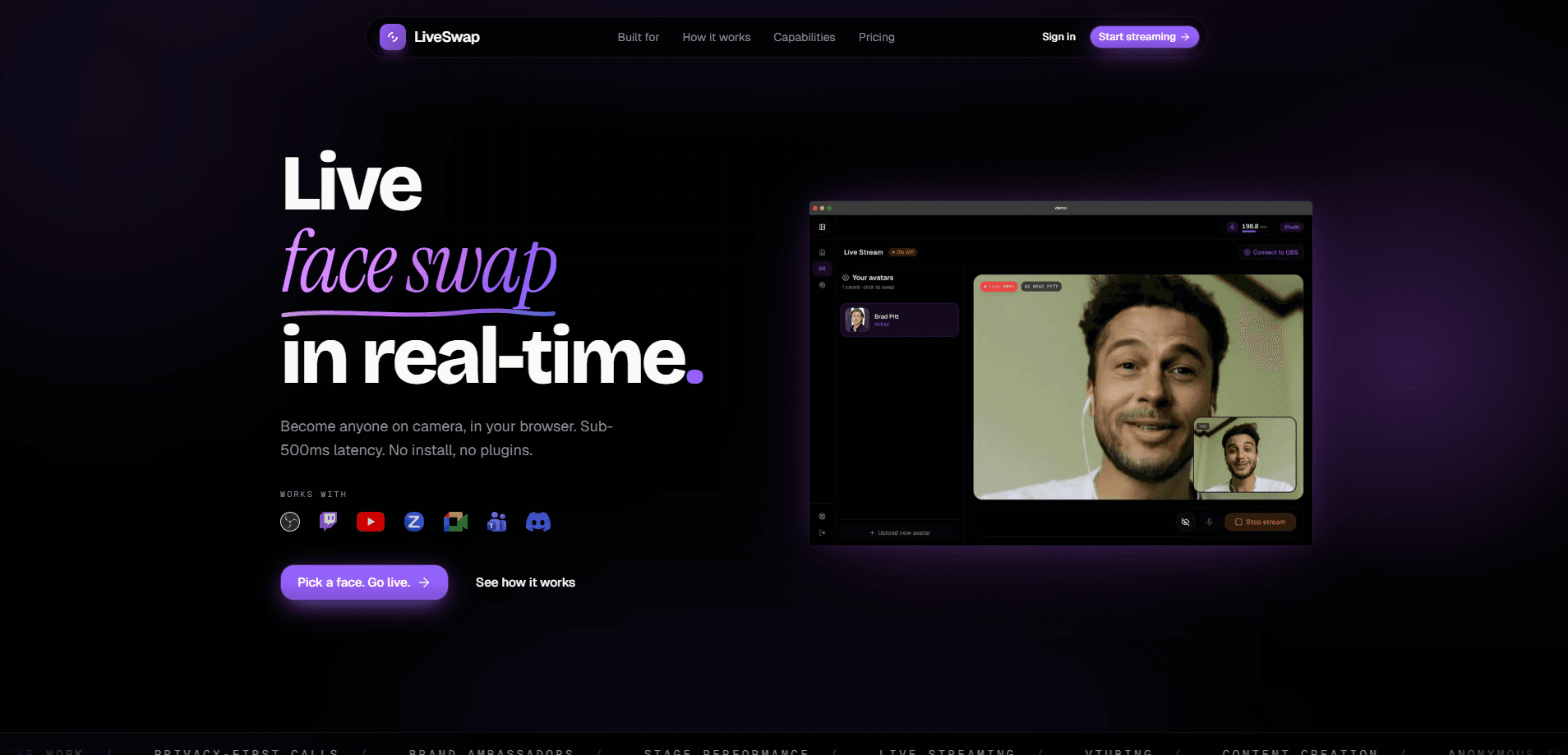
LiveSwap is a real-time AI face swap tool that replaces your face during live video streams, video calls, and recordings. It runs in your browser, so there's nothing to install and no high-end hardware required. You upload a reference face, pick it, and the swap happens as you talk on camera. Pricing starts at $12/mo for 15 minutes of live swap time, with higher tiers covering 720p and 1080p output for creators who stream weekly.
About Live Swap
What Is LiveSwap
LiveSwap is a browser-based AI face swap engine built for live video rather than edited clips. Instead of processing a recorded file after the fact, it takes your webcam feed and outputs a transformed stream in real time. That distinction matters if you're on a call, hosting a stream, or recording yourself talking. The face you see is the face everyone else sees while it's happening.
The pitch is accessibility. There's no software to download and no GPU requirement. Not even close. The heavy lifting happens on LiveSwap's servers, so your laptop just needs a browser and a webcam. You sign up, upload reference faces into a library, and start swapping. The tool fits content creators, streamers who want a persona on camera, and anyone who'd rather not show their real face.
The main limit is the billing model. There's no free tier and no trial listed on the site. You pay from the first minute. Every plan meters live swap time in credits, where one credit equals one minute of active swapping. Uploading and browsing your face library is free; the clock only runs when you're live. There's also an 18+ age requirement.
Getting Started
- Create an account on the LiveSwap site with an email address.
- Pick a plan, since Basic starts at $12/mo for 15 minutes of live swap time.
- Upload the reference face or faces you want to appear as; the library holds as many as you like.
- Open the live swap session, aim your webcam, and select the face you want to wear.
- Start streaming or recording; the swap runs on your live feed and your minutes count down only while it's active.
Product Information
A quick look at Live Swap's pricing, supported platforms, and performance.
Best for
The users, tasks, and scenarios where this tool fits best.
Users
- Live streamers
- Content creators who record on webcam
- Privacy-conscious callers
Tasks
- Hosting a stream under a persona
- Filming webcam segments with a different look
- Testing how a character reads on camera
Scenarios
- Weekly streams where you want a repeatable on-screen identity
- A one-off video call where you'd rather stay anonymous
- Short-form clips shot from a laptop
Key features
Real-Time Face Swap Engine
The core of LiveSwap is an engine that transforms video as it happens, not after the fact. How fast is it? Point a webcam at yourself and the output stream shows the swapped face immediately, which is what makes it usable for calls and live broadcasts. It's the difference between a filter on a recording and a swap that keeps up with you in the moment.
Runs Entirely in the Browser
There's no app to install and no dedicated graphics card required. You open the site, sign in, and start a session from the browser on a normal computer. That lowers the barrier a lot. Most face swap tools expect either a beefy GPU or a separate desktop program.
Unlimited Face Library
You can upload and store as many reference faces as you want, and prepping them costs nothing. The minutes only get charged once you're actually live, so you can build out a set of personas and rotate them without burning credits. Handy if you switch looks between streams.
Time-Based Credits
Billing is tied directly to live minutes, and one credit equals one minute. Uploads, browsing, and setup are free; the meter runs only during an active session. If you stream twice a month, you're only paying for those sessions rather than an all-you-can-use subscription.
Output Up to 1080p
Resolution scales with your plan. Basic caps at 480p, Creator reaches 720p, and Pro and Studio push to 1080p. Simple as that. If your audience watches on a large screen, the higher tiers keep the swapped face looking sharp rather than soft.
Consent and Content Controls
LiveSwap requires you to confirm you have rights to any face you upload, and it logs the consent along with IP, user agent, and timestamp for audit purposes. The terms also bar impersonating real people without consent, non-consensual or sexual content, and bypassing biometric verification. That's a real constraint, but it's a sensible one for a tool that can put someone else's face on your body.
Pros and cons
Pros
- Works in the browser with no download or GPU requirement, so older machines and everyday laptops can run it without a dedicated graphics card.
- Real-time swapping suits live streams and video calls rather than only edited footage.
- Unlimited face uploads with billing limited to live minutes, so prepping a whole set of personas never eats into the allowance you're paying for each month.
- Resolution tiers up to 1080p for creators who need a sharper output.
Cons
- No free plan or trial means you pay from the first minute, which is a hurdle if you just want to test it.
- The cheapest tier tops out at 480p and 15 minutes, so serious use pushes you toward $29/mo or higher.
- Minutes are metered, so a long unscripted stream can run through your monthly allowance faster than you might expect going in.
- 18+ only, which rules it out for younger creators.
Frequently asked questions
It swaps your face in real time during live video, so it's built for streaming, webcam recording, and video calls where you want to appear as someone or something else. Think personas, anonymized calls, or character footage.
Related content
Explore related tools, skills, and articles for Live Swap.
Live Swap Alternatives

Google EmbeddingGemma 2
Google DeepMind · Writing · Image · CodingGoogle EmbeddingGemma 2 is a 740M-parameter open model that turns text, code, images, audio, and video frames into vectors in one 768-dimension space, running on phones and laptops.

Tractionwave
TractionWave · Image · MarketingTractionWave is an AI attention heatmap tool for static ads. Upload a PNG or JPG and it returns predicted attention, ranked hotspots, and fixes before you spend budget.

Imejis.io
Imejis.io · Image · MarketingImejis.io is an AI design studio for agents and marketing teams. Describe an image in plain words, and it writes the copy, builds the layout, reflows it to every size, then exports a finished file.