
Lizzy Sleep
Lizzy Sleep, LLC · AI Assistant · Chatbot
Lizzy Sleep is an AI baby sleep training app that combines guided sleep programs with 24/7 chat help and sleep tracking for children from birth to age two.
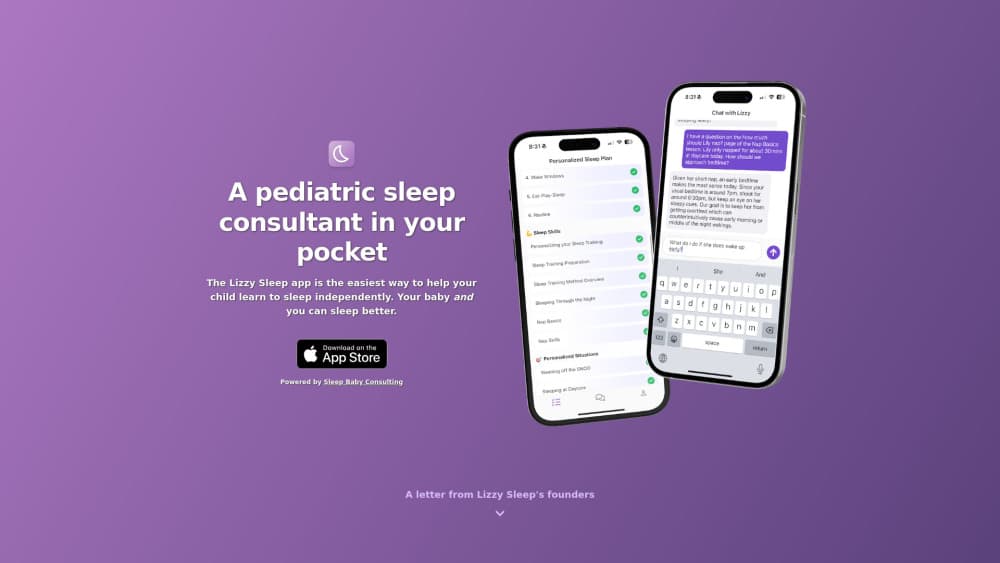
About Lizzy Sleep
What Is Lizzy Sleep
Lizzy Sleep is an iPhone and iPad app built for parents who want a plan for their baby's sleep instead of another pile of search results. It was created by Ensley Nesbitt, a mother of four and the owner of Sleep Baby Consulting, and it packages the same kind of advice her team gives in paid one-on-one consultations.
The app does three things. It walks you through a structured sleep program, it answers questions in a chat window at any hour, and it tracks naps and bedtimes so the advice can match your actual day. That last part matters, because a schedule pulled from a generic chart rarely survives a real household.
The limits are worth knowing up front. Lizzy covers birth through roughly two years, so it won't help with preschool sleep battles. It also isn't a medical tool, and the company tells parents to check with a pediatrician before changing anything.
Getting Started
- Download Lizzy Sleep from the App Store and create an account.
- Answer the intake questions about your child's age, current schedule and sleep habits.
- Pick a program: New Baby Bootcamp for expectant parents and newborns, Sleep 101 for the basics, or the Sleep Training Program for independent sleep.
- Start a nap or bedtime timer when you put your child down, and follow the plan the app builds for the day.
- Ask Lizzy in the chat when something goes sideways, like a skipped nap or a 3am waking.
Product Information
A quick look at Lizzy Sleep's pricing, supported platforms, and performance.
Best for
The users, tasks, and scenarios where this tool fits best.
Users
- First-time parents
- Parents in the middle of sleep training
- Expectant parents
- Families that tried free advice and stalled
Tasks
- Building a workable baby sleep schedule
- Handling night wakings
- Extending short naps
- Weaning off a swaddle, pacifier or the SNOO
Scenarios
- The 4am wake-up where you need an answer now
- Starting sleep training on a weekend
- Travel or a schedule blow-up
Key features
Guided Sleep Programs
Three programs cover different stages. New Baby Bootcamp runs from pregnancy through three months and focuses on soothing and sleep hygiene. Sleep 101 explains how baby sleep works and is free. The Sleep Training Program, for three months and up, builds a personalized plan for independent sleep and longer stretches at night.
24/7 Instant Sleep Chat
The chat is the centerpiece. Lizzy was trained on the company's real one-on-one sleep consultations, so answers reference wake windows, feeding timing and your child's history instead of generic tips. Human sleep consultants supervise the system, and free users get five chats before the paywall.
Sleep Tracking With Schedule Autocomplete
You start a timer for a nap or bedtime, and the app records the session. From there it proposes a schedule for the rest of the day based on your child's age and what already happened. Live Activities show the running timer on the Lock Screen and in the Dynamic Island, which saves you from reopening the app at 2am.
Short, Structured Sleep Plan
The plan is deliberately brief. Rather than a long PDF, you get a short list of steps for the next few days, with the reasoning attached. The format suits tired parents who need one clear action tonight.
Age-Appropriate Method Guidance
Lizzy mostly uses a controlled crying approach, where you let your child fuss for set intervals and respond on a schedule. The program puts wake windows, feeding rhythm and sleep environment first, since the company argues that a technique fails when a baby is overtired.
Progress Check-Ins and Adjustments
The app asks how the night went and changes the next day's plan accordingly. That loop is the main difference from a book: recommendations update with your data instead of staying fixed.
Pros and cons
Pros
- Chat support is available at any hour, which fits the reality of night wakings.
- The advice comes from a working sleep consultant's practice, not a generic content library.
- A free tier covers Sleep 101 and five chats, so you can test the approach before paying.
- Sleep tracking and scheduling sit in the same app as the advice, which cuts down on switching between tools.
- Weekly plans exist for parents who want a short, focused push.
Cons
- Premium costs $19.99 per month or $99.99 per year, which is more than most baby tracking apps.
- The app stops at about age two, so families with older toddlers need another solution.
- It's iOS only, and Android users are left out entirely.
- The controlled crying method won't suit every family, and the program doesn't offer a no-cry alternative track.
Frequently asked questions
Downloading is free, and the Sleep 101 program plus five chats with Lizzy cost nothing. The New Baby Bootcamp and Sleep Training programs can be started for free but need a subscription to finish, and unlimited chat requires Premium.
Related content
Explore related tools, skills, and articles for Lizzy Sleep.
Lizzy Sleep Alternatives
Agibot
Agibot · Productivity · AI Assistant · ChatbotAgibot is a personal AI agent for Mac that keeps running after you close the window, runs routines on a schedule, and works from Telegram or Slack with your own API keys.

Foley
Hanamori Labs, LLC · Voice & Language · Productivity · AI AssistantFoley is a voice to-do list that turns a spoken sentence into a filed task, complete with project, date and time, then helps you plan the day around what is already there.

Ghost Core
Ghost · Productivity · AI AssistantGhost Core is a $3,499 screenless personal AI computer that runs local AI models on its own hardware, builds context from your apps and devices, and acts without waiting for a prompt.