

LLM Pricing
AILesson · Business · Other
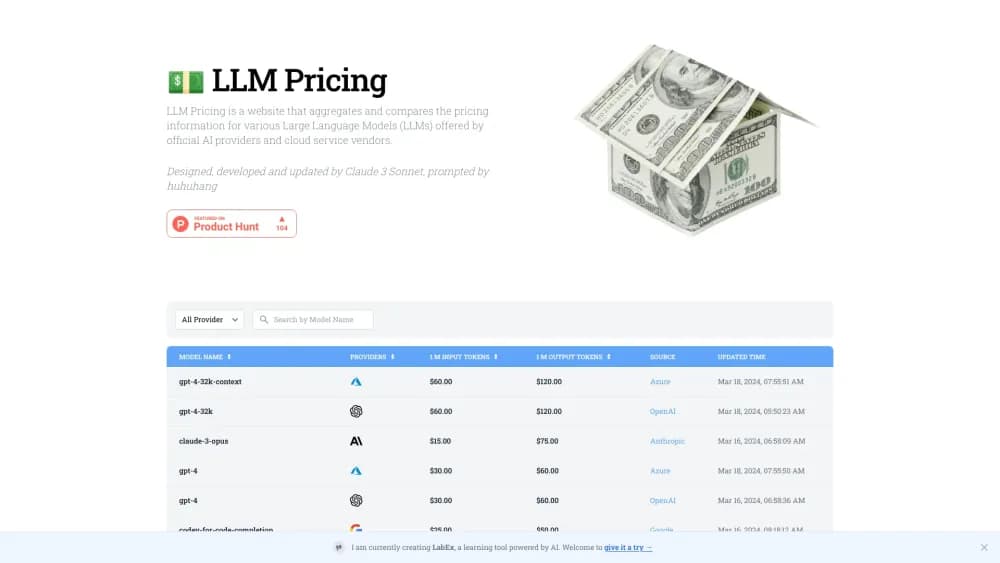
LLM Pricing is a free web tool that puts token rates for 441 large language models side by side, with a calculator that turns input and output tokens into a monthly API bill.
About LLM Pricing
What Is LLM Pricing
LLM Pricing is a price table for large language models that runs in the browser. It collects rates from OpenAI, Google, Anthropic, Meta, Mistral, DeepSeek, xAI and dozens of smaller labs, then lays them out in one sortable list. The result is an LLM pricing comparison you can read in a minute. There's no account to create and nothing to install. The table is there on the first visit.
The problem it fixes is boring and real. Every lab publishes rates on its own page, in its own units, with discounts buried in footnotes. Comparing Claude with Gemini with a Qwen model used to mean three tabs and a scratchpad. This site puts input cost, output cost, total cost, context length and provider name on the same row.
Three limits are worth knowing. Prices refresh on a six hour cache cycle, so a change made this morning may not show up until later. The numbers are list rates: cached input, batch discounts and tool fees aren't folded into the total. Batch versions of some models do get their own rows. And the table says nothing about output quality. A cheap model that fails your task is the expensive choice.
Getting Started
- Open llm-price.com. The model list loads immediately, with no signup.
- Narrow the list with the search box, or pick a lab from the Provider menu.
- Sort by Input Cost, Output Cost, Total Cost, Context Length or release date.
- Open the token cost calculator and enter expected usage in millions of tokens for input and output.
- Read the estimate, then confirm the figure on the provider's own pricing page before you commit.
Product Information
A quick look at LLM Pricing's pricing, supported platforms, and performance.
Best for
The users, tasks, and scenarios where this tool fits best.
Users
- Developers picking a model for a new feature
- Product managers pricing a feature
- Hobbyists and students on a tight budget
Tasks
- Shortlisting models for a chatbot
- Budgeting a summarization or translation job
- Checking whether a bigger context window is worth the price
- Sanity-checking a vendor quote
Scenarios
- Early architecture decisions
- Monthly bill review
- Watching a new release
Key features
One Table for 441 Models
The catalog covers 441 models from OpenAI, Google, Anthropic, Meta, Mistral, DeepSeek, Alibaba, Moonshot, MiniMax, NVIDIA, Amazon and others. Each row carries the model name, provider, release date and context length, so the list doubles as a rough release tracker. Sorting and filtering happen in the browser, with no page reload. AI model pricing moves fast, and a flat table is the quickest way to keep up with it.
Input and Output Rates Side by Side
Every row splits the price into input cost and output cost per million tokens, then adds a total. That split matters because output usually costs three to five times more than input, and a workload that generates long answers behaves very differently from one that mostly reads. The columns are sortable, so you can rank by whichever side dominates your bill.
Token Cost Calculator
A small calculator takes expected input and output usage in millions of tokens and returns an estimate per model. "M" means one million tokens. It multiplies each side by the matching rate and adds the two, which is the same arithmetic a provider uses on its invoice, minus the extras. Results update as you type.
Provider Filter and Search
The Provider menu lists every lab in the catalog, from the big four to smaller outfits like Liquid AI, StepFun and Upstage. The search box matches model names, so typing "haiku" or "flash" narrows the table in a keystroke. Both controls work together, which helps when you're comparing one lab's lineup against another's.
Context Window and Modality Columns
Context length appears in tokens, next to a column for input modalities, so vision and audio capable models stand out from text only ones. This is the part most price lists skip. A model that can't accept an image is useless for a screenshot pipeline, no matter how low its rate.
Six Hour Refresh from the Upstream Catalog
Prices come from an upstream model catalog and refresh on a six hour cache cycle when the source is reachable. New releases show up within days rather than weeks, which is quick for a free tool. The trade-off is that a same day price cut can lag, so the number on the provider's page stays the final word.
Pros and cons
Pros
- Free, with no account, paywall or usage limit on the comparison table.
- 441 models in one view, including open weight models and smaller labs that most comparison pages ignore.
- Input and output rates are separated, which matches how providers actually bill.
- The token cost calculator turns per million prices into a concrete estimate in seconds.
- Context length, modalities and release date sit beside the price columns, so cost never floats free of capability.
Cons
- Prices update on a six hour cache, so a just announced cut may not appear right away, and you'll want to confirm on the provider's page before budgeting.
- Estimates cover list rates only. Cached input, committed use discounts and tool or image fees aren't included, which can understate a real invoice by a wide margin.
- There's no quality or benchmark data, so the table can't tell you whether the cheapest model is good enough for your task.
- No API and no CSV export means anyone tracking rates over time has to copy numbers by hand.
Frequently asked questions
Yes. The comparison table and the token cost calculator are open to anyone, with no subscription, trial window or account. The site is supported by the wider AILesson platform rather than by charging for the table.
Related content
Explore related tools, skills, and articles for LLM Pricing.
LLM Pricing Alternatives
Liveplan
Palo Alto Software · BusinessLivePlan is business plan software that helps founders and small business owners turn an idea into a funder-ready plan. It combines AI-assisted writing, market research with cited sources, and connected financial forecasting so your income statement, cash flow, and balance sheet move together when you change one number. Over 1.5 million businesses have used it to plan, forecast, and track performance against real accounting data. That's a lot of founders. It's also a signal the tooling survived contact with real lenders.

Swms
Swms AI · Writing · Productivity · BusinessSwms is an AI safety compliance tool that turns a plain description of a job into ready-to-use safety documents. Describe your project, trade, and known hazards, and it writes a safe work method statement, job hazard analysis, safe work procedure, RAMS, or safety data sheet in seconds. It also ships with Oscar, a chat assistant that answers workplace safety questions in any language. Teams in construction, mining, transport, and warehousing use it to cut the paperwork that usually eats into a workday.

Rows
Rows (Superhuman) · Productivity · BusinessRows is an AI spreadsheet and data analysis tool that imports live data from more than 50 sources, then lets you work with it using plain language instead of SQL queries or nested formulas. You can pull numbers out of PDFs, connect ad platforms, databases, and bank accounts, and ask the AI to build reports, merge datasets, or set up models that recalculate themselves. It runs in the browser, works like a spreadsheet, and now sits under the Superhuman umbrella.