

Mage
Mage · Image
Mage is a free, browser-based AI image generator built on Stable Diffusion. It turns text prompts into art and GIFs, and offers 60+ models with HD upscaling.
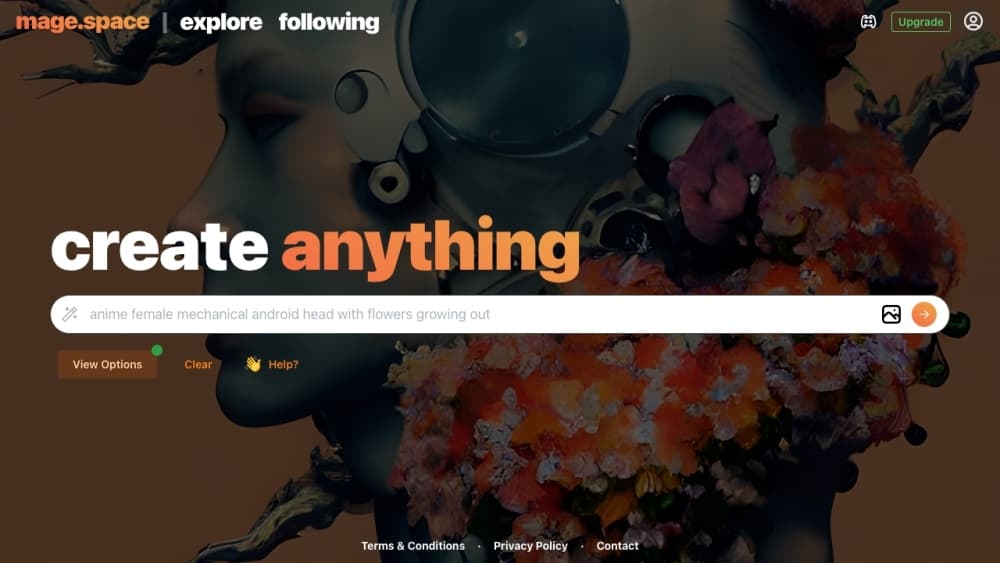
About Mage
What Is Mage
Mage is a web AI art generator that runs on Stable Diffusion. You type a prompt, pick a model, and get an image in seconds, all inside a browser tab. No install and no account are needed to start, which is why it shows up so often on lists of free image generators.
The core appeal is speed and reach. Mage keeps more than 60 custom models in one place, covering everything from realistic photos to anime and 3D styles, and adds a text-to-GIF mode for short animations. When an image looks right but the resolution is low, an upscale step pushes it up to a 2048 by 2048 HD frame.
The limits matter too. The free tier is generous but basic: it opens up Stable Diffusion XL, SD 1.5, and SD 2.1, while LoRA, ControlNet, and Embeddings stay behind a paid plan. Free generations also carry a watermark, so anything you want to use clean needs a subscription.
Getting Started
- Open mage.space in a browser. You can generate right away without signing up.
- Type a prompt describing the picture you want, then choose a style and model.
- Adjust quick settings like speed and image options, then hit generate.
- Refine the result, then upscale it toward 2048 by 2048.
- Register a free account when you want to save work and unlock extra options like negative prompts.
Product Information
A quick look at Mage's pricing, supported platforms, and performance.
Best for
The users, tasks, and scenarios where this tool fits best.
Users
- Beginners who want to try AI art with zero setup, since mage.space generates from a browser tab without an install or a sign-up.
- Artists and hobbyists exploring many styles, who get 60+ models in one place instead of switching between separate sites.
- Social media creators who need quick visuals and short animated GIFs from a single prompt box.
- Anyone testing whether AI image tools are worth it before paying, because the free tier covers the core features at no cost.
Tasks
- Turning a text prompt into artwork
- Making a short animation
- Upscaling a favorite result
- Reworking a rough idea
- Producing headers and thumbnails on a deadline
Scenarios
- Filling a blog or social post with a fitting image when there is no budget for stock or a designer.
- Prototyping a concept for a game, app, or product pitch by generating reference art quickly.
- Exploring a creative direction by dropping in a prompt and cycling through models until one clicks.
- Testing AI art for the first time on a laptop or phone browser before committing to a paid tool.
Key features
Text to Image Generation
Type what you want to see and Mage turns it into a picture in seconds. The prompt box is the main entry point, and the default setup runs on Stable Diffusion XL with standard sampling settings, so a first-time user can generate without touching a single parameter. It is the fastest way to go from an idea to something you can look at.
60+ Custom Models
Mage packs more than 60 models into one site, spanning realistic photography, anime, illustration, and 3D looks. You switch models from a single selector instead of hunting across different platforms. The free tier covers the core Stable Diffusion family, while the full model library opens up on a paid plan, which is the real reason to upgrade.
Text to GIF
A dedicated mode turns prompts into short animated GIFs rather than still frames. That covers simple loops and motion clips for social posts and quick demos. It is a lighter feature than the image side, but it saves a separate trip to a video tool for basic animation.
HD Upscaling
When a generation looks good but sits at a low resolution, the upscale step raises it toward 2048 by 2048. That is the difference between an image you can only preview and one you can actually use in a post, a thumbnail, or a small print. It runs as a follow-up step on an image you already like.
LoRA, ControlNet, and Embeddings
Beyond the base models, Mage supports LoRA, ControlNet, and Embeddings for finer control over a result. These are the tools that let you lock composition, borrow a style, or add a specific subject. They are aimed at users who have moved past simple prompts, and they sit behind the paid plan.
Prompt and Generation Controls
Before generating, you can adjust speed and image settings, and registered users unlock a negative prompt to steer what the model avoids. Instructing a model on what to leave out is often more useful than piling on more description. These controls keep the output closer to the brief without a full prompt rewrite.
Pros and cons
Pros
- Runs entirely in a browser with no install and no sign-up required to generate, so the barrier to a first image is basically zero.
- A free tier that includes the Stable Diffusion XL, SD 1.5, and SD 2.1 models covers a lot of ground before you pay anything.
- More than 60 models in one place means fewer tabs and less hopping between tools to find a style.
- The HD upscaler step up to 2048 by 2048 makes a quick generation usable in a real post or thumbnail.
- Text to GIF and LoRA, ControlNet, and Embeddings support round out the toolkit for users who want animation or tighter control.
Cons
- Free generations carry a watermark, so anything you plan to publish clean needs a paid plan.
- The strongest controls, including LoRA, ControlNet, and Embeddings, sit behind a subscription, which stings once you outgrow the basics.
- Free access is limited to the core Stable Diffusion models, so the full 60-model library is not free to use.
- Some advanced options need a registered account, so a pure no-signup user hits a ceiling fast.
Frequently asked questions
Yes. mage.space offers a free tier that runs the core Stable Diffusion models, and you can generate without an account. Free images carry a watermark, and the full model library plus LoRA, ControlNet, and Embeddings require a paid plan.
Related content
Explore related tools, skills, and articles for Mage.
Mage Alternatives

Google EmbeddingGemma 2
Google DeepMind · Writing · Image · CodingGoogle EmbeddingGemma 2 is a 740M-parameter open model that turns text, code, images, audio, and video frames into vectors in one 768-dimension space, running on phones and laptops.

Tractionwave
TractionWave · Image · MarketingTractionWave is an AI attention heatmap tool for static ads. Upload a PNG or JPG and it returns predicted attention, ranked hotspots, and fixes before you spend budget.

Imejis.io
Imejis.io · Image · MarketingImejis.io is an AI design studio for agents and marketing teams. Describe an image in plain words, and it writes the copy, builds the layout, reflows it to every size, then exports a finished file.