
Magic-Resume
Magic Resume · AI Assistant
Magic-Resume is an AI resume builder that turns a short work history into an ATS-friendly resume or cover letter in about 10 minutes. Credit packs start at $6.90.
About Magic-Resume
What Is Magic-Resume
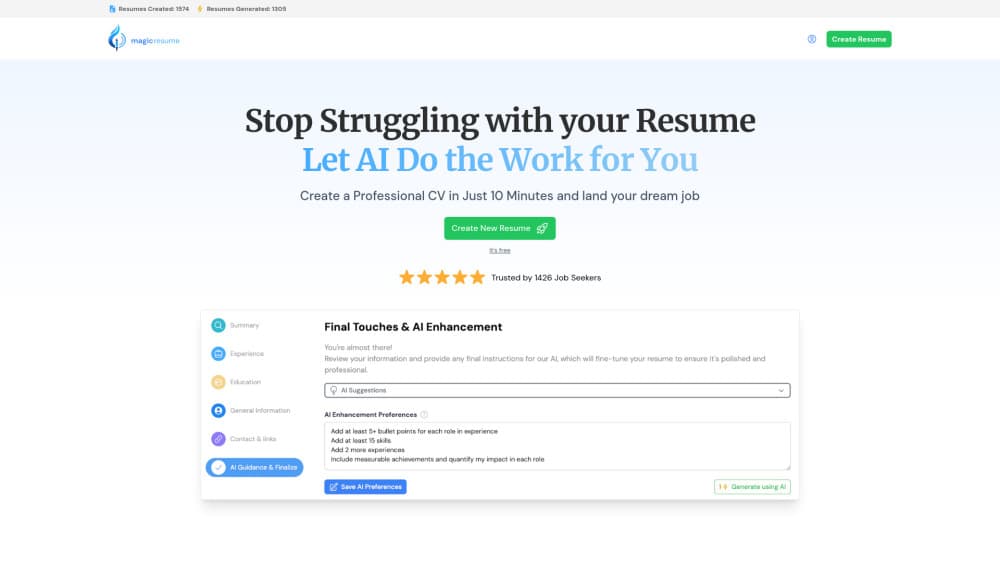
Magic-Resume is a browser-based AI resume builder from the team behind magic-resume.ai. You type your summary, work history, projects, education, and certificates into a form. The AI then rewrites that raw material into full sentences with stronger verbs, measurable detail, and a layout that applicant tracking systems can read.
The product covers two documents that most job applications ask for: a resume and a matching cover letter. Both come out as a PDF you can attach to an application or print for an interview.
Pricing works differently from most competitors. Instead of locking everything behind a monthly plan, Magic-Resume sells credits for a fixed number of AI resumes. Basic costs $6.90 for two AI resumes or cover letters. Pro costs $14.90 for five resumes and unlimited enhancements. Premium is the only subscription, at $29.99 per month for unlimited documents.
The limits are worth knowing up front. Magic-Resume stops at document creation. It has no application tracker, no interview practice, and no native mobile app, so the whole workflow runs in a desktop or mobile browser. AI drafts still need a careful read before you send them.
Getting Started
- Open magic-resume.ai, create an account, and start a new resume.
- Fill in the sections the builder asks for: summary, experience, projects, education, certificates, and general details. Rough notes are enough.
- Choose a template, then run the AI enhancement on each section. You can paste a job description to pull matching skills into the document.
- Review the draft, export the PDF, and build a cover letter with the same credit if you need one.
Product Information
A quick look at Magic-Resume's pricing, supported platforms, and performance.
Best for
The users, tasks, and scenarios where this tool fits best.
Users
- First-time job seekers
- Career switchers
- Freelancers and contractors
- International applicants
Tasks
- Rewriting weak bullet points
- Turning a job post into a skills list
- Producing a matching cover letter
- Reformatting an existing resume
Scenarios
- Applying to several similar roles in one week
- Returning to work after a break
- Applying to English-speaking companies from another country
- A last-minute application
Key features
AI Resume Generation From a Short Brief
You don't need a finished resume to start. Type a few lines about each job and the AI expands them into a summary and experience bullets. The output keeps your dates, employers, and titles, so the structure stays factual while the wording improves. This is the core of the product and the reason a first draft takes minutes rather than an afternoon.
ATS-Friendly Formatting
Every template uses a single-column reading order, standard section headings, and selectable text. That matters because many applicant tracking systems struggle with tables, text boxes, and graphics. Magic-Resume avoids those elements by default, so the file parses cleanly when a recruiter opens it in their hiring software. The site cites the common figure that 75% of resumes are rejected by ATS filters, and the templates are built around that constraint.
Job Description to Skills Extraction
Paste a job posting into the builder and it pulls out the skills and keywords an employer is likely to scan for. You can add them to your skills section or work them into experience bullets. This is the fastest way to tailor a resume without rewriting it from scratch for every opening.
Cover Letter Builder
The cover letter tool uses the same resume data to draft a letter in a matching tone. It saves you from starting a second blank page after finishing the resume. Treat the result as a draft: check the company name, the role, and any specific claim before you send it.
Section-by-Section AI Enhancements
You can improve one section at a time instead of regenerating the whole document. That keeps the parts you already like and limits the damage when a rewrite misses the mark. Basic includes five enhancements, Pro and Premium remove the cap. It's a small design choice that makes the tool feel less like a slot machine.
Template Library and Live Editing
The editor shows the formatted page while you type, so you see page breaks and spacing problems immediately. Several resume templates cover traditional, modern, and compact layouts. Switching a template keeps your content, which makes it easy to test a look before you export the final PDF.
Pros and cons
Pros
- One-time credit packs make short job searches cheaper than a monthly subscription.
- The AI writes usable bullets from rough notes, which saves the most time on the task people dread.
- ATS-friendly layouts and a job description parser cover the two biggest resume filters.
- The cover letter builder reuses resume data, so a second document takes minutes.
Cons
- No free AI credits: you can start building for free, but generating a resume requires a paid pack.
- The editor is web only, with no mobile app or offline mode.
- AI drafts can overstate results, so every number and claim needs a check before you apply.
- There is no application tracker or interview prep, so you need other tools for the rest of the search.
Frequently asked questions
Basic is $6.90 one time for two AI resumes or cover letters and five enhancements. Pro is $14.90 one time for five resumes with unlimited enhancements. Premium is $29.99 per month for unlimited documents.
Related content
Explore related tools, skills, and articles for Magic-Resume.
Magic-Resume Alternatives
Agibot
Agibot · Productivity · AI Assistant · ChatbotAgibot is a personal AI agent for Mac that keeps running after you close the window, runs routines on a schedule, and works from Telegram or Slack with your own API keys.

Foley
Hanamori Labs, LLC · Voice & Language · Productivity · AI AssistantFoley is a voice to-do list that turns a spoken sentence into a filed task, complete with project, date and time, then helps you plan the day around what is already there.

Ghost Core
Ghost · Productivity · AI AssistantGhost Core is a $3,499 screenless personal AI computer that runs local AI models on its own hardware, builds context from your apps and devices, and acts without waiting for a prompt.