

Maildun for Mac
Dunn · Productivity · Marketing · Business
Maildun for Mac is a free macOS email builder for designing on-brand emails by hand, with an AI assistant, or over MCP, then exporting HTML that holds up in Outlook and Gmail.
About Maildun for Mac
What Is Maildun for Mac
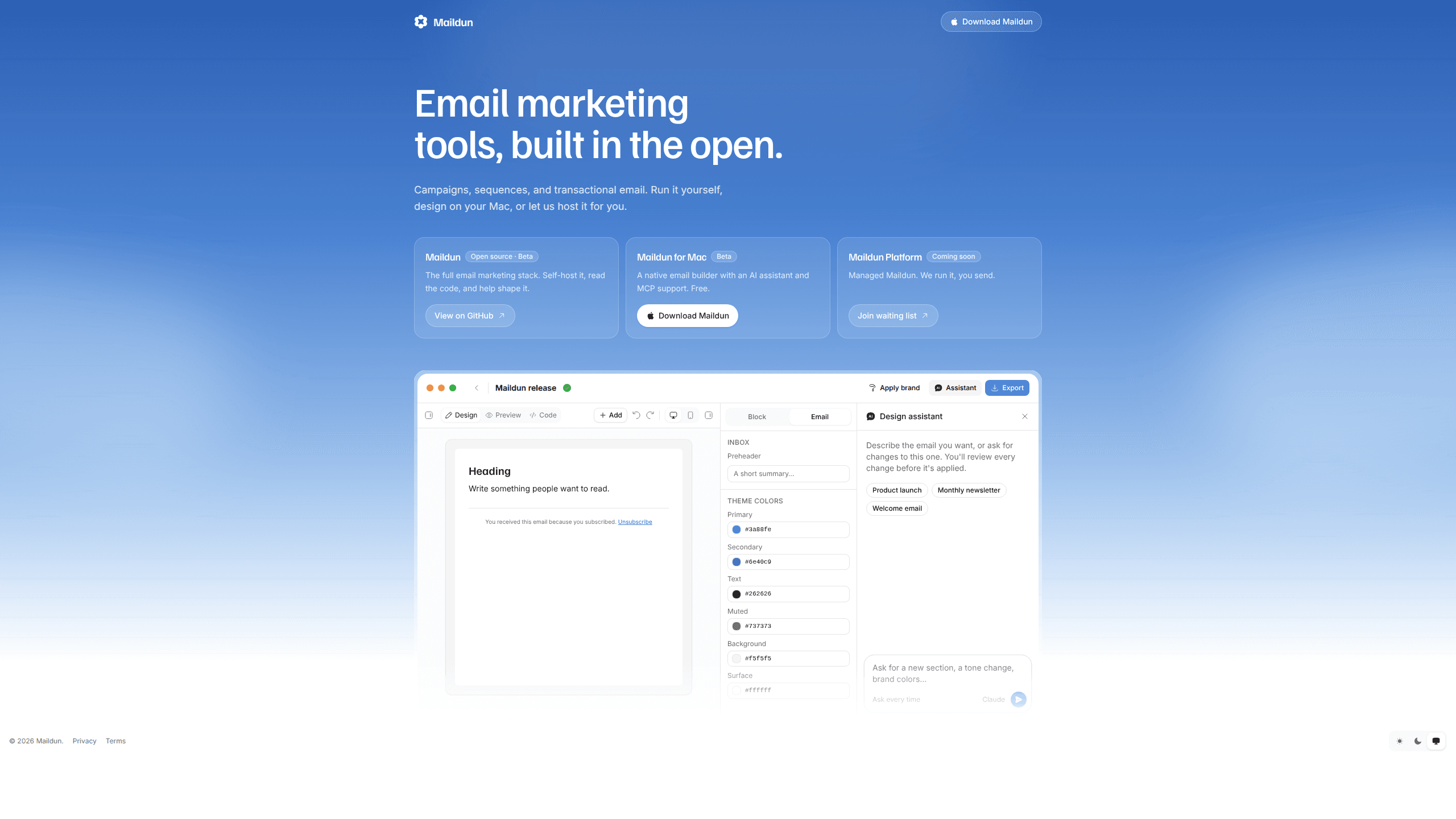
Maildun for Mac is an agentic email builder for macOS. It's a desktop app where you drag blocks onto a canvas, pull in saved sections, and check the result in desktop and mobile previews. The app exports HTML built for email clients rather than browsers, which is where most design tools quietly fall apart.
The AI part runs on your own account. You connect Claude, ChatGPT, Gemini, or Grok with an API key, and the assistant edits the design while you watch. Every change arrives as a proposal you accept or reject, so a stray rewrite never lands in a finished email. A brand page holds your colors, fonts, and a written brief that the assistant reads before it touches a design.
Two limits are worth knowing up front. Maildun for Mac builds and exports email; it doesn't send campaigns or manage subscriber lists. You pair it with Maildun itself, self-hosted or hosted, or with whatever sending service you already use. The app is also beta software at version 0.3, so expect rough edges and frequent updates.
Getting Started
- Download the universal DMG from the GitHub releases page and drag Maildun into Applications. The build is signed with an Apple Developer ID and notarized, so it opens without a security warning.
- Open the app and create a workspace for a client or product. Each workspace keeps its own designs, brand settings, and media.
- Set the brand page: pick colors and fonts, then write a short guide covering voice, audience, and what to avoid.
- Start a design and either drag blocks yourself or describe the email in the assistant panel. Review the proposed edits before you accept them.
- Export the HTML, or sign in with Maildun and push the design into a workspace as an Email Builder template.
Product Information
A quick look at Maildun for Mac's pricing, supported platforms, and performance.
Best for
The users, tasks, and scenarios where this tool fits best.
Users
- Freelance email designers
- Small product teams without a designer
- Developers who already work in Claude Code, Codex, or Cursor
Tasks
- Building a launch announcement
- Keeping a weekly newsletter on brand
- Turning a rough idea into a reviewable draft
Scenarios
- An agency hands three clients their own workspaces, so a Black Friday layout for one brand never picks up another brand's colors.
- A founder needs a receipt email at 11pm and has no design tool open
- A developer is already in Claude Code and asks it to add a pricing table to an existing design, then checks the change in the app window that opens on its own.
Key features
Drag-and-drop editor with saved sections
The canvas takes text, images, buttons, dividers, and multi-column blocks, and an inspector handles spacing, typography, and links. Save a header, footer, or any block once and it shows up in every later design. Desktop and mobile previews sit next to the canvas, so you catch a cramped headline before export rather than after a campaign goes out.
AI assistant on your own API key
Maildun connects to Claude, ChatGPT, Gemini, or Grok through an API key you supply. The assistant works on the open design and returns a proposal with the changes highlighted. Accept it, reject it, or ask for another pass. Because the key is yours, model choice and usage cost stay under your control, and the key itself lives in the macOS Keychain.
A brand guide the assistant reads first
The Brand page holds colors, fonts, and a Markdown brief covering voice, audience, layout habits, and imagery rules. A starter template gives you the headings to fill in. The assistant reads that guide before it writes copy or picks a layout, and small edits that don't touch copy skip the step to save time.
Design over MCP
Turn on the built-in MCP server and Claude Code, Codex, Claude Desktop, or Cursor can create and edit emails in Maildun. No Node.js install, no local script to babysit. Closing the window hides the app instead of quitting it, so an AI client keeps working in the background, and a new request brings the window back on screen.
Workspaces, media, and your own storage
A workspace groups the designs, brand, and media for one client or product. Images upload to your Cloudflare R2 or Amazon S3 bucket, resized and converted to WebP before they land there. Designs stay as plain files on your Mac, which makes them easy to back up, sync, or move between machines.
Export HTML or push a template
Export produces HTML that renders in Outlook, Gmail, and mobile clients. If you run Maildun, self-hosted or on the hosted platform, you can sign in from the app and push a design into a workspace as an Email Builder template. Pushing the same design again updates the existing template instead of creating a duplicate.
Pros and cons
Pros
- The app is free, with a pay-what-you-want checkout that accepts $0, so you can test the workflow before spending anything.
- The AI assistant uses your own provider key, which keeps model choice open and avoids a second subscription on top of your API bill.
- MCP support works out of the box and without Node.js, which is rare among desktop design apps.
- Designs live as plain files and API keys sit in the Keychain, so nothing depends on a vendor cloud you can't inspect.
- Exported HTML targets email clients directly, including the Outlook rendering paths that break browser-first builders.
Cons
- Version 0.3 is beta software, so features and file formats can still change between releases.
- AI editing needs a paid API key from Anthropic, OpenAI, Google, or xAI, which adds a cost the free download doesn't show.
- There is no sending, list management, or analytics. You still need Maildun or another email service provider to deliver a campaign.
- Media hosting requires a Cloudflare R2 or S3 bucket, which is extra setup and a separate bill for anyone who doesn't already have one.
Frequently asked questions
It's an email design app for Mac: a desktop builder where you design in a visual editor, optionally with an AI assistant, then export HTML for a sending platform. It's the Mac companion to Maildun, the open-source email marketing platform, and it works with other sending tools too.
Related content
Explore related tools, skills, and articles for Maildun for Mac.
Maildun for Mac Alternatives

Base Code
Base44 (Wix) · Coding · ProductivityBase Code is a shared cloud development environment from Base44. Teammates describe changes to an existing GitHub codebase in chat, preview them live and send them back as pull requests.

Knocket
Knocket (Tencent RTC team) · Productivity · Business · ChatbotKnocket is a free live chat and contact page tool that lets visitors message you from your website, app, or a shareable link, with every reply handled from Telegram or one inbox.

FloorGen
Vinit Kumar (FloorGen) · Productivity · China AIFloorGen is a browser-based floor plan maker that turns a sentence or a sketch into an editable 2D plan and a 3D walkthrough. Export to PDF, DXF or video, and draw without an account.