
mesha
mesha · Productivity · Marketing · Business
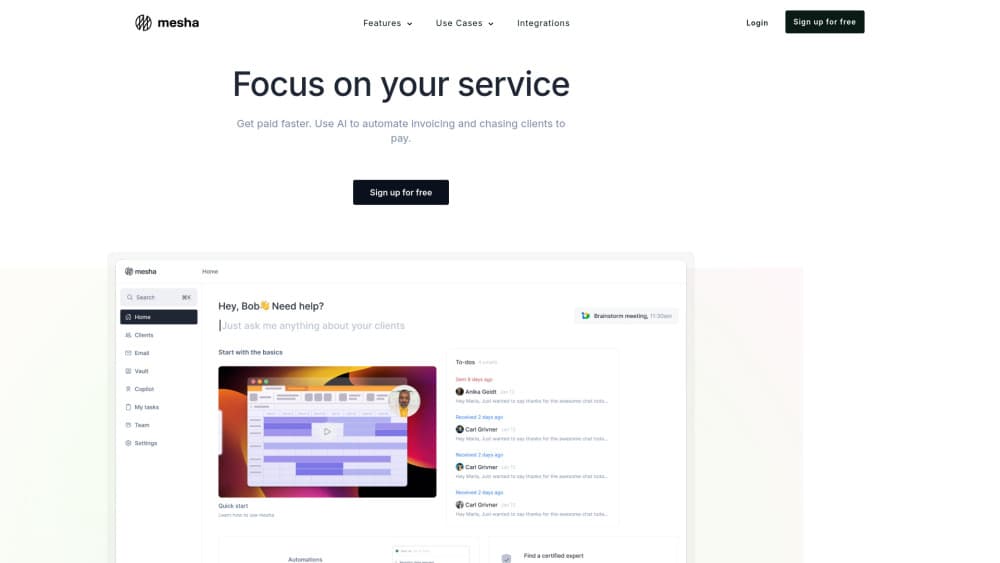
mesha is an AI practice management platform for professional service firms that automates workflows, manages client relationships, and lifts profitability.
About mesha
What Is mesha
mesha is an AI-powered practice management platform built for professional service firms. It pulls the everyday admin work of running a practice into one place. Things like client records, workflows, and billing. The AI cuts down the manual steps behind them. Less busywork, basically.
The pitch lands with small and mid-sized firms that lose hours to scattered tools. Instead of juggling a CRM, a billing app, and a spreadsheet or two, teams work from a single system that keeps client data and money matters in sync. That matters most for practices without a dedicated ops person. One messy handoff between tools usually means a missed invoice or a stale client record.
The main limit is scope. mesha targets service firms, not product teams or retailers, so if you run a storefront or a warehouse you'll want something else. It's also a newer platform, so expect a smaller integration list and fewer reviews than the established names in the category. That's the trade-off with new tools. They earn their keep one workflow at a time, so plan a short trial before you move real client data across.
Getting Started
- Go to the mesha website and book a demo or start a trial so you can see the dashboard with your own data type in mind.
- Set up your firm profile and invite teammates, then assign roles so the right people can see client and billing records.
- Import existing client records and past work, or add a few manually to test how the system handles your usual project types.
- Build your first workflow, such as a project kickoff or an invoice reminder, and let the automation run on a live client.
- Review what the AI flagged or completed, adjust the rules, and roll the workflow out across the rest of your client base.
Product Information
A quick look at mesha's pricing, supported platforms, and performance.
Best for
The users, tasks, and scenarios where this tool fits best.
Users
- Small service firms without a dedicated operations hire
- Accounting, legal, and consulting teams
- Agency owners juggling several tools
Tasks
- Automating recurring admin, such as client onboarding steps or invoice reminders, so nothing depends on someone remembering to send it.
- Tracking billable work and profitability per client
- Managing client relationships in one place
Scenarios
- Month-end billing runs
- Onboarding a new client
- Spotting an unprofitable account
Key features
Workflow Automation
mesha lets you build repeatable workflows for the tasks your firm runs again and again. Client intake. Project setup. Billing reminders. Same every time. You define the steps once, and the platform handles the handoffs, so work moves forward without someone chasing each stage by hand. The value shows up on the boring stuff, which is exactly where small firms bleed hours. Nobody notices it. That's the point.
AI-Powered Client Management
Client records, communication history, and billing details sit in one place rather than spread across a CRM and a spreadsheet. AI sorts and surfaces the parts worth your attention, so you can pull up an account and see where things stand without digging. Simple enough. For a firm with a few hundred clients, that's the difference between a quick answer and a half-hour search.
Profitability Tracking
The platform connects billable work to revenue, so you can see which clients and projects actually make money. Instead of guessing at month-end, you get a running view of where margin is leaking. Big difference. That's the feature owners tend to underrate until they find a client who's been quietly losing them money for a year.
Billing and Invoicing Support
mesha ties billing to the work you've logged, which reduces the mismatch between what you did and what you charged for. Invoices follow your workflows, so a completed project can trigger the next step automatically. It won't replace a full accounting suite. Still, it keeps the billing side close to the client record. Closer than a spreadsheet, anyway.
Centralized Firm Dashboard
A single dashboard shows client status, open tasks, and financial signals across the practice. Managers get a read on the whole firm without asking each person for an update. Not bad, in theory. The trade-off is that the numbers are only as good as what the team logs. Sloppy input kills it.
Team Collaboration
Roles and shared records let multiple people work the same client without stepping on each other. Notes and status updates live with the account, so context travels with the work. Handoffs get easier. No more "ask Sarah, she knows that account." For firms where one person owns every client relationship, this is the feature that makes letting go possible.
Pros and cons
Pros
- Combines client management, workflow automation, and billing in one platform, which cuts the tool-juggling most small firms live with.
- Targets professional service firms specifically, so the defaults fit recurring client work rather than forcing a generic CRM into a job it wasn't built for.
- AI handles sorting and routine steps, which saves time on the admin work owners usually do themselves.
- Profitability tracking ties hours to revenue, helping you spot money-losing clients before the year is out and the damage is done.
Cons
- It's aimed at service firms only, so product businesses, retailers, and other models aren't a fit.
- Pricing isn't published, so you'll need to talk to sales before you can weigh cost against value.
- Public detail on integrations and API access is thin, which is a real question mark if mesha has to plug into the stack you already run.
Frequently asked questions
mesha is an AI practice management platform for professional service firms. Think of it as practice management software with an AI layer. It brings client management, workflow automation, and billing into one system, and it leans on AI to reduce the manual steps behind each of those jobs, which is where most of a small firm's lost time actually hides.
Related content
Explore related tools, skills, and articles for mesha.
mesha Alternatives

Base Code
Base44 (Wix) · Coding · ProductivityBase Code is a shared cloud development environment from Base44. Teammates describe changes to an existing GitHub codebase in chat, preview them live and send them back as pull requests.

Knocket
Knocket (Tencent RTC team) · Productivity · Business · ChatbotKnocket is a free live chat and contact page tool that lets visitors message you from your website, app, or a shareable link, with every reply handled from Telegram or one inbox.

FloorGen
Vinit Kumar (FloorGen) · Productivity · China AIFloorGen is a browser-based floor plan maker that turns a sentence or a sketch into an editable 2D plan and a 3D walkthrough. Export to PDF, DXF or video, and draw without an account.