

Math.bot
Math.bot · Leaning · Chatbot
Math.bot is a GPT-4o powered AI math solver that gives students and self-learners step-by-step answers to algebra, calculus and word problems through a browser.
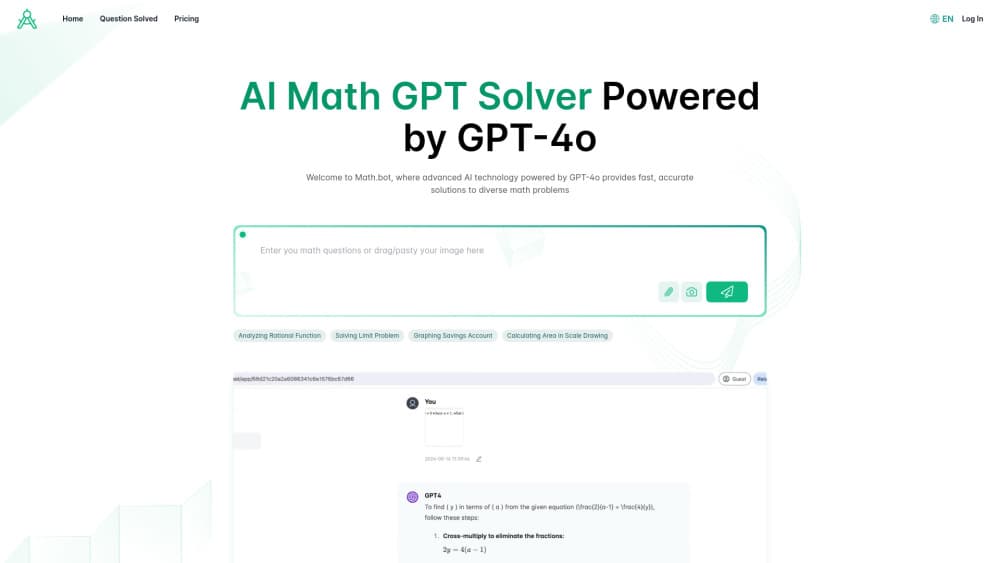
About Math.bot
What Is Math.bot
Math.bot is a web-based AI math solver built on GPT-4o, the multimodal model from OpenAI. You type an equation or upload a photo of a handwritten problem, and it returns the answer along with the reasoning that gets you there. It covers algebra, calculus, geometry and the word problems that trip people up when the numbers hide inside sentences.
The final number matters, sure, but the reasoning behind it matters more. Math.bot walks through each step so you can see which formula applies and why, and that's what separates real math homework help from a calculator that just spits out a result. It also handles physics and other subjects, so one online math solver can cover more than a single class.
The limits are worth knowing up front. You need an internet connection, and the free tier caps you at 5 credits per day, which is generous enough to test the waters but tight if you're grinding through a full problem set the night before a test. Accuracy is strong on standard problems, but we'd treat any single answer as something to check, not gospel.
So who is it actually for? Anyone who wants to understand the method, not just collect the answer.
Getting Started
- Open math.bot in your browser and pick the free plan to start, no card needed.
- Type your problem in the text box, or upload a picture of a printed or handwritten equation.
- Read the step-by-step solution and ask follow-up questions if a step doesn't click.
- Upgrade to Pro from the pricing page if you hit the daily credit limit.
Product Information
A quick look at Math.bot's pricing, supported platforms, and performance.
Best for
The users, tasks, and scenarios where this tool fits best.
Users
- Students
- Self-learners
- Parents helping with homework
Tasks
- Solving equations step by step
- Math word problems
- Photo homework help
- Physics and other subjects
Scenarios
- Late-night homework
- Test prep
- Quick answer checks
Key features
Step-by-Step Solutions
Math.bot doesn't stop at the answer. It breaks each problem into the steps that lead there, naming the formulas as it goes. That's the difference between learning the method and just copying a number. Honestly, that gap is the whole reason AI homework help gets a bad reputation. A tool that hands over answers trains nobody. One that shows its work, step by step, is the kind you can actually study from.
Image and Text Input
You can type a problem or upload a photo of one. The math picture solver reads handwriting and printed equations, so you don't have to retype everything by hand.
Word Problem Solver
Word problems are where most solvers stumble, and it's usually because the numbers are scattered through three sentences of story about a train leaving a station. Math.bot parses the text, pulls out the key numbers and sets up the calculation before solving it, which helps when the math is buried in a paragraph instead of laid out in a tidy equation on its own line.
Conversational ChatGPT Math Solver
Beyond one-off questions, Math.bot works as a chat interface. Ask follow-ups, request a different method, or explore a related idea without starting over.
Free Tier and Pro Plan
The free plan gives 5 credits a day with basic model access, enough to test it out. Pro runs $6.9/mo with 100 credits a day, priority responses and advanced models.
Web Access Anywhere
Math.bot runs in the browser on desktop, tablet and mobile, so a session you started on a laptop can carry over to a phone without losing your place in the middle of a long problem. There's no install and no app store detour, which is convenient when you're helping a kid with homework at the kitchen table and don't want to set anything up. Open a tab, and you're solving. Worth noting: because everything lives in the browser, you'll need a connection. Offline study sessions aren't part of the deal.
Pros and cons
Pros
- Step-by-step explanations built into every answer, not bolted on.
- Photo input saves retyping handwritten problems.
- Free plan needs no card, so you can test it before paying.
- Works across algebra, calculus, geometry and physics.
Cons
- The free tier's 5 daily credits disappear quickly if you're working through a problem set.
- No API, so developers can't plug it into their own apps.
- Web only, with no dedicated desktop or mobile app for offline use.
Frequently asked questions
Yes. There's a free plan with 5 credits per day and basic model access. Pro costs $6.9/mo for 100 daily credits, priority responses and advanced models.
Related content
Explore related tools, skills, and articles for Math.bot.
Math.bot Alternatives

HireKey
HireKey · Voice & Language · Productivity · LeaningHireKey is an AI job search copilot built by a former tech recruiter. It checks role fit, tailors resumes, runs interview practice and tracks every application.

Lune
Retrograde Labs · Productivity · LeaningLune is a research search engine for scientific AI agents. It runs as an MCP server that lets Claude, ChatGPT and Cursor search peer-reviewed computer science papers and cite them.
Coddy
Coddy · Coding · LeaningCoddy is a gamified platform to learn to code through short interactive lessons in 20+ languages, with a browser editor, an AI tutor and free certificates.