

MathLens
MathLens · Productivity
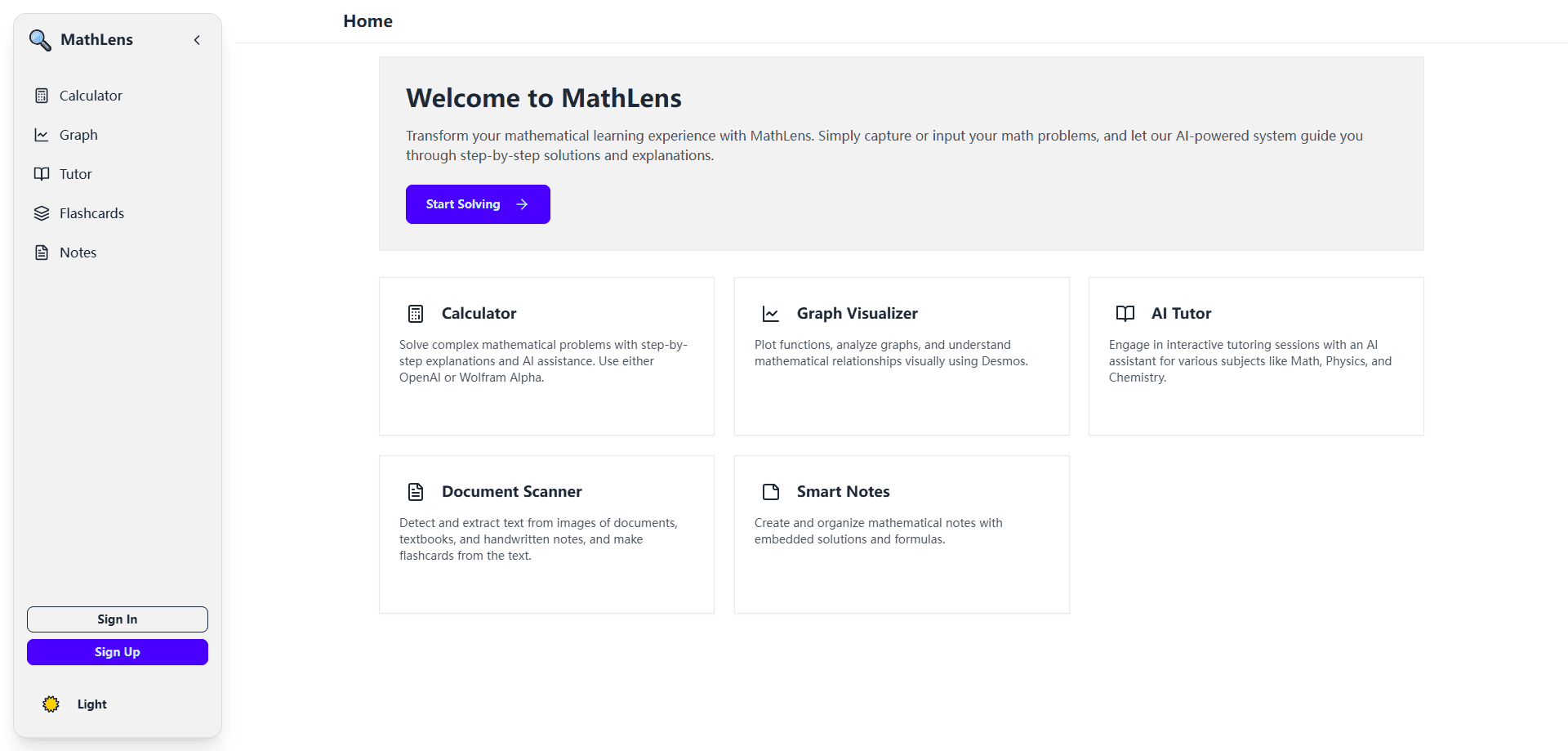
MathLens is an AI math learning platform that pairs a calculator, graphing, tutoring, document scanning, and note-taking with step-by-step solutions and explanations.
About MathLens
What Is MathLens
MathLens is a math learning app built around one idea: stop treating the answer as the finish line. It bundles a scientific calculator, a graphing tool, an AI tutor, a document scanner, and a note-taking workspace into a single product, then wraps every result in a worked solution that explains how the app got there.
The pitch is that students juggle too many tools. One app solves equations, another plots graphs, a third scans a worksheet, and a fourth is where notes actually live. MathLens folds those jobs together so a problem can move from scan to solution to graph to note without leaving the page. When a student types, photographs, or imports a problem, the platform returns each step written out rather than a bare final value, which is the part that turns a solver into something closer to a tutor.
The limits are worth stating plainly. The math focus is broad but the app is not a full learning-management system, so it won't replace a school platform for every subject. The public website has been offline or repurposed, which means pricing, platform support, and the current feature set should be confirmed through the app or the developer before you commit. As with any AI tutor, the value depends on engagement: a user who reads the steps learns more than one who copies the last line.
Getting Started
- Create an account or open the app. MathLens is a web-first product with mobile access, so check the current platform list before you rely on a specific device.
- Enter a problem by typing it, scanning a worksheet with the camera, or importing a document. The scanner is built to read printed and handwritten math.
- Read the step-by-step solution, or ask the tutor to re-explain a single step when the reasoning isn't clear.
- Plot the result with the graphing tool to see the shape of the equation, or move the work into a note to keep it with the rest of your study material.
- Reuse the note and the worked solution when you revise, so the same problem doesn't have to be solved twice.
Product Information
A quick look at MathLens's pricing, supported platforms, and performance.
Best for
The users, tasks, and scenarios where this tool fits best.
Users
- Students in high school and early college
- Note-takers who study from their own material
- Learners who struggle with a single step
Tasks
- Working through a homework sheet
- Understanding a graph
- Revising for a test
Scenarios
- The night before an exam
- Building a study notebook over a term
- Picking up a topic you missed
Key features
All-in-one math workspace
MathLens combines five tools that usually live in separate apps: a calculator, a graphing tool, an AI tutor, a document scanner, and a note-taking space. The point is continuity. A problem scanned on a phone can be solved, plotted, and filed as a note without exporting it anywhere, which cuts the friction that makes students abandon a tool halfway.
Step-by-step solutions and explanations
Rather than returning only a final value, MathLens writes out the working and explains why each step follows from the last. That structure is what separates a learning aid from a lookup tool: a student can read the reasoning, find where their own attempt diverged, and correct the method instead of just copying the answer.
AI math tutor
Acting as an on-demand AI math tutor, the assistant responds to questions about a problem, re-explains a step in plainer terms, and works through a similar example when the first explanation doesn't land. It's built for the moment a student is stuck on one line, not only for the moment they have no idea where to begin, and it keeps the conversation tied to the problem at hand.
Graphing and visualization
The graphing tool turns equations into pictures. Students can plot a function, see its shape, and connect the algebra to the curve, which is often the fastest way to understand behavior that a formula hides. It covers the standard graph types a high school or early college course expects.
Document scanning
As an AI math solver that reads the page, the scanner handles printed and handwritten math from a photo or an uploaded document, so a student can scan math homework straight off a worksheet instead of retyping it. That matters for longer assignments, where manual entry is the slowest part of getting help, and it feeds the rest of the workspace with clean input.
Note-taking that stays linked to the math
Digital math notes hold the scanned problem, the solution, and the graph together, so a study page becomes a record of how a problem was solved rather than a plain transcript. That makes revision faster, since a student re-reads the reasoning they used rather than rebuilding it from scratch.
Pros and cons
Pros
- Five tools in one app: calculator, graphing, tutor, scanner, and notes cover solving, seeing, and studying without juggling separate products.
- Explanation-first output: solutions show the working, so the app teaches the method rather than handing over a number.
- Scanner built for real homework: printed and handwritten input means a worksheet can be captured directly instead of retyped.
- Notes tied to solutions: keeping the problem, the steps, and the graph together makes revision quicker and less repetitive.
- Free entry point: a free plan lets users test the workflow before deciding whether to pay.
Cons
- Website is offline or repurposed: the public site no longer serves as a reliable source for current pricing, platform support, or feature updates, so details need checking in the app.
- Pricing is unclear: without a live official pricing page, the paid tiers and what they include can't be confirmed from public sources.
- Not a full learning platform: the product centers on math with a graphing and tutoring focus, so it isn't a substitute for a school system across every subject.
- Results depend on engagement: the tutor rewards users who read and ask, so someone after a quick answer gets less out of it.
Frequently asked questions
MathLens is an AI math learning platform for solving and understanding math. It combines a calculator, graphing, an AI tutor, document scanning, and note-taking, and it returns step-by-step solutions with explanations rather than a final answer alone.
Related content
Explore related tools, skills, and articles for MathLens.
MathLens Alternatives

Udon
Udon · Coding · ProductivityUdon turns an Apple Silicon Mac into a home server you run from a browser, with container controls, file shares, and an optional AI sysadmin.

offstage
offstage cloud · Coding · Productivityoffstage gives AI coding agents and CI jobs a real Mac: a fresh macOS account on Apple silicon, driven over an API and billed by the second.

BotBus
Chengdu Tuyang Tusen Technology Co., Ltd. · Coding · ProductivityBotBus lets you control AI coding agents from your phone and watch: approve commands, start tasks and read results while the code stays on your desktop.